


An Amazon EC2 Auto Scaling group can terminate and replace an instance between scheduled scans. The instance ID disappears, while the vulnerable image may remain in the launch template. A finding under a new ID forces the vulnerability manager to decide whether both records represent one problem. Across AWS, Azure, GCP, and Kubernetes estates, cloud vulnerability management becomes a data-reconciliation job before patching begins.
Severity cannot prioritize that queue alone. The same CVE may affect an isolated development host and an internet-facing production service handling regulated data. One belongs in the backlog; the other may breach the remediation SLA. Duplicate records and missing service ownership blur that difference.
Sasha Romanosky and Jay Jacobs make the threshold problem explicit in FIRST’s EPSS guidance:
“There is no universal ‘right’ answer to what the cutoff should be between a high, and medium, or a medium and a low."
A threshold helps only when matched to remediation capacity, exposure, environment, and ownership. The operational unit is a finding on a current asset, with enough context to route and verify the fix.
This article applies that test to Wiz, Cortex Cloud, Tenable One, Qualys VMDR, Rapid7 InsightVM, Orca Security, Microsoft Defender for Cloud, CrowdStrike Falcon Cloud Security, and Cloudaware. Each profile tests ephemeral-workload coverage, agent versus agentless deployment, prioritization context, remediation workflow, and pricing evidence captured in September 2026. Official documentation, public pricing, and attributable feedback support every profile; documentation checks remain clearly labeled.
Strong vulnerability management in the cloud puts reachable, exposed, owned risks first. Another CVE matters only when it changes that decision.
Key insights: the best tool for each job
The best options for cloud vulnerability management depend on the buying job. Some replace scanning; others add runtime evidence, patch deployment, or CMDB context. Use these as shortlist gates, not an overall leaderboard.
- Best for prioritizing findings from existing scanners with CMDB ownership and asset context: Cloudaware
- Best for agentless multi-cloud coverage with graph context: Wiz
- Best for code-to-runtime CNAPP coverage plus runtime defense: Cortex Cloud
- Best for cross-domain exposure intelligence and attack-path prioritization: Tenable One
- Best for enterprise vulnerability management with optional first-party patch deployment: Qualys VMDR
- Best for established InsightVM teams adding shared exposure and remediation context: Rapid7 InsightVM
- Best for rapid agentless workload assessment with optional sensor-based runtime reachability: Orca Security
- Best for Azure-led estates extending Microsoft-native workflows across hybrid and multicloud: Microsoft Defender for Cloud
- Best for teams operating the Falcon platform and needing cloud runtime response: CrowdStrike Falcon Cloud Security
The tool still has to fit the wider vulnerability management program, including scope, ownership, SLAs, exceptions, remediation workflows, and reporting.
Before a product survives the shortlist, run one finding from discovery to closure. Confirm the asset appears while it exists, priority changes with exposure or ownership, the right team receives the record, and a retest closes the same item. Any platform that breaks the chain in your stack is the wrong fit, however impressive its CVE count.
What is cloud vulnerability management?
Cloud vulnerability management continuously discovers, validates, prioritizes, remediates, and verifies cloud security vulnerabilities across hosts, images, containers, serverless functions, dependencies, and IaC. At larger organizational scale, enterprise vulnerability management extends that model across multiple scanners, infrastructure domains, business units, ownership models, SLAs, exceptions, and reporting requirements.
A cloud vulnerability assessment produces a snapshot; management reconciles findings as resources, versions, exposure, and ownership change. A working record is more than “CVE-2026-XXXX, Critical.” It connects the weakness to an active asset or artifact, with affected version, exposure, environment, owner, remediation state, exception, and verification time.
Asset changes can alter the action even when the CVE does not.
How cloud VM differs from traditional vulnerability management
Traditional programs assume stable hosts, scheduled scans, and persistent agents. Vulnerability management in cloud computing must cover resources created and deleted between scans, plus templates that can recreate a weakness after the original virtual machine disappears.
Use two evidence planes. Provider APIs and agentless collection show resources and configuration; agents or runtime sensors add package, process, and reachability detail. Test coverage by CI class; neither plane guarantees complete workload evidence.
Responsibility also shifts. Under the AWS shared responsibility model, AWS secures the infrastructure, while EC2 customers patch the guest operating system and applications. Managed services move that boundary, so map each advisory to its required customer action.
Vulnerability management for cloud hosts and workloads
NIST authors Murugiah Souppaya and Karen Scarfone define patch management as
“identifying, prioritizing, acquiring, installing, and verifying the installation of patches, updates, and upgrades.” (NIST SP 800-40 Rev. 4)
Cloud workloads change the remediation object, not verification. Patch or rebuild a host, then verify the live instance. For containers or functions, fix the image, dependency lockfile, or function package; redeploy; confirm the vulnerable artifact is gone.
Consider an illustrative vulnerable image digest feeding 60 short-lived pods. Sixty tickets create activity without removing the source. Treat the digest as the remediation unit, deploy its replacement, and verify that the vulnerable digest count reaches zero. That is the practical boundary of cloud-native vulnerability management.
How we evaluated these tools
One rubric covers nine products. We scored dimensions 0–5, applied their weights, and totaled 100 points. Example: 4/5 coverage earns 20 of 25 points. The method lets buyers assess cloud-based vulnerability management without rewarding CNAPP breadth.
NIST warns against one-method assessments:
“No individual technique provides a comprehensive picture of an organization’s security.” (NIST SP 800-115)
| Dimension | Weight | Full-credit evidence |
|---|---|---|
| Scan coverage | 25% | Hosts, containers, IaC, serverless, and stated limits |
| Prioritization | 20% | CVSS plus EPSS, KEV, exposure, reachability, and asset context |
| Multi-cloud parity | 15% | Comparable AWS, Azure, and GCP depth |
| Remediation | 15% | Owner, ticket, SLA, exception, and verification |
| Deployment | 10% | Agent-based and agentless evidence, including gaps |
| Integration and API | 10% | Scanner, CMDB, ITSM, and API depth |
| Reporting | 5% | Coverage, age, ownership, and closure evidence |
Official documentation established capabilities; pricing pages established cost. Analyst reports informed positioning only. Each profile records G2, Capterra, and TrustRadius ratings, counts, dates, and attributable comments. Comments reveal workflow friction; they never prove features.
Access was unequal, so each profile states whether evidence was hands-on, demonstrated, or documentation-reviewed. Unverified capabilities received no points; quote-only prices stayed quote-based. Cutoff: September 10, 2026. Runtime detection and cloud security monitoring scored only when they changed vulnerability priority, remediation, or closure evidence.
If the primary requirement is finding weaknesses in application code, dependencies, APIs, and exposed application behavior, evaluate application vulnerability testing separately from infrastructure vulnerability management.
What to look for in a cloud VM tool
Treat public cloud vulnerability management procurement as evidence collection. Run one test pack across candidates; retain the coverage, priority, API, and ticket artifacts.
- Scan coverage across the workload lifecycle. Coverage determines which remediation queues can be trusted. For vulnerability management for cloud workloads, count VMs, container images, running workloads, serverless packages, and IaC files. Deploy a vulnerable image. Confirm registry detection, production correlation by digest, and persistence after pod deletion. Cloud-native vulnerability management platforms fail when “container support” loses that chain.
- Agent versus agentless: compare the evidence. Deployment choice trades rollout effort against evidence depth. Microsoft Defender for Cloud documents agentless and agent-based machine scanning; limits vary.
Scan the same host by snapshot or side-scanning and through an authenticated agent. Compare package inventory, kernel or process evidence, scan age, encrypted-disk handling, unsupported operating systems, and stale-agent behavior. Choose both when either path misses required evidence. An agent can also watch what a host does after exposure, which a snapshot cannot. That is the job of a separate module, Cloudaware NeoSec, not of the scanner. - Prioritization must survive a controlled test. A buyer needs defensible ranking logic. After comparing 600 vulnerabilities, Viktoria Koscinski and coauthors found:
“Our findings reveal significant disparities in how scoring systems rank the same vulnerabilities, with implications for organizations relying on these metrics.” (2025 empirical comparison)
Load equal-CVSS findings with different EPSS, KEV, exposure, and reachability states. For vendor scores such as VPR or TruRisk, request the input fields. Change one factor per run; reject irreproducible scores. - Multi-cloud parity must be tested by CI class. Multi-cloud vulnerability management needs evidence by provider and CI class because broad labels hide gaps. Grid Linux VMs, Kubernetes nodes, registries, and functions across AWS, Azure, and GCP. Mark each cell
supported,partial,unsupported, orprerequisite. One missing serverless row can outweigh excellent AWS depth. - Provider-native services set the baseline. Native coverage establishes the baseline. For GCP vulnerability management, decide whether operating-system findings are sufficient.
Amazon Inspector covers EC2, ECR images, and Lambda. Defender for Cloud covers machines, while Google Cloud VM Manager reports OS vulnerabilities after setup. Compare those boundaries with shared workflow and asset-context needs. Assess broader posture in a separate Google Cloud security assessment. - Remediation must survive the ticket lifecycle. Ownership evidence must survive state changes. Push one finding through
New → Assigned → Exception → Fixed → Reopened. Verify the owner, source IDs, SLA clock, approver, expiry, and retest requirement.
Close the ticket before rescanning. A green dashboard while the scanner still reports the vulnerable version measures paperwork rather than remediation. A complete vulnerability management lifecycle carries that evidence from discovery and prioritization through assignment, remediation, rescan, and verified closure. - Integration depth starts with the raw payload. Connectors must preserve identity and history. Request an API payload and failed-connector log. Map resource ID, CVE, component, version, source ID, seen dates, owner, application, environment, exception, ticket, and verification state.
Vulnerability management automation can move that workflow faster by routing findings, creating remediation work, applying SLA and escalation logic, and updating state as new evidence arrives, but verification still has to come from a rescan, retest, or another approved check.
This is also the core of vulnerability analysis: validate the affected condition, combine technical severity with exploit and exposure evidence, and document why one finding should move ahead of another.
Key features checklist for the final shortlist
Carry three proof sets:
- Coverage: workload and provider matrices, plus the deployment comparison.
- Decision: reproducible priority changes and exported inputs.
- Closure: ticket history, retest evidence, and reporting export.
Pass only when another analyst can reproduce priority, route the finding, and verify closure without vendor assistance.
The 9 tools at a glance
The top cloud vulnerability management solutions solve three different buying jobs. CNAPPs connect code, posture, and runtime context. Vulnerability and exposure platforms go deeper on finding intelligence and remediation. Cloudaware combines CSPM with scanner aggregation and CMDB context. Eliminate the wrong category before comparing features.
Lists of the best-rated cloud vulnerability management tools help with discovery. Ratings cannot prove workload coverage, ranking inputs, or the commercial unit that drives cost. These tables use public product and pricing documentation reviewed on September 10, 2026. “Quote-based” means no comparable public price exists for the configuration described.
Use the first table to remove category mismatches. It shows how each product collects evidence and the buying job it handles best.
| Tool | Type | Collection method | Best for |
|---|---|---|---|
| Wiz | CNAPP | Agentless-first; optional sensor | Agentless multi-cloud coverage with context |
| Cortex Cloud | CNAPP | Agentless and agent-based | Build-to-runtime vulnerability management inside a CNAPP |
| Tenable One Cloud Exposure | VM / exposure / CNAPP | Agent, scanner, and agentless cloud | Deep vulnerability intelligence and exposure management |
| Qualys TotalCloud | VMDR / CNAPP | Cloud API, snapshot, appliance, and agent | Enterprise VM breadth plus integrated patching |
| Rapid7 InsightVM / Exposure Command | VM / exposure; CNAPP by package | Agent and scan engine; agentless cloud by package | Risk-based VM and remediation workflow |
| Orca Security | CNAPP | Agentless-first SideScanning; optional sensor | Fast agentless deployment |
| Microsoft Defender for Cloud | Native CNAPP | Agentless and agent-based | Azure-led estates that want native multi-cloud coverage |
| CrowdStrike Falcon Cloud Security | Exposure management / CNAPP | Falcon sensor and agentless cloud | Organizations already standardized on Falcon |
| Cloudaware | CSPM / scanner aggregation / CMDB context | Scanner integrations; Breeze Agent for managed scans | Prioritizing findings across existing scanners |
After category fit, inspect the technical boundaries. Workload coverage shows what you must deploy; the pricing unit shows what will expand the bill.
| Tool | Workload coverage | Prioritization | Cloud reach and pricing |
|---|---|---|---|
| Cloudaware | Integrated and managed-scan findings mapped to cloud and on-premises CIs | Source risk plus CMDB exposure, ownership, and business context | Clouds: Multi-cloud and on-premises — AWS, Azure, GCP, Oracle Cloud, and Alibaba Cloud Public starting estimate: At 50 servers, Core is $67/month and Enterprise is $200/month, with capacity for up to 25,000 CIs. Important: These are CMDB estimates, not complete Vulnerability Management quotes. Final pricing depends on environments, servers, CI capacity, and selected modules. |
| Wiz | Hosts and containers; IaC through Wiz Code | Security Graph, attack paths, exposure, and reachability | Clouds: AWS, Azure, and GCP Pricing: Modular; scales by workloads, active developers, log ingestion, or sensors. No public list price. |
| Cortex Cloud | Hosts, containers, and IaC | Severity plus workload, exposure, and attack-path context | Clouds: AWS, Azure, and GCP Pricing: Quote-based. Palo Alto Networks publishes no list price. Request separate pricing for posture, application security, runtime security, CDR, retention, support, and implementation. |
| Tenable One Cloud Exposure | Hosts, containers, and IaC | Threat intelligence, exposure context, and asset criticality | Clouds: AWS, Azure, and GCP Public VM reference: Tenable One Vulnerability Management is listed at $3,700/year for 100 assets. Another official selector showed $3,500/year for 100 assets, so confirm the current figure in a dated quote. Cloud Exposure: Custom quote. |
| Qualys TotalCloud | Hosts and containers; IaC through TotalCloud apps | Qualys TruRisk | Clouds: AWS, Azure, GCP, and OCI Public VMDR starting figures: VMDR TruRisk $2,195; FixIT $2,995; ProtectIT $4,645. The billing period and included asset quantity are not stated beside these prices. TotalCloud: Custom quote based on selected apps and Qualys Units. |
| Rapid7 InsightVM / Exposure Command | Hosts through InsightVM; containers and IaC through the cloud package | Active Risk: CVSS, exploit intelligence, Rapid7 research, and CISA KEV | Clouds: AWS, Azure, and GCP through cloud coverage InsightVM and Exposure Command: Custom, asset- and use-case-based quotes; no public starting price. Cloud-package reference: InsightCloudSec is listed at $5,775/month for up to 500 instances, equivalent to $69,300/year or $11.55 per instance-month at full utilization. |
| Orca Security | Hosts and containers; IaC and repositories | Business-impact scoring, reachability, and attack paths | Clouds: AWS, Azure, GCP, OCI, Alibaba Cloud, and Tencent Cloud AWS Marketplace references: Small $7,000/month; Small-Medium $12,000/month; Medium $17,000/month; Large $30,000/month. The listing does not disclose the workload capacity of each pack. Custom and private offers are available. |
| Microsoft Defender for Cloud | Hosts and containers; IaC through DevOps security | Exposure, data sensitivity, lateral movement, and exploitability; Secure Score remains separate | Clouds: Azure, AWS, GCP, and hybrid Pricing: Pay-as-you-go by plan and protected resource. The article provides no single public price because rates vary by enabled plan and resource type. |
| CrowdStrike Falcon Cloud Security | Hosts and containers; IaC through cloud-security modules | Adversary intelligence, graph context, and reachable vulnerabilities | Clouds: AWS, Azure, and GCP Falcon Cloud Security: Modular, quote-based subscription; no standalone public list price. Endpoint-suite references: Falcon Go $59.99/device/year; Falcon Pro $99.99/device/year; Falcon Enterprise $184.99/device/year. These are endpoint bundles, not Falcon Cloud Security prices. |
Prices were captured in September 2026
For net-new scanning, shortlist products whose collection method covers your host, container, and IaC estate. Where scanners already provide sufficient coverage, evaluate Cloudaware on CI matching, ownership, and cross-scanner context. Managed scans through Breeze Agent remain available, but aggregation is the differentiated buying case in this comparison. Wiz, Tenable, Qualys, Rapid7, Orca, and CrowdStrike can also supply findings to Cloudaware.
“Strategic decision-making should be driven more by unit costs than total costs whenever possible.”
FinOps Foundation, Introduction to Cloud Unit Economics
Apply that advice to security licensing. Normalize every quote to 12 months, then calculate cost per covered host, container, or image. Add required developer seats, log ingestion, connectors, and support. A low base quote loses quickly when essential coverage sits in another module.
Cloudaware
Cloudaware belongs in the POC when several scanners are staying and the unresolved problem is turning overlapping findings into owned, auditable work.
- Gartner Peer Insights: 5.0/5 from 9 ratings, as of September 11, 2026
- AWS Marketplace: 4.0/5 from 20 ratings, as of September 11, 2026
Best for: Security teams that already use several scanners and need one asset-aware queue for ownership, exceptions, SLAs, and remediation tracking.
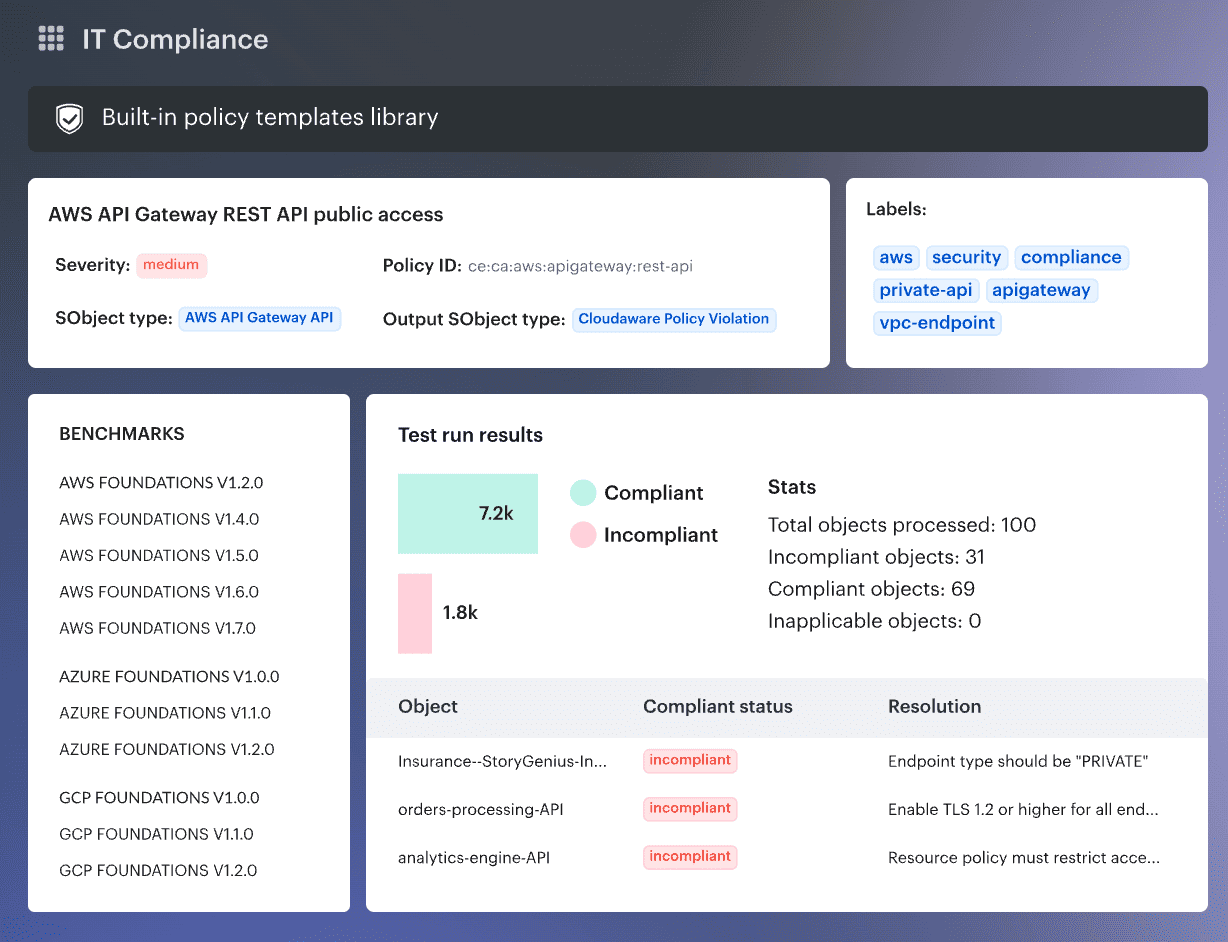
Its Vulnerability Management accepts findings from Cloudaware-managed scanning, cloud-native services, and third-party products including Tenable, CrowdStrike, Qualys, Orca Security, and Rapid7 InsightVM. The CMDB then relates those findings to assets, applications, environments, owners, and business criticality.
That boundary matters. Cloudaware offers managed host, IP, URL, container, and image scanning, but its distinctive role in this comparison is operational: normalize scanner records, expose coverage gaps, prioritize with asset context, and carry work through tickets and exceptions. It does not turn an imported Qualys or CrowdStrike observation into native Cloudaware detection evidence.
This is a documentation-led assessment checked against current product documentation, pricing, and user reviews. It does not claim a production deployment.
The POC I would run
Start with one production EC2 instance carrying the same CVE from Qualys and CrowdStrike. Give the records different observation times, attach an expired exception, and add an existing Jira issue. Then introduce one in-scope server with stale scan data and one retired server.
The platform earns the shortlist only if it can show four outcomes:
- One asset, traceable evidence: Correlate both findings without losing source IDs, timestamps, or scanner evidence.
- A defensible priority: Make exposure, application criticality, ownership, exploitability, age, and exception state affect the queue.
- An honest denominator: Flag the stale asset as a coverage gap and remove the retired asset from active SLA reporting.
- A clean handoff: Update the existing ticket with the owner, due date, source evidence, and exception status instead of creating duplicate work.
This is also where external threat evidence belongs. CISA says, “Organizations should use the KEV catalog as an input to their vulnerability management prioritization framework.” (CISA) During the POC, confirm that KEV or equivalent exploitation data remains visible beside business context rather than being buried inside a composite score.
POC rule: Hiding one duplicate row is not enough. An analyst must be able to reconstruct why two records were grouped, which evidence is newer, and what reopened the issue.
Features
- Multi-source intake: Managed, cloud-native, and third-party findings share one vulnerability model.
- Normalization and deduplication: Source identifiers remain available after correlation.
- Coverage analysis: Scan status and last-scan dates expose stale or unscanned assets.
- Contextual priority: CMDB ownership, criticality, exposure, exploitability, and age inform the queue.
- Exceptions and SLAs: Risk acceptance, due dates, escalation, and audit history stay attached to findings.
- Remediation workflow: Jira actions create or update work; routing and closure remain reportable.
- Runtime evidence: NeoSec adds per-asset behavior baselines and AI investigation, so exploitation shows up as observed activity on the same CI.
Pricing
Cloudaware’s pricing calculator starts at 50 servers. At that input, it shows Core at $67 per month and Enterprise at $200 per month, with capacity for up to 25,000 configuration items. Enterprise adds advanced reporting and workflows, granular permissions, SSO, and enterprise compliance controls.
Those are CMDB starting estimates, not a complete Vulnerability Management quote. Budget for the selected Cloudaware modules, scanners that remain licensed, onboarding, and any ITSM or patching work outside the base configuration. A 30-day free trial is available without a credit card.
Check Cloudaware’s value for your company now
Where reviewers support the shortlist
Most public reviews discuss Cloudaware’s broader CMDB and cloud-management platform. They validate the data and workflow foundation, not scanner accuracy.
- Enriched multi-cloud data: “I really like how deep, flexible, and well-enriched the data is, especially for managing my multi-cloud infrastructure.” In a VM POC, verify that this enrichment reaches each finding and ticket. (G2)
- Service-catalog inheritance: “Once a service is assigned to a cloud resource, that resource inherits all the Service Now service catalog properties as tags.” Test reassignment and stale catalog data before using those fields for routing. (Gartner Peer Insights)
- Asset visibility for decision-makers: “My senior management has access to accurate asset tracking and discovery at any moment, which has strengthened our credibility and transparency with clients.” Reproduce this with a coverage report spanning cloud and on-premises assets. (Verified AWS customer review)
What can weaken the fit
- New-user learning curve: “Sometimes the ux can be challenging for a newbie.” Give an application owner a ticket and ask them to find the evidence, exception, and next action without administrator help. (G2)
- Manual root-cause work: “We need improved systems for faster root cause automation to eliminate dependencies on manual investigation of incidents.” Treat CMDB relationships as context, then require the analyst to validate the proposed root asset against source evidence. (PeerSpot)
- Weekend support coverage: “Phone support should also be available 24/7, especially on weekends, as immediate resolution of issues can streamline processes significantly.” The current Marketplace listing advertises 24/7 support, so put eligible channels, severity levels, response targets, and weekend coverage in the contract. (Verified AWS customer review)
Cloudaware fits when scanner overlap, asset identity, ownership, coverage, or exception governance is the bottleneck. If one scanner already feeds a reliable remediation workflow, the extra operating layer may be unnecessary. Compare it with Tenable or Qualys for scanner depth, Wiz or Orca for CNAPP attack-path analysis, and CrowdStrike when runtime sensor telemetry should drive response.
Wiz
Verdict: Best for agentless multi-cloud coverage with context.
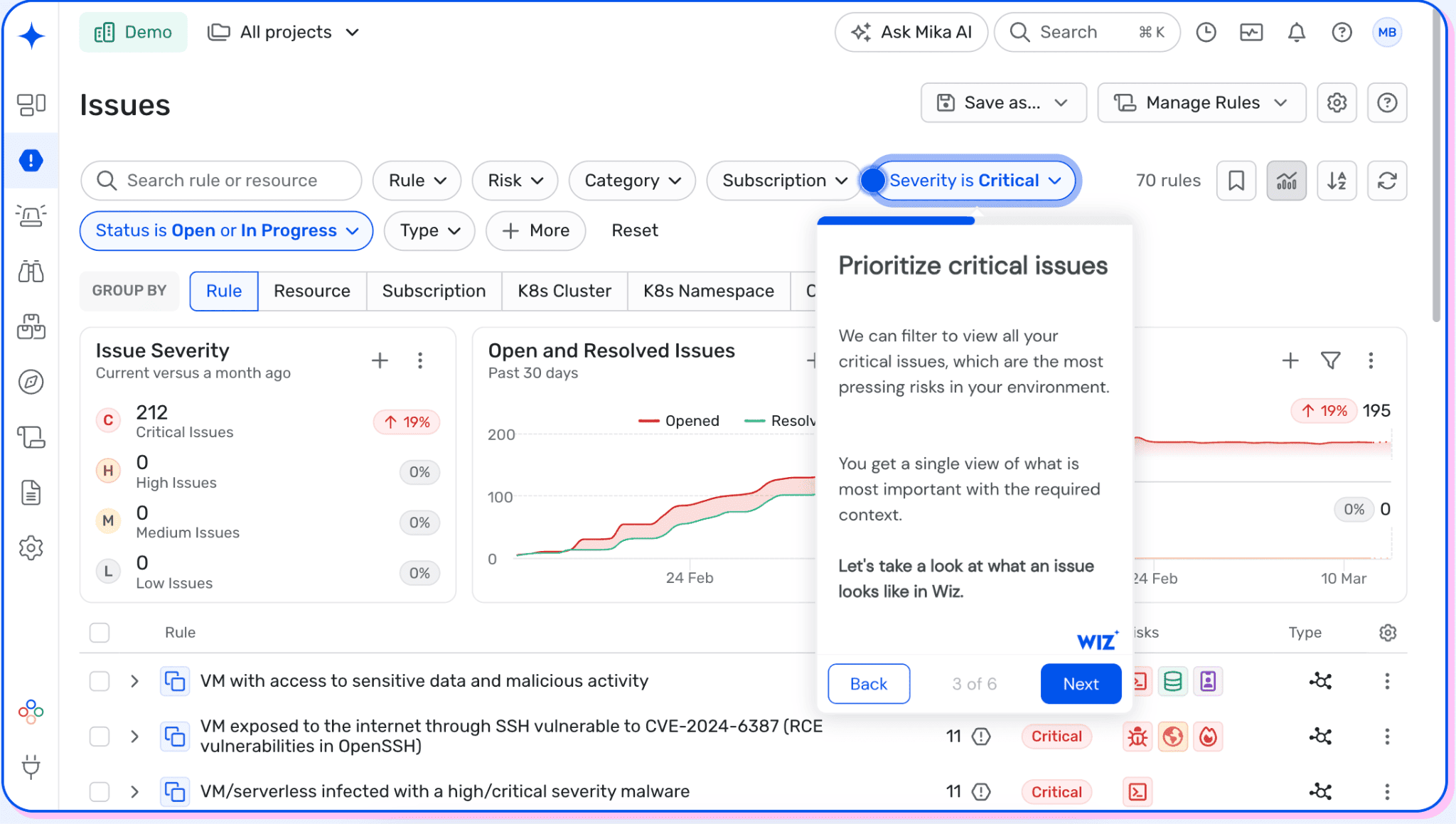
Wiz, now part of Google, is an agentless-first CNAPP for remediation decisions that depend on cloud relationships. Its agentless assessment inventories workloads, while the Security Graph adds exposure, identity, data sensitivity, and attack paths.
For example, two assets may carry the same critical CVE. The internet-facing production workload with a privileged route to sensitive data should receive the earlier ticket.
The platform can also aggregate third-party scanner findings. Wiz Code adds development-stage scanning; the optional eBPF-based Wiz Sensor provides runtime detection and protection. Treat these as separate evaluation layers because code and runtime depth require additional products and licensing.
Evidence basis: Official pages reviewed September 10, 2026. Public reviews provide customer-experience signals; this was a documentation-led assessment, not a lab test.
Ratings: G2: 4.7/5; Wiz’s pricing page displayed 839 G2 reviews at capture. No current Capterra profile was found, so no Capterra score is reported.
“We can see the specific elements that come together to elevate an issue to a severe standing.”
Illyan Tytel, Landscape Integrity Monitoring Senior Lead at Mars, in a Wiz customer story
The graph should make that elevation logic defensible to DevOps. During a PoC, trace one critical Issue through the vulnerable package, exposure, permissions, affected data, owner, and repository. Export it to the intended ticketing system and check what context survives.
What matters in the remediation workflow
- Agentless assessment: Finds workload vulnerabilities without a host-agent rollout.
- Graph prioritization: Correlates exposure, identity, data, and attack paths.
- Unified findings: Combines native results with connected third-party scanner data.
- Code and containers: Scans IaC, images, registries, hosts, and Kubernetes.
- Workflow integration: Shares findings through the Wiz integration ecosystem.
How Wiz prices the deployment
Wiz displays no list price or fixed trial period. Modular licensing scales by workloads, active developers, log ingestion, or sensors. Price the intended module mix and model growth in every metered unit. A March 2026 enterprise G2 reviewer also cautioned that some capabilities are consumption-based.
Where Wiz earns the shortlist
These strengths come from individual vetted TrustRadius reviews published in April 2025. They are customer-experience evidence, so the product capabilities will still be verified through current Wiz documentation.
- ✅ Straightforward multicloud deployment: “Ability of Wiz to integrate with all of our cloud platforms makes it easy to deploy and centralizes our insights into all environments.” This matters for teams replacing separate AWS, Azure, and Google Cloud review processes with one operating view. (TrustRadius)
- ✅ Contextual risk prioritization: “Create a risk mapping that takes into account not only one parameter but the entire risk scope.” The reviewer’s example combined an exposed server, sensitive data, and an exploitable vulnerability. That is the correlation buyers should reproduce with their own production attack path during the PoC. (TrustRadius)
- ✅ Consolidation across security domains: A large-enterprise reviewer using Wiz Cloud, Code, Sensor, and Defend listed “Contextualizing risks” and “Eliminating isolated solutions” as advantages. Check whether the same deployment removes consoles and handoffs in your environment or merely puts another interface above them. (TrustRadius)
What can weaken the fit
These limitations came from individual reviews, not current Wiz documentation. Treat them as PoC test cases because workflows may have changed since April 2025.
- ⚠️ Ticketing granularity: “I would like tickets for specific findings, not just issues.” The reviewer’s larger concern was assignment: application teams could not receive an individual finding through the preferred internal ticketing workflow. During evaluation, create tickets at both the issue and finding level and inspect the routing options. (TrustRadius)
- ⚠️ Remediation reporting: “There is no visibility into MTTR metrics or MTTD.” The same reviewer reported that missing resolved dates made reporting harder. If mean time to remediate is one of your program KPIs, ask Wiz to build that report from your own issue lifecycle during the PoC. (TrustRadius)
- ⚠️ Exception-management workflow: A large-enterprise reviewer wanted better “Exception Management,” including exception-number tracking and “bi-directional status updates (ServiceNow).” Test whether accepted risk, compensating controls, approval history, expiry, and ServiceNow status remain synchronized throughout the exception lifecycle. (TrustRadius)
Who should skip it: Teams centered on authenticated host scanning or transparent per-asset pricing should evaluate a traditional VM platform first. Buyers expecting patch deployment must distinguish Wiz’s one-click remediation from its patch recommendations. The pass condition is whether the graph context survives in the ticket and helps the owner act.
Qualys
Qualys belongs on the shortlist when patch execution sits inside the vulnerability-management buying scope. The fit depends on matching every expected workflow to the correct application and entitlement.
- Gartner Peer Insights: 4.3/5 from 530 ratings, accessed September 11, 2026
- TrustRadius: 9.3/10 from 42 reviews and ratings, accessed September 11, 2026
Best for: Large, hybrid estates that want mature vulnerability assessment, risk-based prioritization, and patch operations on the same platform.
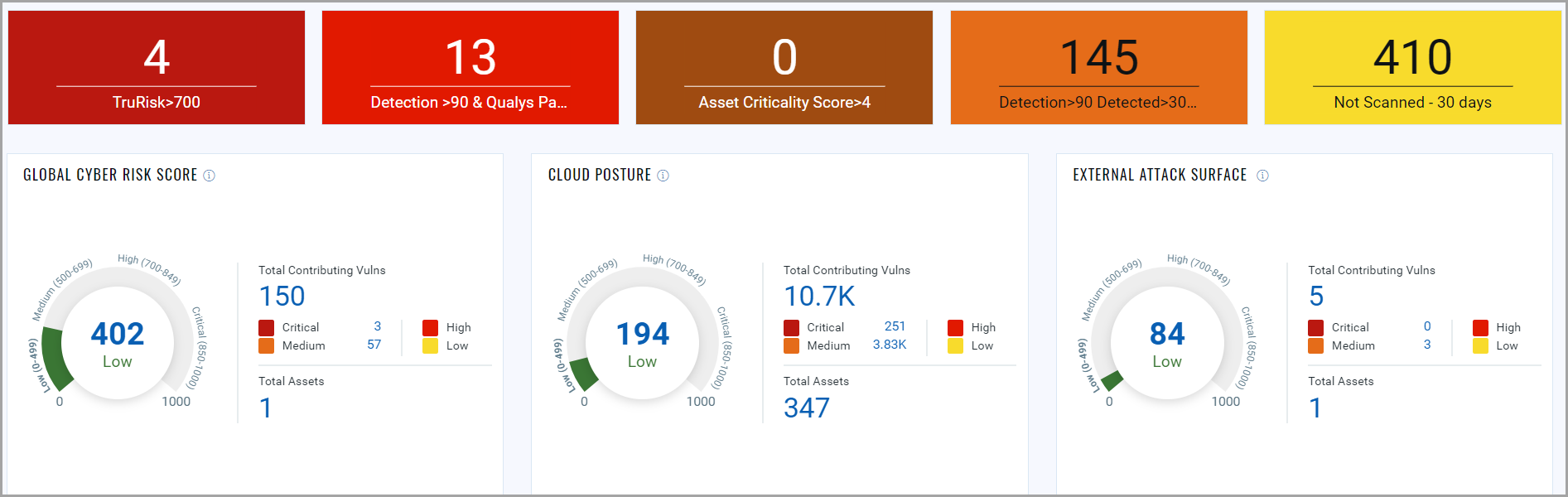
The same vulnerability program may cover long-lived servers, network-discovered assets, cloud workloads, and patch delivery. Packaging is the first detail to pin down. VMDR TruRisk handles vulnerability management and prioritization; VMDR TruRisk FixIT adds remediation and patching. TotalCloud is a separate cloud-native suite configured through cloud connectors and selected applications using Qualys Units.
That distinction matters after the demo. A strong discovery result does not prove that every sensor, workload type, patch workflow, or compliance feature appears in the quoted configuration. During a POC, require the vendor to trace one high-risk vulnerability through the affected asset, last successful assessment, TruRisk drivers, available patch or mitigation, owner, exception, and post-fix rescan.
Qualys is assessed here as the finding and remediation system. The Cloudaware Qualys integration can ingest Qualys vulnerability data, scan dates, and counts into CMDB records. Qualys remains the source of those findings.
What Qualys covers
- VMDR TruRisk: The SMB package inventories on-premises and cloud assets, classifies them using operating-system, application, and other attributes, and uses more than 25 threat-intelligence feeds for risk-based prioritization.
- Patch Management: VMDR TruRisk FixIT adds operating-system and supported third-party application patching. Confirm the supported catalog, maintenance-window controls, rollback behavior, and license scope with your own packages.
- Hybrid cloud assessment: TotalCloud FlexScan supports cloud-API assessment, virtual scanner appliances, workload snapshots, and Qualys Cloud Agents. These methods provide different evidence, so test them separately.
- Container coverage: Qualys Container Security is a separate application for container images, registries, and Kubernetes environments. Do not assume it is included with VMDR.
- Compliance evidence: VMDR TruRisk packages advertise templated reports and controls, while Qualys Policy Audit is the dedicated compliance application. Ask which evidence and reporting workflows require that additional entitlement.
What to prove in the POC
Vulnerability scores need to change a patching decision. Jay Jacobs, Sasha Romanosky, Octavian Suciu, Benjamin Edwards, and Armin Sarabi wrote: “This boost in prediction performance allows organizations to substantially improve their prioritization practices and design data-driven patching strategies.” Their EPSS research concerns exploit prediction, not Qualys TruRisk. The operational lesson still applies: make the vendor show which inputs changed each rank and what the asset owner should do next.
Use an illustrative cohort containing 50 known hosts, 10 short-lived cloud instances, five container images, and one deliberately unmanaged subnet. Measure unknown-asset discovery, authenticated-assessment coverage, priority explainability, patch eligibility, handoff completion, and clean rescans. Include assets that disappear and return under new identifiers; otherwise, an attractive dashboard can conceal duplicate or stale records.
POC rule: Pass Qualys only when every top-risk item can be followed from discovery to verified closure without losing asset identity, ownership, or exception state. A successful patch job is incomplete evidence until the asset rescans clean or records an approved mitigation.
How Qualys pricing works
Qualys publishes three SMB starting figures, as of September 2026:
- VMDR TruRisk: starting at $2,195
- VMDR TruRisk FixIT: starting at $2,995
- VMDR TruRisk ProtectIT: starting at $4,645
The VMDR trial page does not state the billing period or included asset quantity beside those prices, so do not convert them into annual or per-asset costs. It offers a 7-day free trial.
Broader Qualys subscription pricing is custom. Cost depends on selected Cloud Platform Apps, network addresses, web applications, and user licenses. TotalCloud adds its own mix of selected applications and Qualys Units.
For a defensible budget, request a bill of materials that maps every POC workflow to its SKU and counting unit. Check Patch Management, Container Security, Policy Audit, TotalCloud, sensors, and support individually. Price the peak managed scope and year-two module set, not the smallest asset count used during the trial.
Where Qualys earns the shortlist
These reviews describe individual deployments rather than universal product behavior. Each point therefore ends with a check you can repeat.
- Large-estate operation: “We have a big customer which has over 2 million devices to manage and it is a very complex infrastructure.” That 2022 account shows plausible enterprise scale, not guaranteed coverage. Reconcile discovered assets against an independent expected-asset list and investigate every miss. (TrustRadius)
- Patch operations inside the platform: “It was good and effective tool, to work on the patching activities, with ease of access, smooth functioning.” The reviewer used the Patch Management module. Reproduce that workflow with your maintenance windows, unsupported packages, failed jobs, and rollback path. (TrustRadius)
- Consolidated asset and risk context: “Bringing everything together and getting visibility in one Qualys dashboard has helped us.” Test whether that view preserves asset identity across scanner, agent, and cloud records; a shared dashboard alone does not eliminate duplicates. (TrustRadius)
What can weaken the fit
Several useful warnings come from reviews published between 2022 and 2025. Treat them as POC hypotheses, because interfaces, packaging, and service levels may have changed.
- Subscription clarity: “There needs to be absolute clarity on what you get with a subscription.” Ask the account team to label each required capability as included, add-on, or unavailable, then attach that matrix to the quote. (TrustRadius)
- Dashboard reliability: “We would like to see an improvement on the dashboard interface as it is faulty sometimes.” Build the exact filters, exports, and executive report your teams will use, then repeat them with production-scale data before signing. (TrustRadius)
- Cost expansion: “One of our big issues with QCP is that you do have to pay for each scanner, which can quickly add up to large costs.” This 2023 review does not establish current pricing. It does justify reconciling every sensor and counting unit in the proposal against the assets it covers. (TrustRadius)
Shortlisting rule: Choose Qualys when hybrid vulnerability coverage and patch execution matter more than a lightweight, cloud-only operating model. If cloud attack-path analysis across identity, data, and runtime is the primary job, compare TotalCloud directly with current CNAPP configurations rather than treating VMDR as the equivalent SKU.
Tenable
Gartner Peer Insights: 4.6/5 from 374 ratings, as of September 10, 2026
PeerSpot: 4.1/5 from 46 reviews, as of September 10, 2026
Best for: Enterprises and regulated organizations that need deep vulnerability intelligence across hybrid infrastructure and want exploit likelihood to influence remediation order.
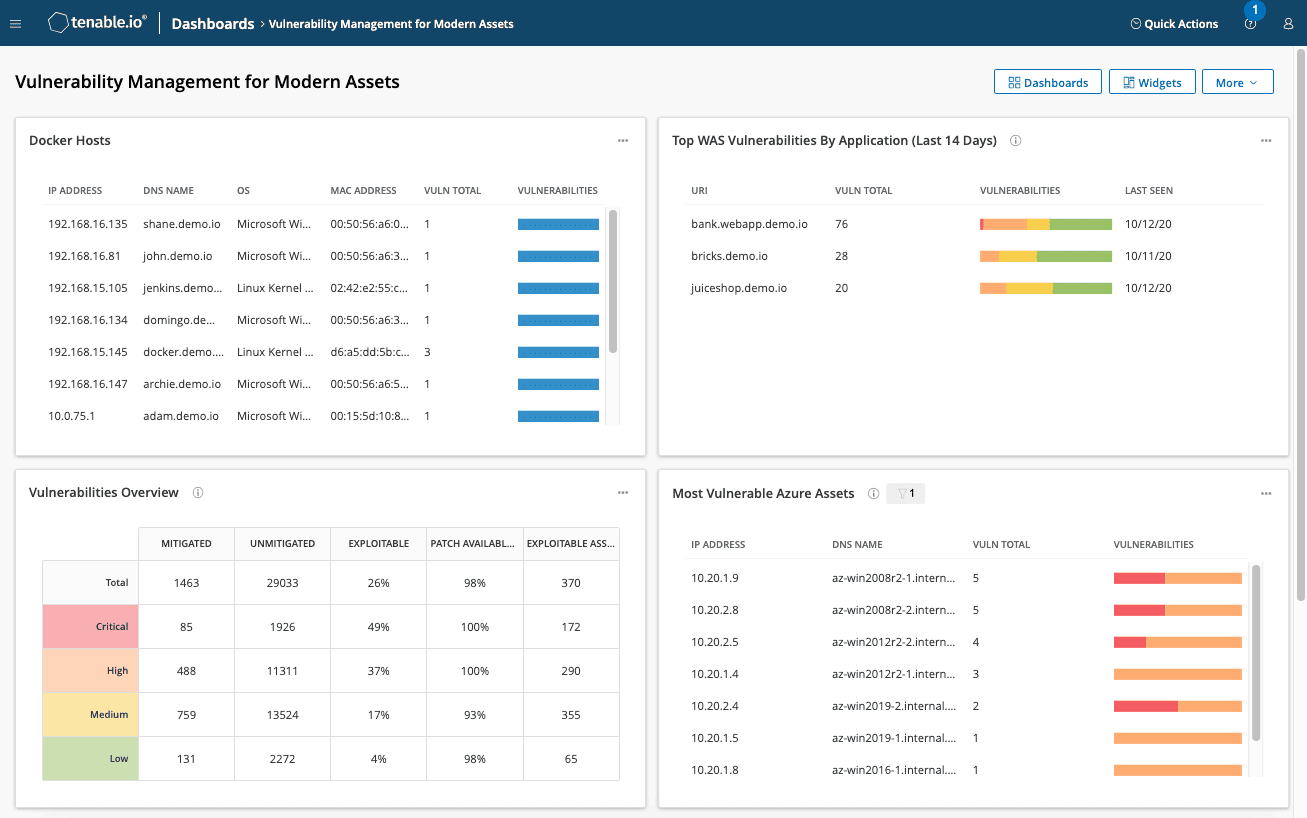
Tenable One Vulnerability Management dashboard. Image source.
Tenable makes more sense once you separate its overlapping product names. Tenable One Vulnerability Management is the Nessus-powered platform for discovering, assessing, and prioritizing vulnerabilities across traditional IT assets. Tenable One Cloud Exposure Vulnerability Management adds API-based, agentless workload and container assessment. Tenable One is the broader exposure-management layer that can combine vulnerability, cloud, identity, web application, attack-surface, and OT findings.
That distinction matters during procurement. Buying Vulnerability Management does not automatically provide every capability shown in a Tenable One demonstration. Patch management, web application scanning, cloud exposure, and other security domains may require separate products or platform licensing.
At the center of the vulnerability workflow is Vulnerability Priority Rating, or VPR. Instead of leaving every critical CVSS finding at the top of the same queue, VPR assigns a dynamic score from 0 to 10 using exploit intelligence and contextual signals. The operational test is whether those scores change what teams fix, defer, or mitigate, not whether the dashboard produces a shorter list.
Features
- Nessus-based vulnerability assessment: Tenable combines continuous asset discovery with scanner and agent-based assessment. This suits hybrid estates where internal networks, remote endpoints, data centers, and cloud resources cannot all be evaluated through one collection method.
- Exploit-aware prioritization: VPR supplements static severity with changing threat intelligence and predicted exploitability. During a POC, compare VPR with CVSS, CISA KEV status, asset criticality, public exposure, and your existing exception decisions.
- Agentless cloud workload and container scanning: The cloud vulnerability-management product uses cloud APIs to assess workloads and containers without installing an agent. This lowers rollout friction, but it should not be mistaken for runtime workload protection.
- Exposure correlation through Tenable One: The wider platform can bring together vulnerability, identity, cloud, web application, OT, and external attack-surface data. Verify whether it resolves duplicate assets and creates useful relationships, rather than simply placing findings from several products on one dashboard.
- Web application and API scanning: Tenable One Web App Scanning provides DAST for running applications and APIs. It does not perform static source-code analysis, so teams requiring SAST still need a code-scanning product.
- Remediation workflow: Vulnerability Management supports guided remediation and bidirectional ticketing. Test status synchronization, reopen behavior, exception expiry, reassignment, and closure after rescanning with the ticketing system you actually use.
“Patching is one of several ways to respond to risks from software vulnerabilities. However, immediately patching, updating, or upgrading vulnerable software is sometimes not viable.” - Murugiah Souppaya and Karen Scarfone, NIST SP 800-40 Rev. 4
That guidance creates a better Tenable test than simply counting detected CVEs. The workflow should preserve whether the team accepted, mitigated, transferred, or avoided a risk, along with the owner, evidence, expiry date, and verification result.
POC rule: Select 30 vulnerabilities covering internet-facing systems, business-critical assets, compensating controls, accepted risks, and duplicate observations from agents, scanners, and cloud APIs. Follow each one from detection through prioritization, ownership, ticket creation, remediation, rescanning, and closure. If the same asset appears under several identities or the exception decision disappears between systems, calculate that reconciliation work before approving the platform.
Pricing
As of September 10, 2026, Tenable’s purchase page lists Tenable One Vulnerability Management at $3,700 per year for 100 assets, with online purchasing available for deployments of up to 250 assets.
However, an embedded purchasing selector on Tenable’s cloud vulnerability-management page displays $3,500 for one year and 100 assets. Because Tenable currently publishes two figures for the same apparent selection, treat either number as an initial budgeting reference and obtain a dated order form before comparing vendors.
Other relevant public prices include:
- Nessus Professional: $4,790 per year
- Nessus Expert: $6,790 per year
- Tenable One Web App Scanning: $3,578 per year for five FQDNs
- Tenable One Exposure Management and Cloud Exposure: Custom quote
A free Vulnerability Management trial is available and includes Web App Scanning, although the public form does not state a trial duration.
Cloud licensing deserves its own calculation. Tenable averages the number of billable resources seen each day and applies a rolling 90-day average. That is more suitable for ephemeral workloads than counting every short-lived instance as a permanent asset, but you should replay an actual autoscaling period against the licensing formula.
Where Tenable earns the shortlist
These comments describe individual customer experiences rather than independent capability tests. Their value is in identifying workflows worth reproducing during evaluation.
- Remediation prioritization: “Tenable allows us to reduce our attack surface level and helps to prioritize which vulnerabilities need to be actioned first.” The useful POC question is whether the same prioritization survives after your asset criticality, exclusions, and remediation SLAs are applied. (TrustRadius)
- Consolidated internal scanning: “An internal network scanner can be linked to and controlled from the cloud portal for a consolidated view of scans and results.” That architecture can work well when centralized security manages scanners inside segmented networks without operating a separate management plane for each location. (TrustRadius)
- Coverage across hybrid infrastructure: “It allows us to find outdated, unsupported and unpatched software no matter the OS or its location(cloud or on-premises.)” For mixed estates, test unsupported operating systems, private subnets, remote endpoints, and intermittently connected assets instead of demonstrating coverage only on current server images. (TrustRadius)
What can weaken the fit
The following reviews were published between 2019 and 2022 and use the former Tenable.io name. They should be treated as regression tests for the current product, not assumptions that every limitation remains unchanged.
- Configuration complexity: “Configuration is not always intuitive, but the comprehensive training and documentation comes to the rescue.” Ask a working administrator, rather than the vendor’s solution engineer, to build authenticated scans, credentials, exclusions, schedules, and permissions during the POC. (TrustRadius)
- Finding exploration and reporting: “It would be nice to be able to sort the vulnerabilities found in different ways. There are some options available, but more would be a plus.” Reproduce the reports used by security leadership, asset owners, auditors, and remediation teams; a useful executive dashboard does not prove that engineers can extract the evidence they need. (TrustRadius)
- Potential overkill for smaller estates: “It may be less ideal on a small network without the need for extensive security measures such as these.” Organizations with limited infrastructure and no dedicated vulnerability-management function may receive better value from a simpler scanner or a security platform they already operate. (TrustRadius)
Shortlisting rule: Choose Tenable when vulnerability research, hybrid assessment depth, and exploit-aware prioritization are central to the program. A team primarily seeking cloud attack-path analysis, unified CNAPP controls, or runtime workload defense should compare broader cloud-native platforms before committing to multiple Tenable modules.
Cortex Cloud
Best for: Full build-to-runtime CNAPP vulnerability management, especially for Palo Alto Networks customers connecting code, posture, and live attack evidence.
Ratings note: TrustRadius lists 8.8/10 from 35 reviews and ratings under the legacy product name. No clean current G2 or Capterra rating was available for a like-for-like comparison. Checked September 10, 2026.
Evidence basis: This assessment uses current vendor documentation and linked individual reviews; it does not claim a hands-on product test. The TrustRadius comments describe 2021–2025 deployments of the predecessor. They provide POC hypotheses, not proof of current Cortex Cloud behavior.
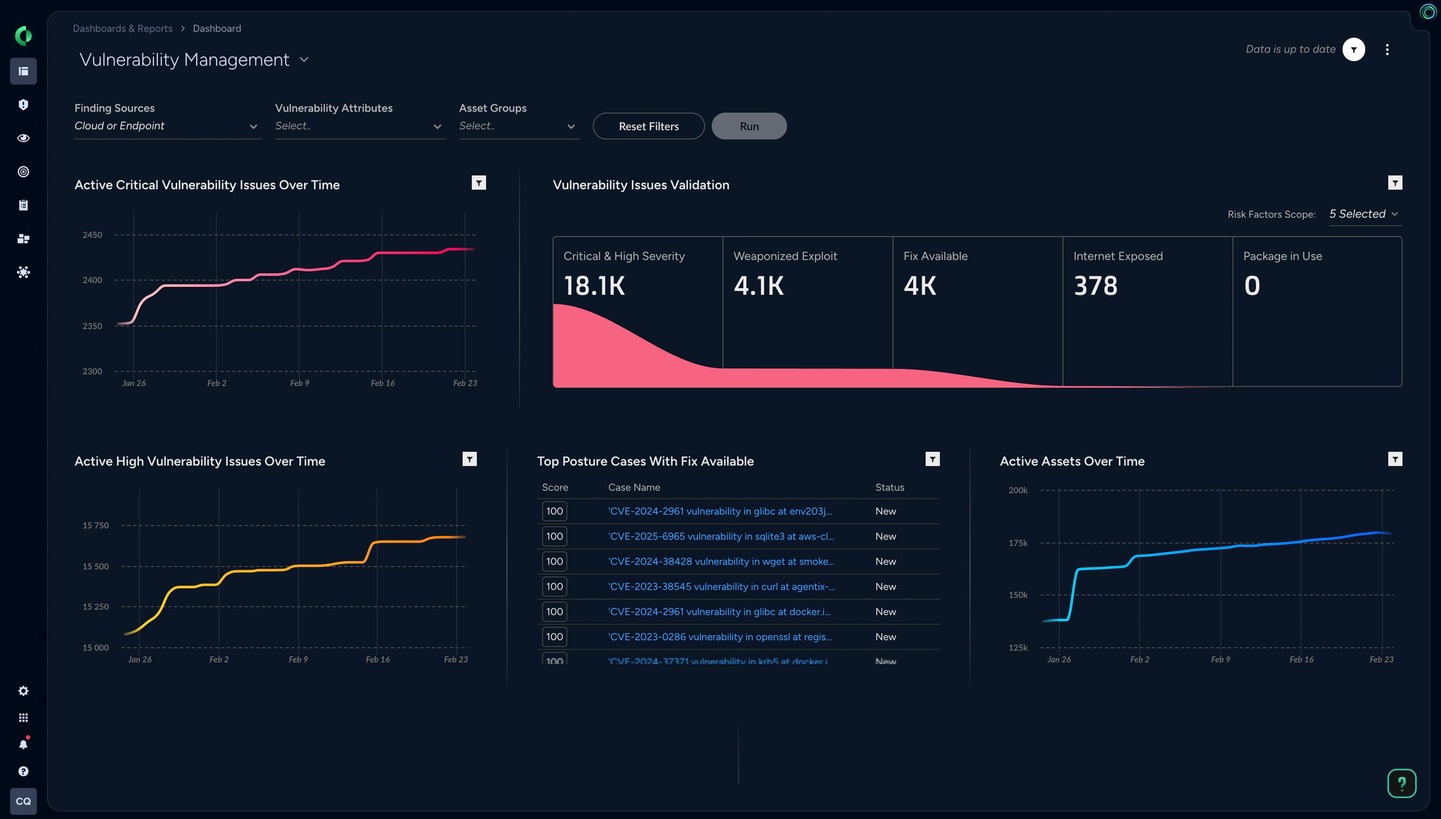
Image source: Palo Alto Networks.
How Prisma Cloud vulnerability management maps to Cortex Cloud
Cortex Cloud is the current name. Palo Alto Networks calls it the next version of Prisma Cloud merged with Cortex Cloud Detection and Response. Vulnerability work can therefore connect code and third-party AppSec findings with posture, runtime investigation, and response.
Evaluate that lifecycle as three distinct evidence paths:
- Before deployment: Application Security covers infrastructure as code (IaC), software composition analysis, software bills of materials (SBOMs), supply-chain visibility, and third-party scanner ingestion. Confirm which repositories, pipelines, registries, and scanners the quote includes.
- Inside the estate: Cloud vulnerability management correlates host, container, and serverless vulnerabilities with exposure and permissions. Agentless scanning snapshots workloads across AWS, Azure, GCP, and OCI on a 24-hour default interval. Azure VMs with Trusted Launch are excluded.
- During execution: Runtime Security adds an agent for detection, blocking, and investigation. Agentless scans create temporary scanners, snapshots, disks, and networking unless you supply and maintain the network path. Their results cannot substitute for runtime telemetry.
POC rule: Choose one internet-reachable container with an exploitable CVE. Trace it from repository to registry, deployed workload, permissions, runtime activity, owner, fix, and rescan. Record which license and collection method supplies each field. A broken link between code, cloud asset, and SOC case defeats the lifecycle case for buying the platform.
“If your architecture doesn't limit what an attacker can reach after a breach, you're just running faster on the same treadmill.”
Emily Long, CEO of Edera, quoted by WIRED on June 10, 2026
Apply that warning to the runtime demo. Make the vendor contain the test workload, show which resources became unreachable, and preserve evidence for the SOC investigation. A recommendation to patch the CVE does not demonstrate blast-radius reduction.
What to price before you commit
Palo Alto Networks publishes no list prices on the current vulnerability management page. A guided tour and sales-led demo are available; no public self-service trial was shown on September 10, 2026. Request separate 12-month and 36-month totals for posture, application, and runtime security, plus CDR, data retention, support, and implementation.
During the POC, measure provider-side scanner compute, snapshots, disks, and network traffic. Normalize proposals to cost per protected workload per year, including runtime agents and expected year-two log volume.
Where customer evidence strengthens the case
- Consolidation: An IT manager reported “approx 4 to 5 tools merge/managed by single console.” List what Cortex Cloud would replace, retain, or ingest before assigning savings. (TrustRadius)
- Multi-cloud operations: An MSP engineer wrote, “We are providing support to multiple clients on the cloud as Managed Service Providers for different cloud services, mainly Azure, GCP, and AWS.” Compare identical host, image, serverless, identity, and exposure fields across those providers; a connector alone does not prove parity. (TrustRadius)
- Preproduction detection: A reviewer highlighted “CF template integration with CI/CD pipeline to identify any security issue before workload are deployed.” Reproduce it using your IaC format, source-file trace, and blocking threshold. (TrustRadius)
Where customer evidence exposes friction
- Licensing: One product consultant wrote, “Portfolio License must be easy for the End User,” and added, “Prices are high from all industry leader companies.” Map every demonstrated screen, API, automation, and retention period to a quoted SKU. (TrustRadius)
- Enablement: After asking for learning material at purchase, a reviewer explained, “This would save a lot of users' time, which is taken up by research and finding the correct documents from the website.” Budget administrator training, query authoring, policy tuning, and runbook ownership before launch. (TrustRadius)
- Onboarding permissions: A large-enterprise reviewer said the solution “should not require write access to a cloud account.” Private networking can remove network-resource creation permissions, but shifts maintenance to your team. Test both modes and record residual permissions. (TrustRadius)
Who should skip it: Teams wanting only posture scanning and self-service procurement may find Cortex Cloud too broad. Shortlist it when code-to-runtime continuity and cloud-to-SOC response are funded requirements.
CrowdStrike
CrowdStrike belongs on the cloud vulnerability management shortlist when Falcon sensors already cover the workloads entering the remediation queue. That installed base can join exposure, EDR, and runtime evidence with little additional endpoint rollout. In an agentless-first estate, the consolidation case is less automatic.
- PeerSpot: 4.1/5 from 34 reviews, as of September 11, 2026
- TrustRadius: 9/10 from 412 reviews and ratings for the broader Falcon platform, as of September 11, 2026
Best for: Best if you already run Falcon (agent + runtime).
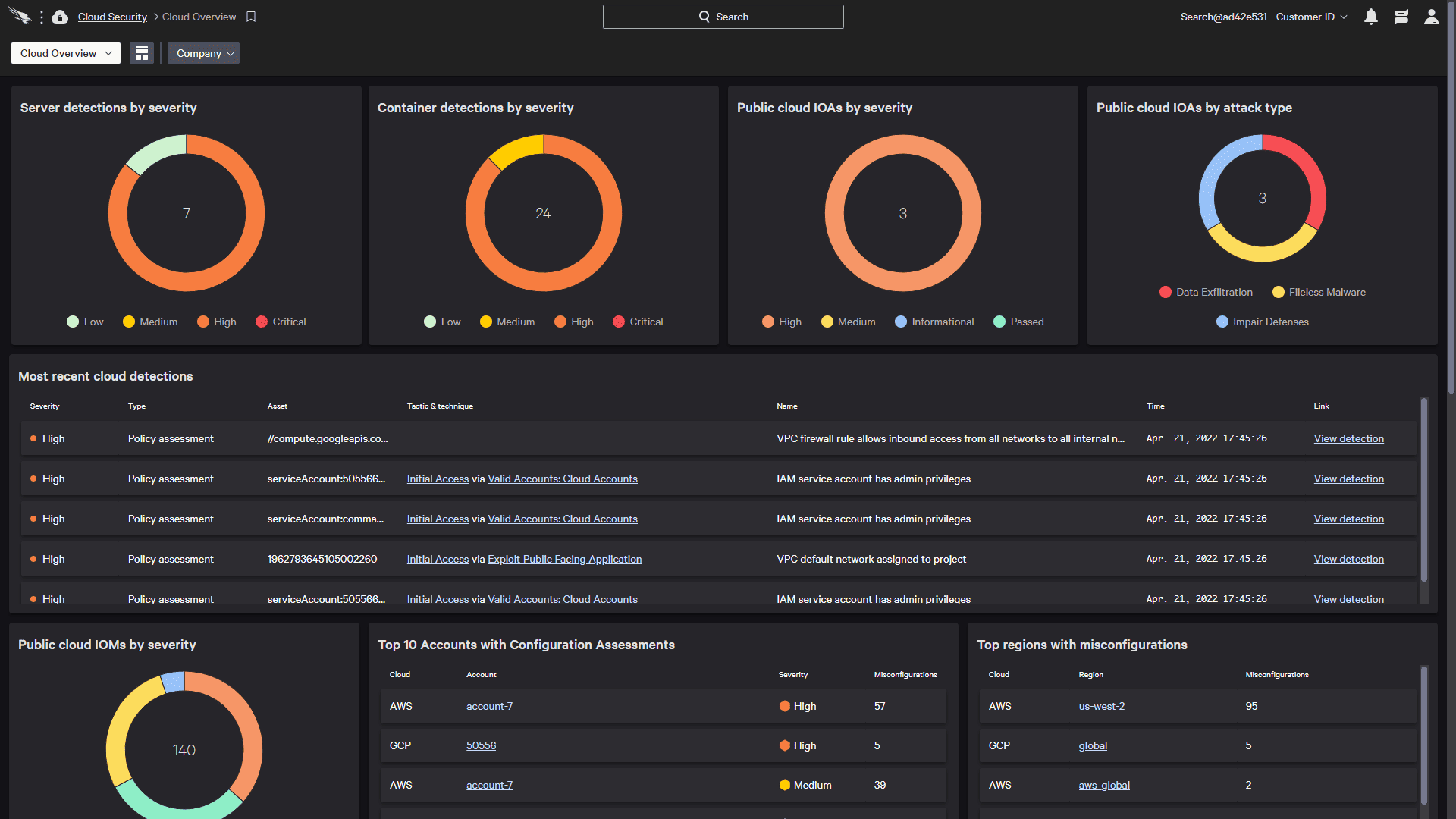
The core VM workflow sits in Falcon Exposure Management. Its sensor-driven assessment brings ExPRT.AI prioritization, adversary intelligence, asset context, and attack paths into the remediation decision. For a Falcon customer, this can reduce the operational gap between identifying an exposed workload and investigating activity on that same system.
Sensor coverage is no longer a strict entry requirement. CrowdStrike now supports Exposure Management in third-party endpoint environments, while Falcon Cloud Security adds agentless cloud posture assessment. However, these evidence paths are not equivalent. An API-connected account can reveal resources and configuration risk; an active sensor supplies endpoint and workload telemetry for runtime detection and response. Score them separately in the POC.
Procurement also needs a naming check. The former Falcon Spotlight URL now redirects to the risk-based vulnerability management area of Falcon Exposure Management. Ask the seller to map Spotlight, Exposure Management, and Falcon Cloud Security to the entitlements on the order form. A familiar product name is not proof that the required module is included.
Evidence basis: current CrowdStrike product and pricing pages, cross-checked against independent Falcon and Falcon Cloud Security reviews. This is a documentation-led buyer assessment, not a claim of hands-on product use.
Run a one-CVE freshness drill
The practical advantage should appear as a shorter, more defensible path from package change to verified closure. Test that path with one controlled CVE on a nonproduction canary. A dashboard tour cannot establish data freshness or identity reconciliation.
- Discovery clock: Install a known vulnerable package on an online, sensor-covered workload. Record the installation time, Falcon device ID, cloud resource ID, sensor version, and the moment the exposure becomes searchable. Define the acceptance window before testing, and ask CrowdStrike to document the expected interval for that operating system and evidence path.
- Priority clock: Capture base severity, ExPRT.AI assessment, exploitation or adversary context, attack-path position, and asset criticality. The result matters only if that context changes the assignee, remediation deadline, or chosen compensating control.
- Closure clock: Upgrade or remove the package, then measure when the finding clears without launching an infrastructure scan. Preserve first-seen, last-seen, remediation, and exception timestamps; those fields determine whether an SLA report can be defended later.
Use outside scores as controls on the proprietary model:
- Severity needs environmental context. “The CVSS Base Score should be supplemented with an analysis of the environment (Environmental Metrics), and with attributes that may change over time (Threat Metrics).” (FIRST CVSS v4.0 User Guide)
- Exploit probability adds a different signal. “It offsets subjective judgments with empirical signals from observed exploitation and ongoing activity, helping you focus limited remediation effort where attacks are most likely.” (FIRST EPSS)
For the test CVE, export Falcon’s base severity, ExPRT.AI result, asset and attack-path context, CISA KEV status, and EPSS probability. The scores do not have to agree. An analyst should be able to explain why Falcon raised or lowered the work and preserve that explanation with the ticket.
Repeat the drill with the sensor stopped, then run it on an agentless-only cloud asset. The console should expose the evidence source, sensor health, and observation age. It should also resolve the sensor identity and cloud resource identity to one asset. Duplicate records or unexplained freshness changes become duplicate tickets and false overdue findings at scale.
POC rule: require one CVE to move from discovery to verified closure across sensor-covered, stale-sensor, and agentless-only states. A single console adds limited value when analysts still have to reconcile identities or guess which observation is current.
Capabilities that matter in the VM workflow
- Continuous assessment: The Falcon sensor tracks endpoint and workload exposures without scheduled scan infrastructure.
- Risk prioritization: ExPRT.AI, adversary intelligence, attack paths, and asset context refine the queue.
- Agentless cloud posture: API connections surface cloud resources, misconfigurations, and exposure paths.
- Runtime correlation: Falcon joins cloud, endpoint, workload, identity, and threat signals for investigation.
- Container and Kubernetes security: Code-to-runtime controls cover containerized workloads and Kubernetes environments.
Price the modules, not the entry bundle
CrowdStrike sells Falcon by subscription, with optional modules adding cost. Its public pricing page lists annual endpoint bundles at $59.99 per device for Falcon Go, $99.99 for Falcon Pro, and $184.99 for Falcon Enterprise, as of September 11, 2026. Treat these as endpoint-suite reference points. CrowdStrike does not publish a standalone list price there for Falcon Exposure Management or Falcon Cloud Security.
Larger buyers can use Falcon Flex, a pre-negotiated commitment that can be allocated across modules. A comparable quote should identify every included module, licensed endpoint and server populations, and the treatment of short-lived cloud workloads. Container coverage, data retention, support, and professional services also need explicit line items or written confirmation.
CrowdStrike advertises a 15-day free trial, but its pricing FAQ describes a baseline trial that includes Falcon Prevent, Device Control, and Express Support. Put Exposure Management, Falcon Cloud Security, ExPRT.AI, agentless onboarding, and the required sensor workflows into the written POC scope. Otherwise, the trial may validate the agent while leaving the proposed VM configuration untested.
What works in a Falcon-standardized estate
The following comments come from individual practitioners reviewing Falcon. They describe user experience, not universal product performance.
- Application and OS exposure visibility: “The Exposure Management function helps in identifying application and OS vulnerabilities before attackers exploit them.” The reviewer had used both Falcon Spotlight and Exposure Management, so the feedback is directly relevant to a VM consolidation decision. (TrustRadius)
- Investigation context: “CrowdStrike Falcon allows the team to get detailed analysis and records of the who, what, when, where and why that other solutions could not provide.” During the POC, verify that the same evidence survives the handoff into the remediation ticket or case. (TrustRadius)
What to challenge before purchase
- Additional licensing: “[T]eams that require integrated SOAR and vulnerability management might be discouraged by the need for additional licensing to unlock those capabilities.” Make the final quote map required workflows to named modules, quantities, and renewal terms. (TrustRadius)
- Reporting depth: “[T]hey have room for improvement related to interface and reports, but overall product is good.” Build the overdue-remediation and executive-risk reports from your fields during the POC; screenshots do not prove that your SLA logic is reproducible. (TrustRadius)
- Agent troubleshooting: “I suggest improvements for CrowdStrike Falcon Cloud Security in areas including vulnerability management and a more straightforward agent troubleshooting process.” Stop a sensor deliberately, then confirm how health, last contact, affected findings, and ownership appear to operators. (PeerSpot)
CrowdStrike is best if you already run Falcon (agent + runtime), sensor health is mature, and joining exposure to live response removes a handoff. An agentless-first CNAPP is usually a cleaner fit when broad sensor deployment is undesirable. Choose a scanner-led platform when authenticated assessment depth and scanner policy control matter more than Falcon telemetry. If several scanners must remain, evaluate a separate aggregation and context layer instead of forcing consolidation inside the detection platform.
Orca Security
Orca's strongest buying case is fast, agentless-first coverage; its main diligence question is where SideScanning ends and Sensor-based runtime evidence must begin.
- G2: 4.7/5 from 314 reviews, as of September 11, 2026
- Gartner Peer Insights: 4.6/5 from 259 ratings, as of September 11, 2026
Best for: Mid-market and enterprise cloud teams that need broad vulnerability and configuration visibility without first deploying agents across every workload, and can add a runtime sensor selectively where real-time execution evidence or blocking is required.
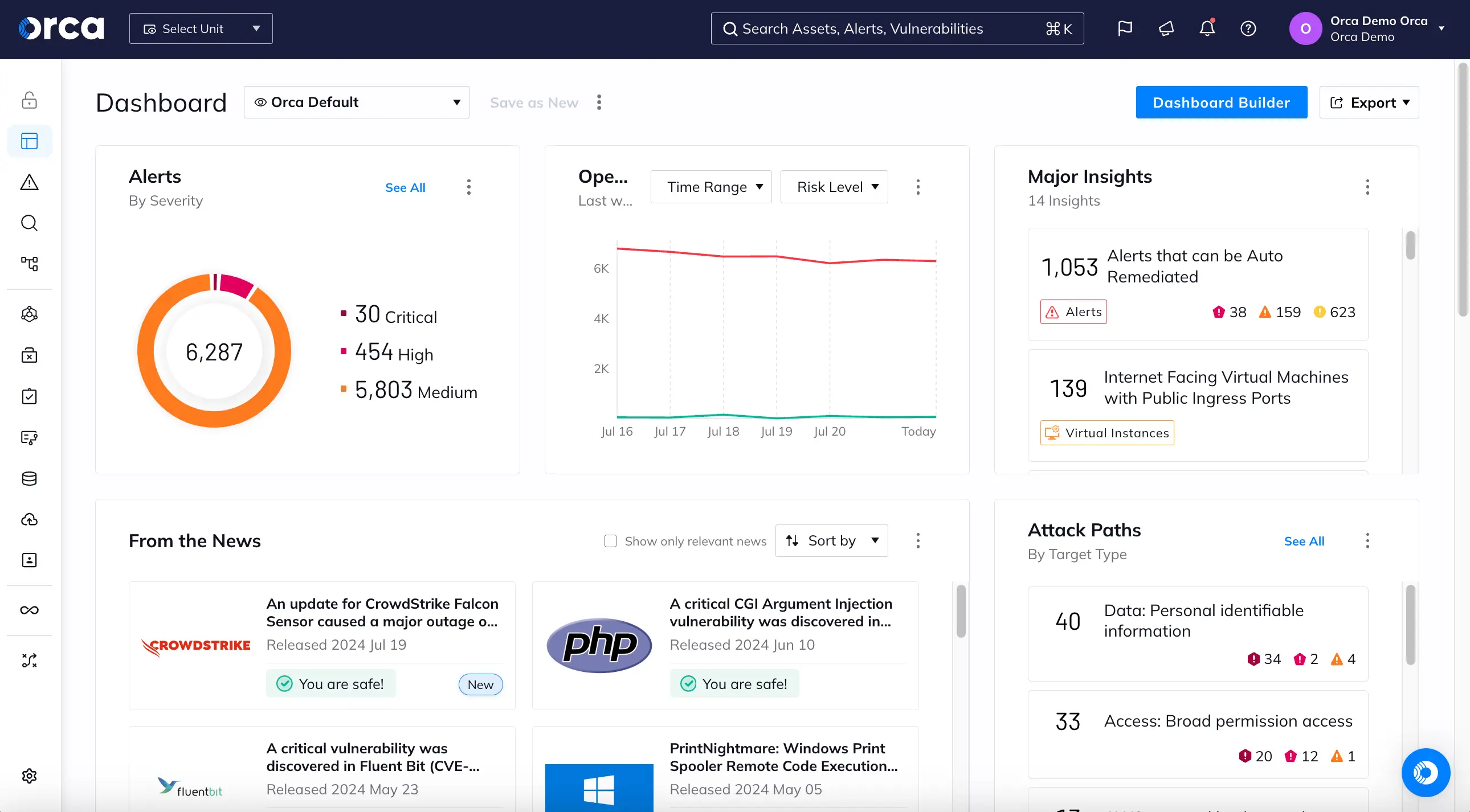
Orca earns its place on a vulnerability-management shortlist when deployment friction is the problem holding back coverage. Its SideScanning architecture reads workload block storage through a virtual, read-only reconstruction outside the workload. Cloud API data supplies the surrounding asset metadata. That combination can inventory operating-system packages, applications, libraries, configurations, identities, and data exposure without putting code or network traffic inside each scanned asset.
The important qualifier is agentless-first, not agentless-only. SideScanning provides broad posture and reachability context; the separate Orca Sensor adds real-time process telemetry, runtime detections, response actions, and evidence that a vulnerable package actually executed. Treating those as interchangeable produces an attractive POC and a coverage gap in production.
Orca correlates vulnerabilities with public accessibility, lateral reachability, IAM paths, sensitive data, and business impact. For a remediation team, that is more useful than forwarding every high-CVSS result. A vulnerable package on an isolated development host should not automatically outrank the same weakness on an internet-facing system with access to regulated data.
This review is based on current Orca product documentation, public marketplace packaging, and named user feedback. Product claims are treated as capabilities to verify in a POC, not as independently observed benchmark results.
Make the first 24 hours a coverage-reconciliation exercise
Connecting an account proves that credentials worked. It does not prove that the platform found the estate you expected, assessed it recently, or preserved enough evidence for another team to act. Orca says SideScanning can produce inventory in minutes and prioritize gaps within 24 hours, so I would turn that promise into a timed acceptance test.
Prepare one reconciliation sheet before onboarding:
- Known denominator: Export provider-native inventory from every selected account, subscription, project, region, and cluster. Include running and stopped virtual machines, a short-lived workload, a container image that is not currently running, a Kubernetes workload, serverless functions, and storage-backed assets. Seed the cohort with known package versions and deliberately safe configuration examples; do not introduce exploitable conditions into production.
- Two checkpoints: Capture matched-versus-expected assets at two hours and again at 24 hours. Calculate
matched in-scope assets / expected in-scope assets × 100, but do not hide misses inside an estate-wide percentage. Every asset in the known-risk cohort should reconcile, and every other miss needs an owner and an explanation. - Evidence contract: For each known vulnerability, require the asset's native identifier, account and region, package name, installed version, file path or image digest, vulnerability source, assessment timestamp, reachability result, exposure context, relevant IAM relationship, data context, and mapped owner. A finding without stable identity or fresh evidence becomes manual investigation rather than remediation work.
- Exception register: Classify unmatched assets as an unsupported resource type, missing account or region, permission gap, identity mismatch, discovery delay, or agreed exclusion. This turns “coverage looks good” into a list that engineering and procurement can close.
One additional test prevents a common architecture mistake. Put a vulnerable package on a noncritical test VM, keep it installed but inactive, and compare the SideScanning result with the evidence available after the Sensor observes execution. Agentless reachability analysis can help estimate whether vulnerable code is usable; only runtime telemetry can prove what executed and support real-time response. No exploitation is needed to establish that boundary.
POC acceptance rule: Orca passes the coverage phase when the known-risk cohort reconciles within the promised window, assessment timestamps meet your freshness requirement, and every unexplained miss becomes a documented vendor or configuration action. A successful connector screen is not an acceptance criterion.
What the architecture gives the vulnerability team
- Agentless workload inspection: SideScanning reconstructs a workload's filesystem from its storage layer and analyzes it outside the asset. The practical benefit is broad initial coverage without waiting for agent packaging, rollout rings, or host reboots. During the POC, verify package identity and scan freshness on stopped and short-lived assets rather than testing only long-running servers.
- Context-based vulnerability priority: Orca's vulnerability-management layer combines workload findings with configuration, identity, data, and network context and draws on more than 20 vulnerability intelligence sources. Ask the platform to explain why one item moved above another; a priority score that cannot be defended to the asset owner will not survive backlog review.
- Attack paths and reachability: Risk prioritization considers factors such as CVSS, EPSS, exploitability, accessibility, lateral movement, and business impact. The useful output is not the path graphic itself but the smallest control change that breaks several paths. Check whether closing one exposure or permission edge causes the related risk to recalculate as expected.
- Container, image, and Kubernetes coverage: Orca assesses registries, images, containers, and Kubernetes environments and provides agentless reachability analysis. Reconcile image digests across registry, deployment, and running workload so the ticket points to the artifact developers can actually rebuild.
- Multicloud inventory: The current platform lists AWS, Azure, Google Cloud, Oracle Cloud, Alibaba Cloud, Tencent Cloud, and Kubernetes coverage. Breadth only becomes operationally useful when account, project, cluster, owner, and environment identifiers remain consistent enough for routing and reporting, so include overlapping names and inconsistent tags in the trial dataset.
- Optional runtime control: The Orca Sensor adds eBPF-based visibility and protection across Linux, Kubernetes, and Windows, including runtime detections and process termination. Evaluate sensor deployment, performance, disconnected behavior, and response permissions as a separate workstream; agentless onboarding results do not validate runtime protection.
Pricing: the public packs show spend bands, not unit economics
Orca uses subscription pricing tied to workload volume, but normal enterprise pricing is quote-based. Its AWS Marketplace listing publishes four one-month contract options based on concurrent running EC2 hosts:
- Small: $7,000 per month, or an $84,000 annualized run rate if usage and price remain unchanged
- Small-Medium: $12,000 per month, or a $144,000 annualized run rate
- Medium: $17,000 per month, or a $204,000 annualized run rate
- Large: $30,000 per month, or a $360,000 annualized run rate
Those annual figures are arithmetic run rates, not advertised 12-month contract prices. The listing does not expose the workload capacity inside each pack, so dividing $7,000 by an assumed host count creates a fictional per-workload rate. Custom and private offers are available, and AWS infrastructure charges may still apply. The Marketplace page also flags a free trial without publishing its duration.
For a usable quote, make the vendor define a billable workload, the concurrency measurement window, and the treatment of stopped or ephemeral instances, container images, serverless functions, nonproduction accounts, and duplicate assets across clouds. Price the Sensor, support tier, data retention, overages, and onboarding services separately. The number procurement needs is the cost of the accepted production architecture, not the cost of the agentless discovery exercise.
Evidence from teams that got value quickly
These reviews describe individual environments rather than universal outcomes. Their value is in giving the POC team a concrete claim to reproduce.
- Fast exposure discovery: “After an incredibly easy setup, Orca immediately brought into focus how seriously exposed some of our assets were.” That is a strong reason to test Orca when agent deployment has delayed visibility. Start the clock at account authorization and stop it only when the POC team has reconciled the expected assets and inspected the supporting evidence. (G2)
- Broad initial assessment: “After onboarding, Orca provides really comprehensive asset discovery, vulnerability scanning, and risk assessment.” Reproduce that outcome across every resource cohort in the denominator, especially stopped compute, images, serverless, and accounts with imperfect tags. “Comprehensive” should resolve to measured coverage, not a large finding count. (G2)
- Exposure-aware patching: “That added context lets us prioritize host patching based on real exposure instead of relying on raw CVSS scores.” Give the trial team two queues, one ordered by severity and one by Orca context, then record which queue finds internet exposure, lateral access, or sensitive data sooner. (G2)
Evidence that should shape the POC
The practical weaknesses appear after discovery, when teams have to tune expected behavior, map ownership, and communicate risk upward.
- Tuning sanctioned data movement: “A bit of tuning was needed to distinguish sanctioned data copies from the risky ones, since some of the lower-environment data was there on purpose.” Build an approved-copy list before the POC, then measure how exceptions are scoped, reviewed, expired, and prevented from suppressing genuinely risky copies. (G2)
- Ownership taxonomy: “The main follow-on work was organizing the findings to match how our teams and business units are structured, including grouping agents by owner and function.” This comment arose from an AI-agent use case, but the governance test carries over: map cloud accounts, projects, tags, and clusters to your real owner hierarchy, then change one owner and verify that routing follows. (G2)
- Executive reporting: “I think the downside of Orca Security is the reports. I don't have any good reports ready to deliver to an executive.” Require the current product to produce a board-ready view of coverage, open risk, exceptions, SLA performance, and trend without a spreadsheet reconstruction. If another analytics layer is necessary, include its labor and licensing in the decision. (PeerSpot)
Decision boundary: Shortlist Orca when the priority is rapid, broad cloud coverage with vulnerability, identity, exposure, and data context in one risk model. If continuous execution telemetry, host-level blocking, or response evidence is mandatory across the estate, price and test Sensor coverage separately; the agentless result alone does not satisfy that requirement.
Rapid7
Rapid7 is strongest when the bottleneck appears after detection: the team has findings, yet prioritization, assignment, and closure still happen in separate queues. Its current packaging makes the buying boundary important because InsightVM, Exposure Command, and InsightCloudSec do not represent the same scope.
- Gartner Peer Insights: 4.3/5 from 744 ratings, accessed September 11, 2026
- TrustRadius: 8/10 from 87 reviews and ratings, accessed September 11, 2026
Both ratings apply to InsightVM. They should not be read as ratings for Exposure Command Ultimate or InsightCloudSec.
Best for: Mid-market and enterprise vulnerability teams that want threat-aware prioritization, remediation projects, service-management handoffs, and SLA reporting across hybrid infrastructure.
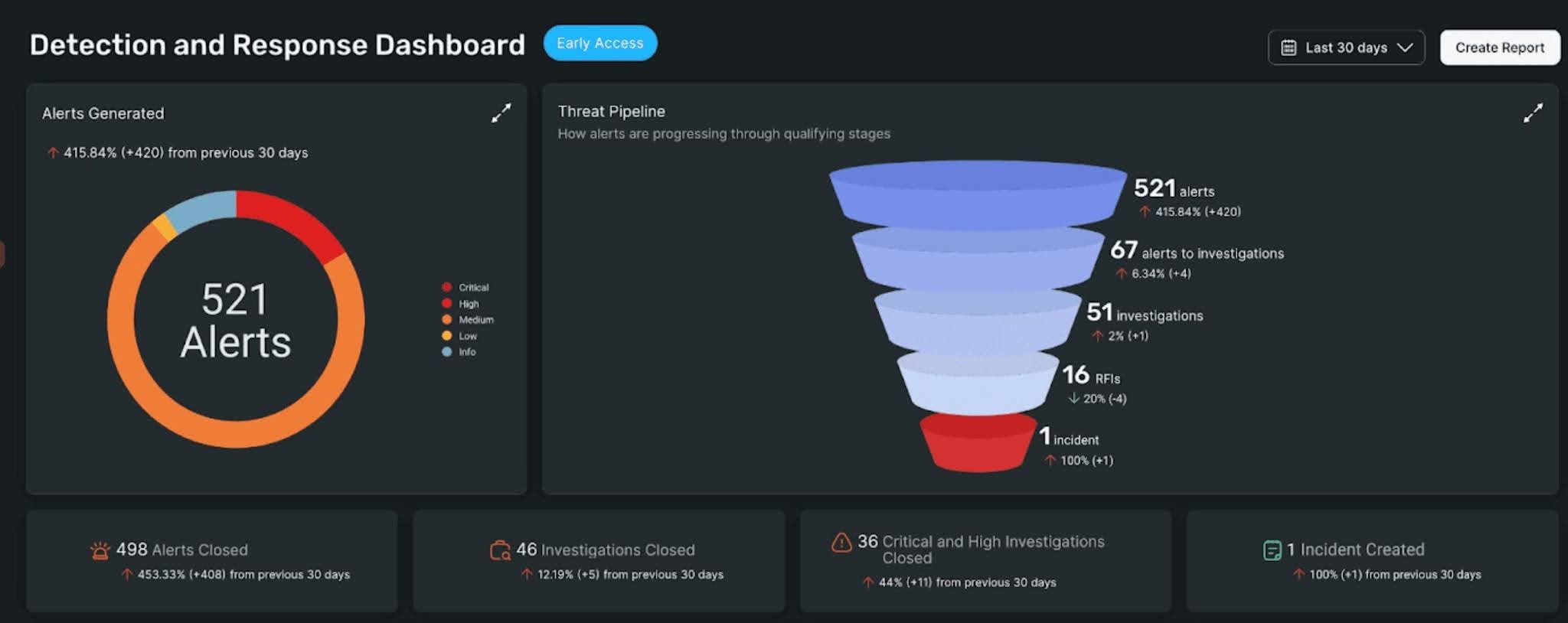
Evidence basis: current Rapid7 product, package, trial, and pricing pages plus public user reviews. This is a documentation-based assessment, not a claimed hands-on test.
Rapid7 now describes InsightVM as the vulnerability-management technology that powers Exposure Command. Exposure Command Essentials combines agent-based and network scanning with attack-surface context, risk scoring, remediation workflows, SLAs, and reporting. Ultimate adds multi-cloud and container security, attack-path analysis, cloud posture, infrastructure-as-code scanning, and cloud threat detection.
That packaging changes the shortlist. A team replacing a hybrid scanner can evaluate InsightVM or Essentials. Broader cloud-native coverage requires an Ultimate or InsightCloudSec scope, and the quote must identify which one supplies each capability. The current product pages document remediation guidance, projects, SLAs, and ITSM handoffs; they do not describe a native general-purpose patch deployment engine.
Follow one finding through the operating loop
A polished dashboard proves very little about the handoff between security and infrastructure. Build the POC around one externally exposed production asset with a known fix, then preserve the same asset and vulnerability identifiers through five checkpoints.
Viktoria Koscinski, Mark Nelson, Ahmet Okutan, Robert Falso, and Mehdi Mirakhorli warn: “While various scoring systems exist to support this task, their differing goals, methodologies and outputs often lead to inconsistent prioritization decisions.” Their 2025 study of 600 Microsoft vulnerabilities supports a practical rule: treat any priority score as a decision input, then test how asset criticality, exposure, exploit evidence, and remediation feasibility change the queue.
- Confirm the evidence. Record the asset identifier, CVE, assessment method, last scan, authentication status, vulnerable software, and available fix. A high score without fresh authenticated evidence should not move directly into an emergency patch window.
- Challenge the rank. Rapid7’s published Active Risk method combines CVSS with sources including AttackerKB, Metasploit, ExploitDB, Rapid7 honeypot telemetry, CISA’s Known Exploited Vulnerabilities catalog, and other intelligence. The documented score runs from 0 to 1,000. The verified description does not name EPSS as an input, so ask the vendor to demonstrate any EPSS field or rule your program expects.
- Create owned work. Put the finding into a remediation project or Remediation Hub workflow with a current owner, due date, SLA, affected asset count, and exception path. Assignment is successful only when the receiving team can understand the requested change without reopening the scanner console.
- Test the handoff. Send the item to Jira or ServiceNow, update its state there, and check which fields return to Rapid7. Preserve the vulnerability identifier, asset identity, priority rationale, fix guidance, due date, and exception status.
- Prove closure. Apply the fix through the system that owns the change, then rescan. Close the work only after Rapid7 no longer reports the vulnerable condition or an approved mitigation records its owner and review date.
Business ownership may still be missing when the scan result is ready. The Cloudaware Rapid7 InsightVM integration is read-only and brings InsightVM assets and vulnerability context into CMDB lists and reports for correlation, coverage review, and reporting. Validate the connection, wait for initial discovery, and reconcile imported asset counts against InsightVM before using that context. Rapid7 remains the finding source; this connector does not perform the scan, ticket update, patch, or verification.
POC rule: Rapid7 passes only when the same finding travels from scan evidence to an owned ticket and back to a verified result without manual re-identification or silent loss of priority, SLA, or exception data.
Capabilities that matter to remediation teams
The useful feature set follows the operating loop above. Keep the quoted tier beside every requirement because several cloud capabilities sit above the InsightVM-only scope.
- Threat-aware risk scoring: Active Risk uses a 0-to-1,000 range and combines vulnerability severity with observed and reported threat intelligence. Require an explanation of the inputs behind a sample score and the event that would change it.
- Remediation projects and SLAs: InsightVM organizes findings into remediation work, while current Exposure Command packages add the Remediation Hub, SLA tracking, dashboards, and reports. Test partial fixes, reopened items, and expired exceptions rather than a clean happy path.
- Agent and scan-engine assessment: The InsightVM trial supports agents and scan engines for on-premises and cloud-hosted infrastructure. Compare authenticated coverage, scan duration, resource consumption, and last-seen behavior for each method.
- Agentless cloud and container coverage: InsightCloudSec provides agentless vulnerability assessment plus multi-cloud, container, Kubernetes, cloud-posture, identity, and IaC capabilities. Exposure Command places comparable cloud breadth in Ultimate, not Essentials.
- ITSM and automation connections: Rapid7 documents Jira and ServiceNow handoffs, while Exposure Command packages include built-in automation, integrations, and security orchestration, automation, and response support. A connector count is less useful than one demonstrated bidirectional workflow.
- Operational reporting: Live dashboards, dynamic asset tags, remediation status, and executive risk views can show risk and SLA movement. Reproduce the exact weekly owner report and overdue-work view before treating reporting as complete.
Price the workflow, not the scanner count
Rapid7 does not publish a starting dollar figure or an enterprise ceiling for InsightVM or Exposure Command. The current Exposure Command pricing page says pricing follows the asset types and use cases in scope, with billable usage tracked against entitlement. That is custom, quote-based pricing as of September 2026.
InsightCloudSec does publish a cloud baseline: $5,775 per month for up to 500 instances, as of September 11, 2026. Twelve months at that listed rate equals $69,300; using all 500 instances works out to $11.55 per instance-month. The page says managed clouds, containers, compliance packs, automated remediation, user accounts, guardrails, dashboards, and reports are unlimited within the subscription, but it does not publish the next volume tier or enterprise ceiling.
A self-serve InsightVM trial is available, although the current trial page does not state its duration. Ask for three commercial views: the InsightVM or Essentials scope, the cloud-inclusive Ultimate scope, and standalone InsightCloudSec where relevant. Each quote should show the asset definition, peak-versus-average counting rule, non-production treatment, overage handling, support, data retention, and the cost at your expected year-two volume.
Budget rule: Do not add the public InsightCloudSec baseline to an Exposure Command Ultimate quote unless Rapid7 confirms that the two are separately chargeable in your configuration.
What working teams value
TrustRadius labels the three 2024 accounts below as vetted or verified and incentivized. They provide POC hypotheses, not capability proof.
- Remediation work stays measurable: “We track remediation projects/phases, view and audit vulnerability remediation, as well as department shared goals.” Recreate the reviewer’s workflow with one project spanning two infrastructure teams, then confirm that progress, evidence, and overdue items remain visible by owner. (TrustRadius)
- Evidence helps defend the ticket: “The remediation instructions are excellent and the ‘proof’ data is very useful to show other departments how the tool found the vulnerability.” Give the receiving engineer the exported evidence without console access; the ticket passes when they can reproduce the condition and select the correct fix. (TrustRadius)
- ITSM handoffs can carry the operating model: “It integrates well with a number of different ITSM solutions which I think is very good.” Reproduce that claim with one ServiceNow or Jira workflow and verify which fields, comments, states, and exception changes return to Rapid7. (TrustRadius)
Where the workflow needs pressure-testing
The reports below span 2020 to 2023. They cannot prove a current defect, but each supplies a costly failure mode to reproduce before purchase.
- Cost can become the deciding constraint: “Only concern with the tool I have is its costing.” Price the year-two asset count, required engines, cloud scope, support, retention, and overage treatment. Compare that total with the operational effort the workflow actually removes. (TrustRadius)
- Stale assets can distort the denominator: “This need to improved because we are scanning many ghost host that are no longer anymore in system.” Reconcile InsightVM against an authoritative inventory, then separate retired records, duplicate identities, unreachable hosts, and genuinely unmanaged systems. (TrustRadius)
- Scan operations may need active maintenance: “Works well most of the time for even large enterprise organizations, but takes a lot of care and feeding to ensure it’s running properly.” Stop a scan engine during the POC, restore it, and verify missed-job recovery, scheduling behavior, resource contention, and operator alerts. (TrustRadius)
Shortlisting rule: Choose Rapid7 when remediation ownership, ITSM handoff, and SLA evidence carry more weight than having every cloud-native control in the base VM package. A team centered on agentless attack paths, identities, data, and runtime cloud signals should compare Exposure Command Ultimate or InsightCloudSec directly with CNAPP configurations, using equivalent scope and pricing.
Microsoft Defender for Cloud
Microsoft Defender for Cloud earns its place when Azure is the center of gravity and the security team wants posture, vulnerability, and workload signals to stay inside the Microsoft operating model. The product also covers AWS, GCP, and hybrid machines, but the evaluation must prove equivalent outcomes rather than assume feature parity.
- TrustRadius: 8.6/10 from 126 reviews and ratings at capture.
- Gartner Peer Insights: 4.4/5 from 188 ratings at capture.
Best for: Azure-led enterprises extending Microsoft-native posture and workload protection across hybrid and multicloud environments.
Evidence basis: Current Microsoft Learn documentation, the Azure pricing page, and recent attributable reviews. This is a documentation-led assessment, not a claimed production deployment.
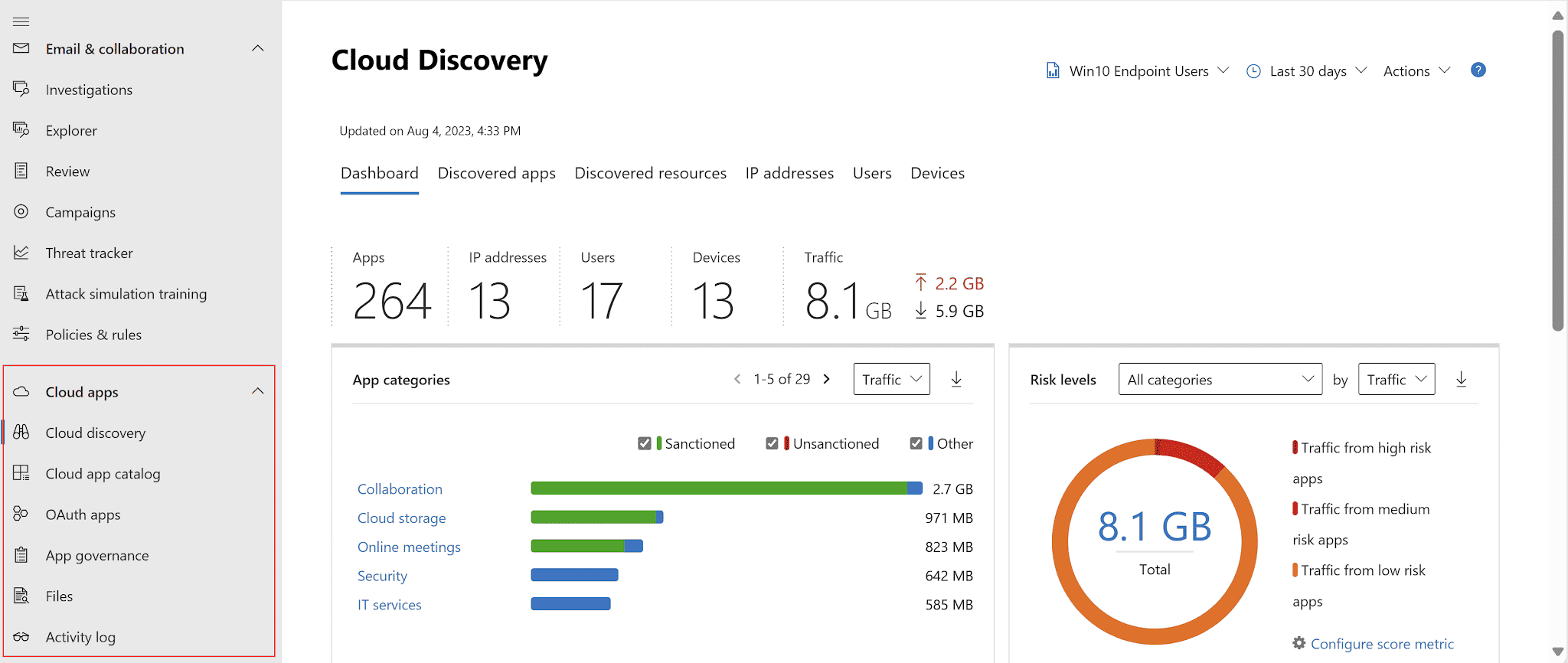
The POC I would run for an Azure-led estate
Use one Azure VM, one AWS EC2 instance, and one GCP compute instance built from images that contain the same vulnerable package. Add an EC2 Auto Scaling group whose instance is replaced between assessment cycles. The POC should answer whether Defender follows the weakness back to the durable image and deployment path, or leaves the team closing findings against instance IDs that no longer exist.
Require five checkpoints:
- Inventory continuity: Reconcile every expected machine, then record how quickly a replacement instance appears and how the deleted instance leaves active reporting.
- Evidence quality: Compare agentless disk-snapshot results with Microsoft Defender for Endpoint evidence on the same host. Keep package version, assessment method, observation time, and fix guidance visible.
- Risk change: Expose one workload publicly and attach sensitive-data or privileged-access context. Confirm the recommendation moves for a documented reason, not because its CVE severity changed.
- Owned remediation: Assign the recommendation through a governance rule, send it to the operating team, and preserve the affected resource, due date, rationale, and exception state.
- Verified closure: Rebuild from a clean image, let the workload return, and wait for fresh evidence. The workflow passes only when the active deployment is clean and the old instance does not keep the issue open.
POC rule: A disappearing instance is not remediation. The durable image, launch template, container digest, or build definition must stop recreating the vulnerable state.
Capabilities that matter to vulnerability teams
- Foundational and advanced CSPM: Foundational CSPM supplies inventory, recommendations, Secure Score, and multicloud policy assessment. Defender CSPM adds agentless vulnerability scanning, attack-path analysis, data context, governance, and the cloud security graph.
- Agentless machine scanning: Defender takes out-of-band disk snapshots for Azure VMs, AWS EC2 instances, and GCP compute instances, then uses Microsoft Defender Vulnerability Management to assess software and vulnerabilities.
- Agent-backed workload evidence: Defender for Servers can add Microsoft Defender for Endpoint telemetry, file integrity monitoring, update assessment, and other server protections. Plan and platform support differ, so test the exact operating systems and cloud connectors in scope.
- Contextual prioritization: Defender risk prioritization can use exposure, data sensitivity, lateral-movement potential, and exploitability. Make the team reconstruct why one recommendation ranked above another.
- Container coverage: Defender CSPM provides agentless Kubernetes discovery and image assessment. Defender for Containers adds runtime protection and cluster hardening, so keep posture and runtime requirements separate in the quote.
- Handoffs and export: Governance rules can assign recommendations, while continuous export sends alerts and recommendations to Log Analytics or Event Hubs for downstream SIEM, SOAR, or ITSM workflows.
Price the enabled plans, not the product name
Microsoft’s public pricing page confirms the billing units, free Foundational CSPM tier, and 30-day trial, but the dollar values can fail to render by region. For a budget model, use published list-price cross-checks:
- Defender CSPM at about $5 per billable resource/month;
- Defender for Servers Plan 2 at $15 per server/month;
- Defender for Containers at $6.87 per worker-node vCore/month;
- and Defender for Storage at about $10 per storage account/month.
Treat these as USD list-price estimates, not a quote.
A modeled 500-server estate with paid Defender CSPM and Servers Plan 2 costs (500 × $5) + (500 × $15) = $10,000/month, or $120,000/year. Add 100 Kubernetes vCores at $6.87 and 50 storage accounts at $10: $687 + $500 = $1,187/month. The combined model is $11,187/month, or $134,244/year.
If the team keeps Foundational CSPM and uses Servers Plan 1 at about $5 per server/month, the same 500-server fleet starts near $2,500/month, or $30,000/year. That is not a like-for-like substitute for the P2 model. Validate the exact server features the POC needs before trading coverage for the lower rate.
These totals exclude malware scanning at roughly $0.15/GB, scans beyond the included container-image allowance, databases, APIs, extra Log Analytics ingestion and retention, Microsoft Sentinel ingestion, Defender Experts, taxes, and support. At 2 TB of storage malware scanning per month, add about $307.20/month or $3,686.40/year.
Microsoft’s 22% top-tier pre-purchase discount would reduce the $134,244 base model to a theoretical $104,710.32/year, but only if the spend qualifies and the commit is fully used.
Where Microsoft Defender for Cloud earns the shortlist
Current reviews support three useful hypotheses for the POC. They describe customer experience, not capability proof.
- Microsoft-native deployment: “It's native to the Microsoft ecosystem, so it is fairly easy to enable.” Reproduce that advantage across subscriptions, management groups, AWS accounts, and GCP projects. Easy enrollment matters only if permissions, coverage, and policy inheritance remain auditable. (TrustRadius review)
- One operating view: A reviewer praised “one stop visibility” for posture and workload protection. Give a cloud-security engineer one exposed production asset and check whether vulnerability, attack path, owner, policy, and alert evidence can be traced without changing consoles. (TrustRadius review)
- Multicloud governance: A large-enterprise reviewer said the product helped “apply visibility and controls across multi-cloud systems in an effective way.” Test that claim with the same control and reporting requirement in Azure, AWS, and GCP, then document every provider-specific gap. (TrustRadius review)
What can weaken the fit
The failure modes below come from individual reviews. Treat them as acceptance tests because the current configuration and scale may produce a different result.
- Prioritization noise: One enterprise reviewer found the volume of findings and alerts overwhelming at scale. Seed related recommendations on the same resource, then measure whether attack paths, risk factors, grouping, and ownership reduce the queue to work a team can finish.
- Exception and refresh friction: A reviewer reported that “the status doesnt reflect immediately” after remediation and wanted simpler exception handling. Time the path from fix to reassessment, test expiry and approval on an exception, and verify that stale evidence cannot close or reopen work silently. (TrustRadius review)
- Training and taxonomy: One reviewer said “getting folks adequately trained” was harder than expected; another found vulnerability categories difficult to understand. Give an application owner a recommendation without portal training and check whether they can identify the affected workload, reason, fix, deadline, and verification step. (TrustRadius reviews)
Decision boundary: Shortlist Microsoft Defender for Cloud when Azure-native policy, Defender telemetry, Microsoft security operations, and multicloud posture need to share one operating model. A cloud-neutral team that prioritizes uniform graph behavior across providers should compare the same AWS and GCP scenarios with Wiz or Orca. A vulnerability program centered on deep scanner operations and patch deployment should compare Tenable or Qualys on equivalent scope.
How to choose the best cloud vulnerability management tool
Choose the tool that removes the bottleneck in your current vulnerability-management process. If scanners already find the vulnerabilities, another scanning layer may add coverage without fixing duplicate records, missing ownership, or weak remediation context. Test each candidate with one production finding and require the asset, evidence, owner, ticket, exception, and verification state to survive the full workflow.
If your scanners already find vulnerabilities but teams cannot act on them
Start with Cloudaware when the problem is not finding another CVE, but turning findings from several scanners into one prioritized, owned remediation queue. Its ready-made scanner connections ingest findings from supported sources such as Tenable, Qualys, CrowdStrike, Orca Security, Rapid7 InsightVM, and cloud-native scanners without requiring your team to build and maintain custom ingestion pipelines.
The connected scanner remains the source of the finding. Cloudaware normalizes the incoming record and relates it to CMDB context: the affected configuration item, application, environment, current owner, business criticality, exposure, related resources, vulnerability age, last scan time, exception, ticket, and remediation history. A vulnerability manager can then see what makes the finding urgent, who should act, which services or assets are related, how long the issue has been open, and whether work is already underway.
Test this with the same CVE reported by two scanners against one production asset. Cloudaware should correlate the records without discarding source IDs, observation times, or scanner evidence, then expose the finding with its current owner and related CMDB records. Change the owner, resolve the vulnerability, and rescan. The workflow passes only if the existing task is updated and the closure remains traceable to fresh scanner evidence.
If the gap is runtime exploitation evidence rather than scanning, run one more test: a short attack chain on a test host, then check that the NeoSec investigation lands on the same CI as the scanner finding.
Best for consolidating findings from existing scanners and enriching them with CMDB context: Cloudaware.
If you want coverage fast without agents
Connect one AWS account, one Azure subscription, and one GCP project. After one business day, reconcile the discovered workloads against provider inventory. Include a short-lived VM and a container image. Missing assets fail the POC; test runtime sensors separately because agentless discovery does not prove runtime telemetry depth.
Best for fast agentless deployment: Orca Security. Best for agentless multi-cloud coverage with graph context: Wiz.
If you need code-to-runtime coverage
Trace a vulnerable dependency or IaC template from the repository through the build, registry, deployed workload, and runtime response. The digest or resource ID must survive every handoff. If that identity breaks, the platform cannot reliably connect a runtime finding to the code or artifact that must be fixed.
Best for build-to-runtime vulnerability management inside a CNAPP: Cortex Cloud.
If vulnerability accuracy leads the decision
Run the same disputed CVE on a backported package through Tenable and Qualys. Compare authentication, package evidence, CPE mapping, false-positive handling, and the result after retesting.
FIRST sets the boundary: “The CVSS Base Score should be supplemented with an analysis of the environment (Environmental Metrics), and with attributes that may change over time (Threat Metrics).” The winning platform must preserve that evidence through prioritization, exception review, and rescan.
Best for vulnerability intelligence and exposure depth: Tenable. Best for enterprise vulnerability-management breadth and integrated patching: Qualys.
If remediation workflow is the bottleneck
Measure the path from triage to verified closure. Inspect the owner, SLA, exception, ticket history, and rescan evidence rather than stopping when a ticket reaches Done. Rapid7 fits when one vulnerability-management model will own the queue and the team values remediation projects and ITSM handoffs.
Best for risk-based vulnerability management and remediation workflow: Rapid7.
If you are Azure-centric
Onboard one Azure subscription plus one AWS account or Google Cloud project. Compare recommendation depth, connector prerequisites, plan dependencies, and downstream remediation for the same workload class. A provider appearing in the supported list does not prove equivalent coverage across clouds.
Best for Azure-led estates extending Microsoft-native workflows across hybrid and multicloud environments: Microsoft Defender for Cloud.