


Service mapping connects a business or application service to the configuration items (CIs), applications, and infrastructure dependencies that keep it running. IT teams use these relationships to assess potential impact during incidents, review changes, and identify who owns affected systems.
Consider an Amazon RDS instance reporting connection errors. Your monitoring platform can identify the instance and its symptoms. An inventory tells you which AWS account owns it. But the incident team still needs to know whether Checkout, Returns, or another production service depends on that database.
A service map provides that context. Its reliability depends on something less visible than the diagram itself: where each relationship came from, whether it still reflects the production environment, and who can verify it.
This guide covers:
- IT service mapping methods
- Worked hybrid-cloud example
- Practical acceptance test for checking map quality
- Compares top 3 tools for service mapping
What is service mapping?
IT service mapping identifies the components supporting a named service and documents how they depend on one another. The resulting service map links applications to their underlying infrastructure, external providers, and responsible teams.
Unlike a general inventory, the map is organized around a service boundary. That might be a customer-facing checkout function, an internal payroll application, or an authentication service used by several business systems.
The relationships are directional. A payment service may depend on a database, but that database does not necessarily depend on the payment service. During an incident, this distinction helps teams identify potentially affected services without treating every connected component as equally important.
A service map supports impact analysis. It cannot independently establish root cause. Technical investigation still needs evidence from telemetry, application logs, traces, and change records.
What a service map should contain
An application service is a group of components that work together to deliver a specific function. For example, an order-processing service might include an API, an application workload, a database, and an external payment integration.
The application record establishes which resources belong to the service. Mapping adds the relationships between those resources and the evidence needed to trust them.
| Field | What it tells the operator |
|---|---|
| Service and environment | Which service instance is in scope, such as Checkout Production |
| Entry point | Where customer traffic or an upstream application enters the service |
| Configuration items | Which applications, infrastructure resources, and supporting systems deliver the service |
| Relationship type | Whether a component hosts, calls, reads from, writes to, or depends on another |
| Direction | Which component is upstream and which is downstream |
| Evidence source | Whether the relationship comes from cloud APIs, configuration, traffic, traces, tags, or owner confirmation |
| Observation or validation time | When the relationship was last seen or checked |
| Ownership and criticality | Who is accountable for the service and how important it is to the business |
These fields do not necessarily exist in one product screen. Organizations may maintain relationship evidence in a CMDB, observability platform, service catalog, or change record.
What matters is whether the operator can inspect an important connection and understand how it was established.
A worked service mapping example
Take an e-commerce checkout application distributed across Azure, AWS, Kubernetes, and an on-premises data center.
Customers interact with an Azure-hosted frontend. Requests reach an order service running on AWS EC2 or Kubernetes. That service validates the order, communicates with payment providers such as Stripe and PayPal, and writes transaction data to Amazon RDS.
Inventory updates pass through an integration that connects the cloud application to an on-premises SAP system. Google Cloud Storage may also be involved in exchanging inventory data. Load balancers handle traffic to the appropriate application backends.
The component list is a starting point. A useful service mapping example goes further by documenting which systems interact and how the team can verify each connection.
| Relationship | Direction | Evidence source | Validation check |
|---|---|---|---|
| Checkout frontend calls order API | Azure frontend → AWS/Kubernetes | API gateway configuration, distributed trace | Does a sampled production request reach the recorded endpoint? |
| Order service writes transaction data | Application → Amazon RDS | Application configuration, cloud inventory, trace | Is this the correct production database and account? |
| Order service calls payment provider | Internal service → external API | Integration configuration, trace, egress logs | Does the map include the configured fallback provider? |
| Order service publishes inventory updates | Producer → queue or topic | Broker configuration, deployment manifest | Are the consumer and retry path accounted for? |
| Inventory integration updates SAP | Cloud workload → on-premises system | Integration configuration, network-flow records | Is the destination current, and which team owns it? |
Suppose checkout transactions start failing after a network configuration change. The map shows that the frontend reaches an order API in another cloud environment and that the API depends on external payment services.
The team can inspect the relevant paths instead of investigating every component in the application. If network telemetry shows the request reaching the order service but failing on the payment API call, that evidence narrows the investigation further.
This is the distinction between a useful map and an attractive infrastructure diagram. The former lets an operator examine an actual dependency and decide what to investigate next.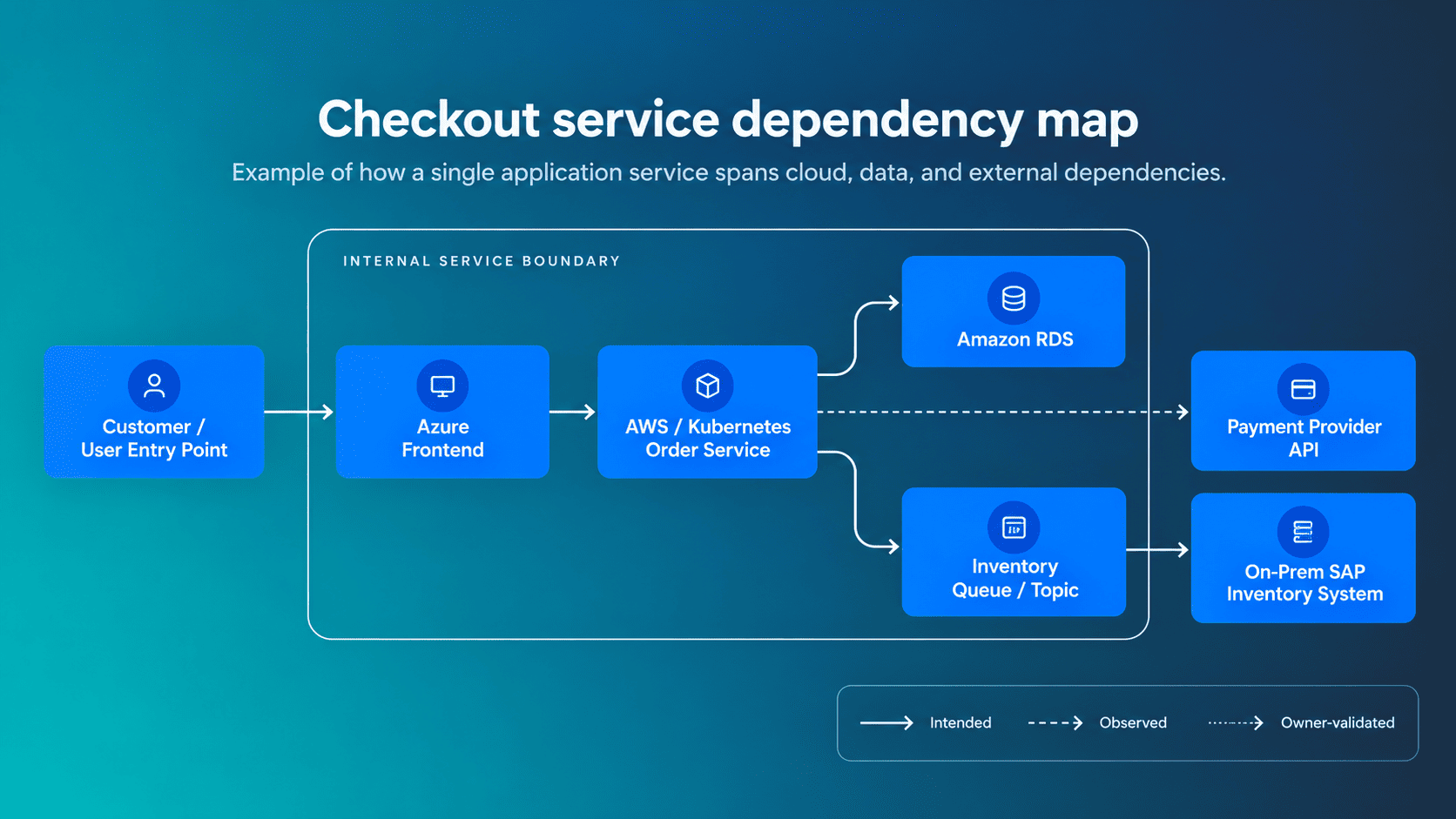 A checkout service map should distinguish documented architecture from observed and validated dependencies.
How IT service mapping works
Service maps draw on several types of discovery data. Infrastructure APIs reveal configuration relationships. Traffic data and distributed traces expose observed communication. Service catalogs, tags, and owner reviews supply application boundaries and responsibility.
The complication is that these sources answer different questions.
An AWS API can establish that a load balancer has a particular target group. It cannot necessarily prove that a customer request currently uses that target. A network flow can show communication between hosts without establishing whether it is essential to the business service.
For this reason, teams need to evaluate the origin of each relationship before using it for incident or change decisions.
Evidence sources and their blind spots
| Evidence source | What it establishes | What it may miss |
|---|---|---|
| Cloud and infrastructure APIs | Resource identity, configuration, hosting relationships, and provider-reported connections | Whether a configured path is currently used by application traffic |
| Tags and service catalogs | Intended application grouping, ownership, environment, and business context | Untagged resources, inconsistent classification, and actual runtime communication |
| Pattern-based discovery | Components and connections recognized from known application patterns | Custom protocols or undocumented components |
| Traffic and network-flow data | Communication observed between systems | Whether a connection is essential or merely background traffic |
| Distributed traces | Request-level interactions between instrumented services | Uninstrumented systems, missing spans, and sampled-out requests |
| Owner review and change records | Intended service boundary, responsibility, criticality, and architectural decisions | Undocumented changes that occurred after the last review |
ServiceNow's mapping-method documentation distinguishes pattern-based, tag-based, traffic-based, and predictive discovery. It notes that traffic-based mapping can introduce redundant CIs and that incomplete tags may exclude relevant components.
The OpenTelemetry service graph connector builds relationships from paired spans. Missing spans or incomplete instrumentation can leave gaps in the graph.
Neither method is inherently unreliable. Problems arise when teams mistake one discovery method's output for a complete account of the service.
An implementation typically moves through six stages:
- Select the service. Identify the application or business function that needs a reliable map
- Establish its boundary. Confirm production entry points, supporting systems, criticality, and responsible teams
- Collect the underlying CIs. Use available discovery methods to identify candidate components and relationships
- Reconcile records. Resolve duplicate identities and distinguish intended associations from observed communication
- Review exceptions. Ask service owners to check missing, uncertain, or contradictory relationships
- Test the result. Use a recent production change or incident to see whether the map supports an actual decision
Discovery quality matters from the beginning. Our guide to CMDB discovery explains the infrastructure collection methods that supply many of these records.
For a closer look at how technical relationships are identified and maintained, see application dependency mapping.
How to build a service map you can trust
The first implementation should cover one critical production service. Choose something with a known entry point, an accountable owner, and enough infrastructure complexity to expose the problems your organization needs to solve.
An enterprise-wide map can follow once the smaller model has survived a real change review.
1. Define the service boundary
Document the service name, production environment, entry points, customer touchpoints, technical owner, business owner, and criticality.
Be explicit about shared services. Checkout might depend on a centralized authentication service, but that does not mean every CI supporting authentication belongs exclusively to Checkout.
2. Collect candidate components
Bring together the discovered CIs associated with the service.
Preserve AWS account IDs, Azure subscription IDs, cloud resource identifiers, regions, Kubernetes clusters, and namespaces where applicable. The name checkout-db is not enough to distinguish a development database from its production counterpart.
Use stable identifiers to avoid merging unrelated resources or counting the same component twice.
3. Check the important dependencies
Choose the relationships that operators would rely on during an incident or production change.
Record the relationship type, direction, evidence source, and observation time. Where available, keep source-confirmed connections separate from associations based on tags or service catalog assignments.
Do not assume that a matching application tag proves an active network or application dependency.
4. Investigate conflicting information
A database tagged Application=Checkout may also receive traffic from Orders and Returns.
That could be a legitimate shared database. It could indicate that ownership tags are outdated. The map alone may not establish which interpretation is correct.
Document the disagreement and identify the person who can resolve it. Replacing conflicting relationships with a generic connection makes the uncertainty harder to detect later.
5. Test a known operational event
Pick a recent change involving an important CI.
Starting from that component, use the map to find the potentially affected service, downstream dependencies, and responsible owner.
Compare the result with the change record or incident investigation. Pay attention to missing paths, incorrect owners, and relationships that appear current but have not been validated.
6. Establish a freshness policy
Different sources have different refresh requirements.
Cloud inventory may be ingested on a regular schedule. Traces represent requests observed within a particular period. Application ownership might change infrequently, but a team reorganization can invalidate dozens of records at once.
Set an expected refresh or review window for each relationship category. Trigger additional validation when an architectural change affects the service boundary.
One-service map acceptance test
Use this scorecard after the first service map is assembled. It checks whether the map contains enough reliable information to support incident triage or change review.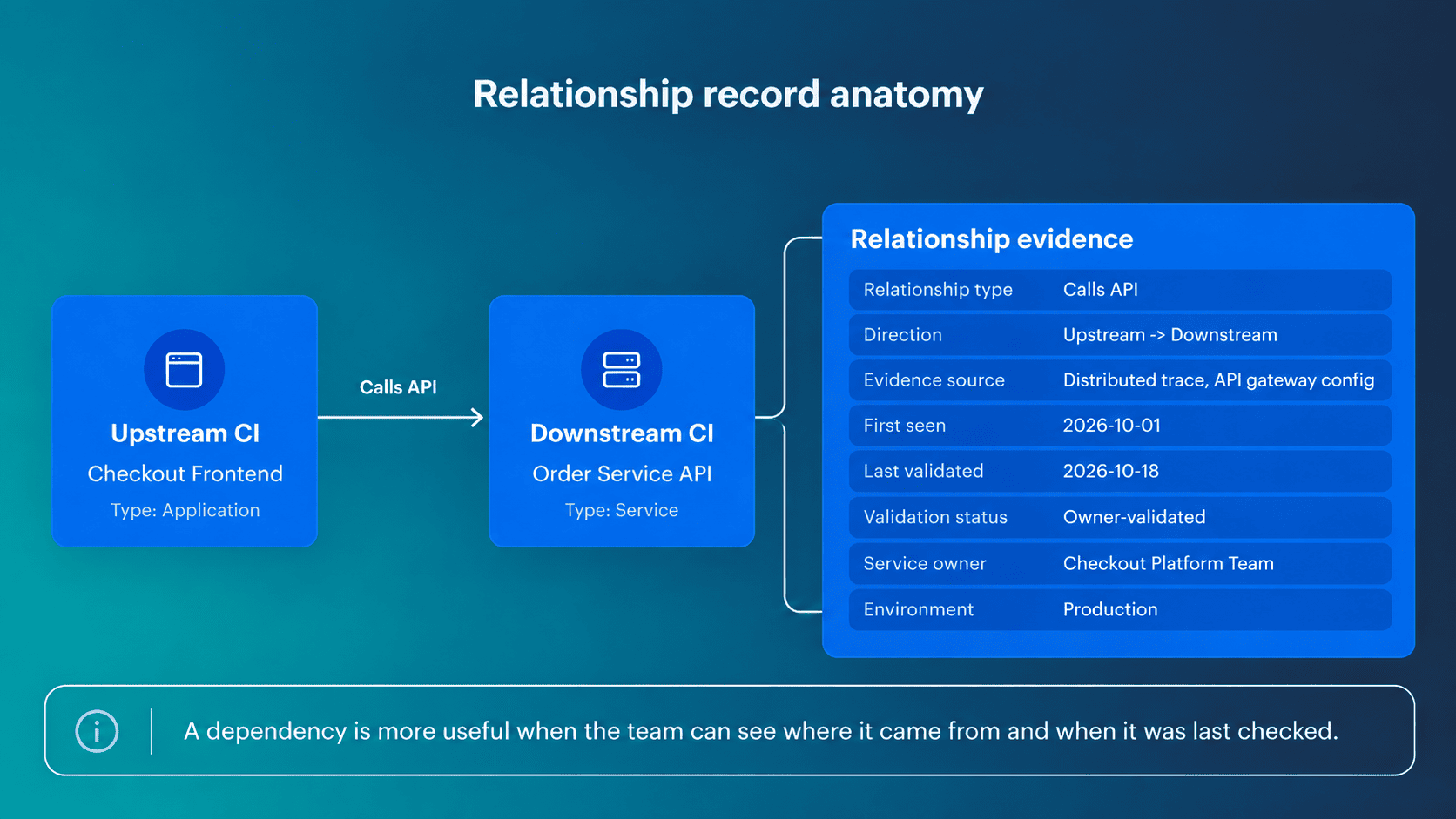 The suggested targets are initial operating goals, not industry benchmarks. Teams should adjust them to reflect service criticality and the evidence their tools can collect.
| Check | Measurement | Suggested starting target |
|---|---|---|
| Entry-point coverage | Documented production entry points / known production entry points | 100% |
| Critical-CI owner coverage | Critical in-scope CIs with an assigned owner / all critical in-scope CIs | 100% |
| Relationship evidence coverage | Important relationships with an identified evidence source / all important relationships in the reviewed scope | At least 95% |
| Freshness compliance | Relationships observed or validated within their expected window/relationships in scope | At least 95% |
| Orphan rate | In-scope CIs without a valid path to the service / all in-scope CIs | Below 5%, with exceptions reviewed |
| Decision drill | Time to identify a potentially affected service, owner, and supporting evidence from a known changed CI | Set a team-specific target and measure it consistently |
The relationship coverage metric needs a defined denominator. Count expected critical dependencies identified during owner review, including those not yet discovered automatically. Otherwise, a map with missing relationships could appear to have perfect evidence coverage.
For the decision drill, use the same procedure across several changes or incidents. Record the time required and the point where the map stops being useful.
A passing result does not mean the service map will remain complete. It means the current boundary, evidence gaps, and outstanding exceptions are understood.
Benefits of service mapping in actual operations
The benefits of service mapping are easiest to assess through the decisions teams make with it. Incident responders need to identify affected services. Change owners need dependency context before approving modifications. Security teams need to connect technical findings to business impact.
Those decisions also provide a way to measure whether the mapping effort has been useful.
Incident triage
A database alert arrives, but the instance name tells the responder little about the applications depending on it.
A maintained service map can show that Checkout and Returns share the resource. Their owners can be brought into the investigation while the operations team checks which connections are failing.
This can reduce the effort required to establish incident scope. It does not guarantee faster root-cause identification, particularly when the mapping data is incomplete.
The map becomes more useful when correlated with cloud monitoring tools that provide metrics, traces, and logs. For this use case, measure how long it takes to identify the potentially affected service and accountable owner. Track the time to a validated technical hypothesis separately.
Change impact analysis
A planned load balancer modification looks routine until the service map shows that the component fronts two critical applications.
The change owner now has reason to check both application teams' maintenance requirements and confirm whether the failover configuration has been tested. That is more actionable than assigning a generic risk label to the change. Dependency context helps teams review plausible impact paths, although it cannot predict every production failure.
Useful measures include the percentage of scoped changes reviewed with service dependency information and the change failure rate for those services.
Security and compliance prioritization
A vulnerability scanner reports identical CVE severity on two virtual machines. One belongs to a development workload. The other supports a customer-facing production service.
The finding's technical severity has not changed, but service ownership, exposure, and business criticality may influence remediation priority.
A service map adds the affected application's context to the CI. Security teams can use it to identify who should investigate the finding and which business service might be exposed.
Track the proportion of critical findings linked to an identified application or business service, then compare remediation times by service tier.
Continuity planning and cost allocation
Shared dependencies create different problems for operations and finance.
A business continuity review may reveal that two critical applications rely on the same authentication service or network connection. That information helps teams assess recovery plans and resilience requirements.
For FinOps, application associations can help determine which infrastructure costs belong to a service. Shared resources still need explicit allocation rules supported by billing and usage data.
Neither decision can be made from the map alone. An apparently unused instance, for example, may support an infrequent batch process that discovery has missed.
The relevant measures are validated dependency coverage for critical services and the proportion of cloud spend allocated through reviewed ownership rules.
Business service mapping vs. application dependency mapping
A configuration management database (CMDB) stores CIs, their attributes, and relationships across an IT environment. Service mapping organizes the relevant subset around a named service.
The distinction matters because the existence of relationship records does not guarantee that an operator can identify the business function affected by a technical change.
Application dependency mapping starts with an application or technical entry point and follows its infrastructure and communication relationships.
Business service mapping starts with the function delivered to users, such as checkout, payroll, or identity verification. It then connects that function to supporting application services, owners, infrastructure, and external providers.
| View | Starting point | Typical information | Primary use |
|---|---|---|---|
| CMDB relationship view | Configuration item | Assets, attributes, configurations, and relationships | Configuration context and data governance |
| Application dependency map | Application or technical entry point | Runtime services, databases, hosts, APIs, and network connections | Troubleshooting and migration planning |
| Application service map | Named technical service | Service boundary, supporting CIs, environment, and ownership | Incident and change operations |
| Business service map | Business function or customer outcome | Supporting application services, owners, criticality, vendors, and service objectives | Business impact assessment and prioritization |
Inter-service application mapping focuses on interactions between services. In the checkout example, that includes the order API calling a payment service and publishing inventory events.
An application service map places these interactions inside a defined technical service boundary. A business service map connects the technical service to the checkout function and its operational significance.
A shared database may appear in several service maps without belonging exclusively to one application. Maintaining that distinction is important for ownership, incident communication, and cost allocation.
Service mapping tools: Cloudaware vs. ServiceNow vs. Device42
Service mapping software differs in how it discovers dependencies and maintains application context. Some tools identify relationships through network traffic and application patterns. Others use cloud inventory, CMDB relationships, and application assignments to establish which infrastructure supports each service.
The right choice depends on what your team is missing: reliable infrastructure records, discovered application connections, or business ownership across environments.
| Tool | Service mapping approach | Best fit |
|---|---|---|
| Cloudaware | Multi-cloud CI discovery, CMDB relationships, Virtual Applications, and ownership context | IT teams connecting AWS, Azure, GCP, and hybrid infrastructure to applications and business services |
| ServiceNow | Pattern-based, tag-based, traffic-based, and Predictive Intelligence discovery | Organizations managing application service maps within ServiceNow ITOM |
| Device42 | Application dependency discovery, dynamically calculated Application Groups, and manually defined Business Services | Teams mapping service dependencies across physical, virtual, cloud, and legacy infrastructure |
Cloudaware
Cloudaware CMDB helps IT teams organize infrastructure and application relationships across multi-cloud and hybrid environments. Its Virtual Applications feature connects CIs from different providers to named applications and tiers, providing a service-oriented view of the underlying infrastructure.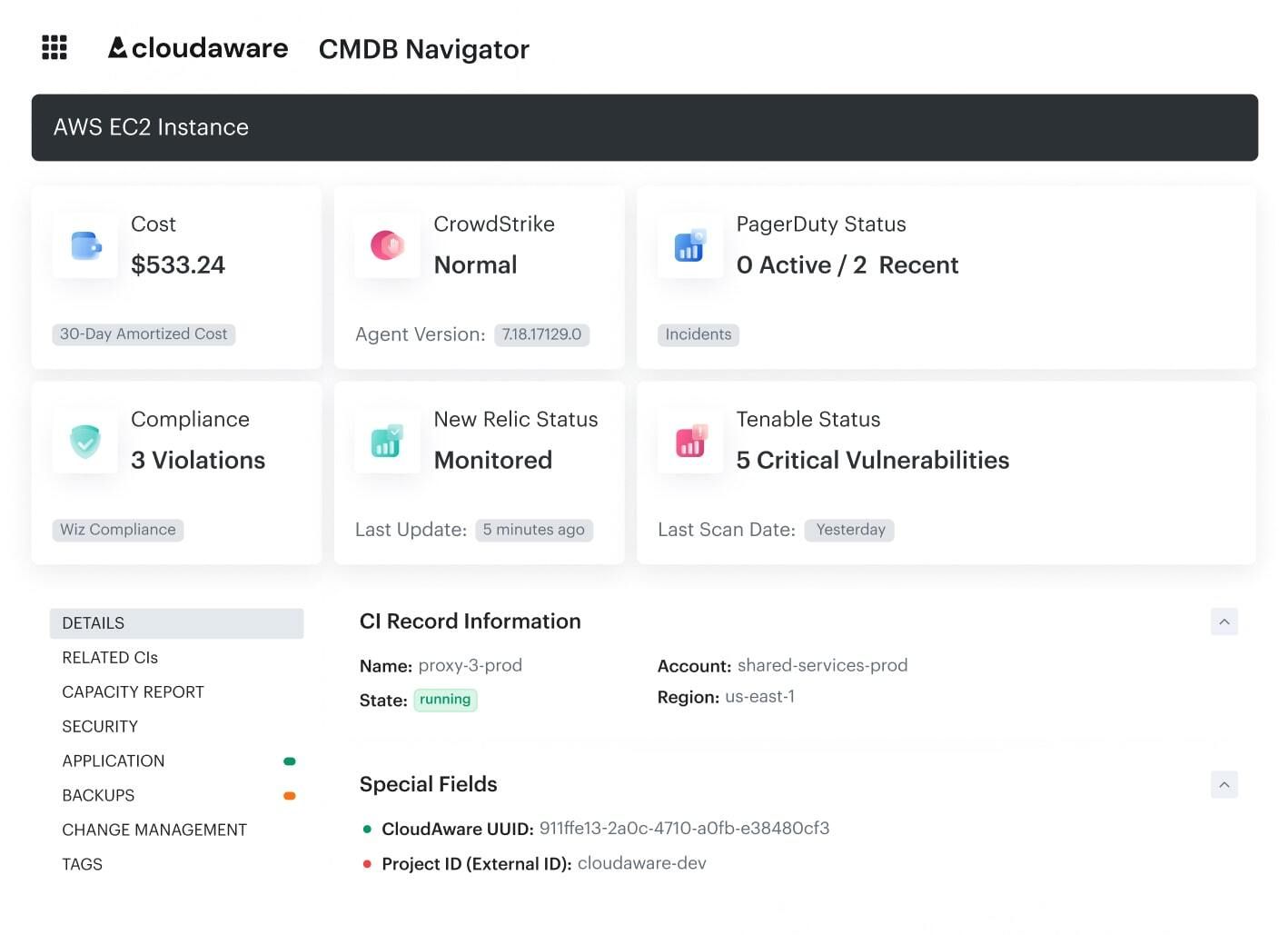 Cloudaware CMDB connects infrastructure records with application and operational context.
Key capabilities for service mapping:
- Multi-cloud discovery: Collect and normalize CIs across AWS, Azure, GCP, VMware, Kubernetes, and supported on-premises sources
- Application grouping: Organize resources into application tiers using manual assignments or automated attachment rules based on tags and other metadata
- CI relationships: Inspect supported infrastructure relationships alongside configuration, ownership, cost, and security context
For example, an e-commerce service might have its frontend on Azure, order-processing workloads on AWS, and inventory infrastructure on-premises. Cloudaware can associate these resources with the same application record, making it easier to review service ownership and configuration changes without switching between provider inventories.
Where it fits: Cloudaware is particularly relevant when the main problem is fragmented infrastructure and application data. Runtime communication and root-cause analysis may still require telemetry from an observability platform.
ServiceNow
ServiceNow Service Mapping discovers application components and dependencies within the ServiceNow CMDB and ITOM ecosystem. It supports several mapping methods, each suited to different infrastructure and data conditions.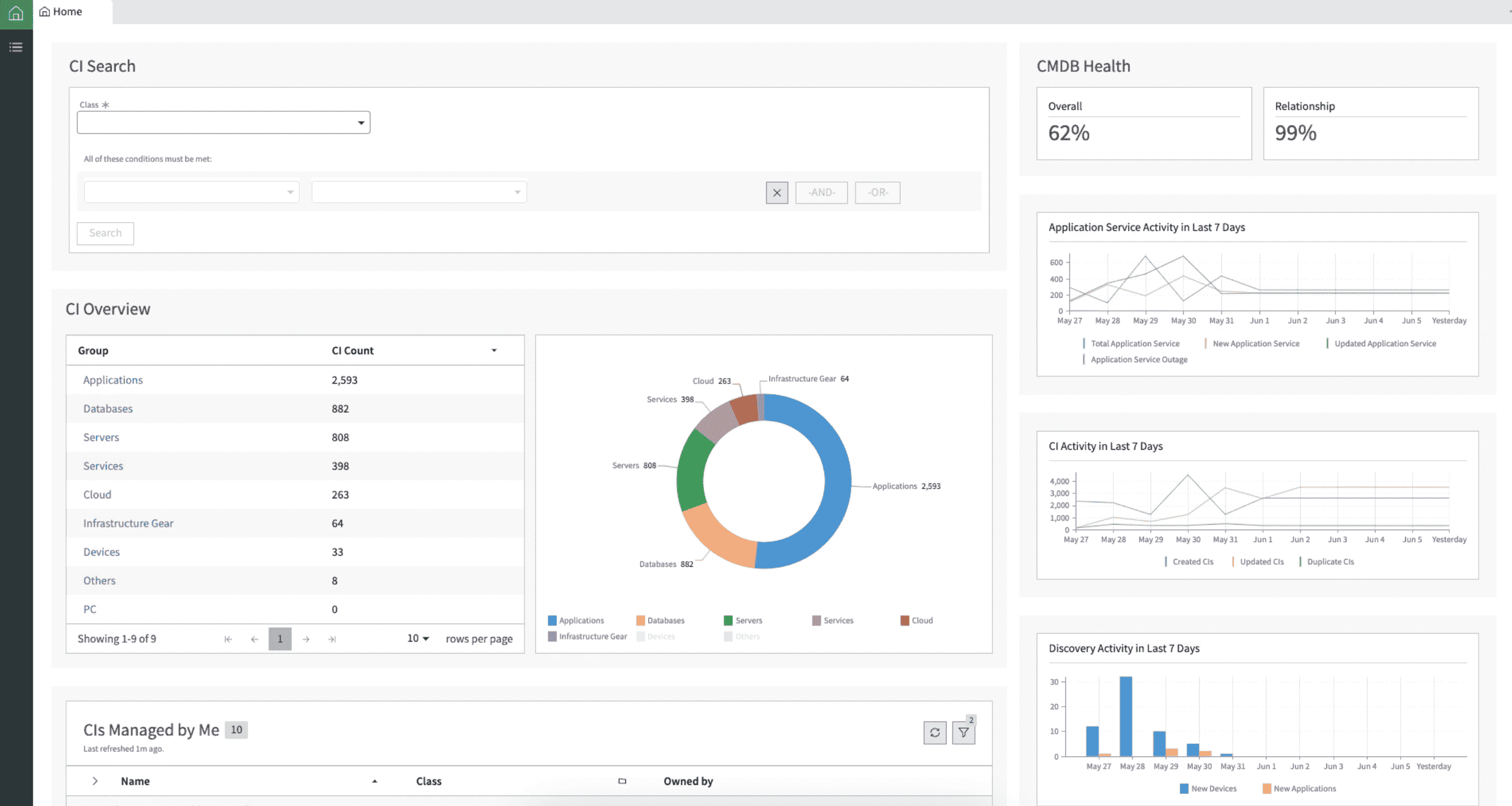 Tag-based service mapping in ServiceNow. Image source.
Available discovery methods:
- Pattern-based: Identifies CIs and outbound connections using supported application patterns
- Tag-based: Groups CIs into application services using metadata collected in the CMDB
- Traffic-based: Follows observed network connections to identify dependencies that patterns may miss
- Predictive Intelligence: Suggests CI connections using learned application and process relationships
Where it fits: Organizations already using ServiceNow ITOM to maintain application service records and manage operational workflows.
The main consideration is implementation effort and discovery accuracy. Pattern-based methods need appropriate credentials, while traffic-based discovery can include connections that do not materially support the service. Tag-based discovery also depends on consistent metadata. See ServiceNow's official mapping-method comparison.
Device42
Device42 discovers infrastructure and application dependencies across physical servers, virtual machines, cloud resources, and data-center systems.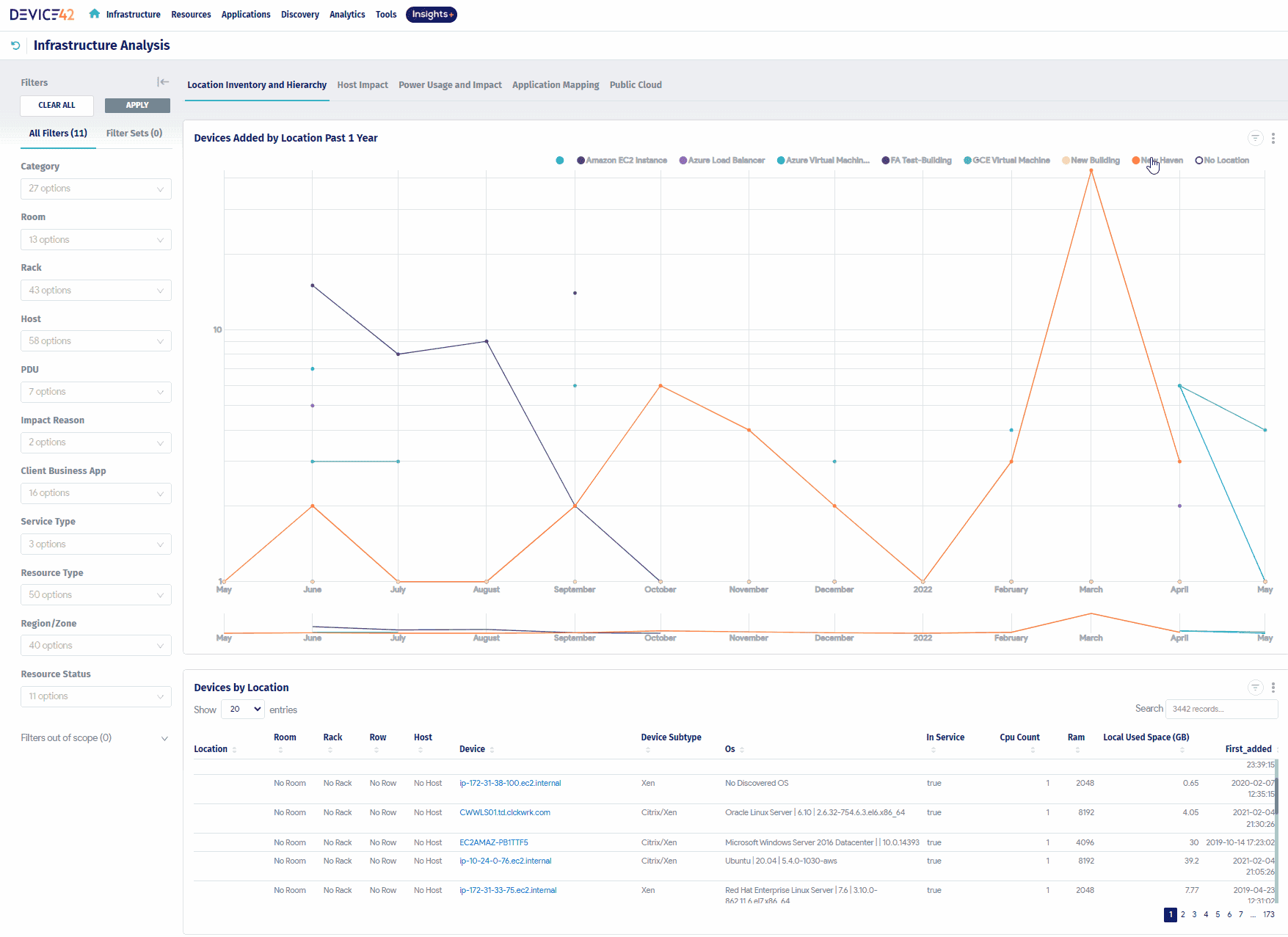 Service map in Device42. Image source.
Its application mapping process includes three relevant capabilities:
- Dependency discovery: Collects application and service communication data from the infrastructure
- Application Groups: Builds dynamic groups around observed communication patterns and configurable calculation rules
- Business Services: Allows teams to assemble and maintain service maps using discovered components, Application Groups, and other resources
Where it fits: Organizations with hybrid infrastructure where important application dependencies extend into data centers or legacy systems.
One distinction matters during evaluation: Application Groups are recalculated from discovered dependencies, while Business Services are manually maintained. Teams should determine how those service definitions will remain accurate as applications change.
See the Device42 Business Services documentation.
What to test before choosing a service mapping tool
Use the same production application for each evaluation. Include at least one cross-cloud connection, a shared component, and a dependency that is difficult to identify from configuration records.
Check whether the tool can:
- Establish the service boundary: Identify the correct applications, CIs, and dependencies without including unrelated resources
- Explain relationship evidence: Distinguish discovered connections from metadata-based associations
- Connect dependencies to owners: Identify the application or team responsible for affected infrastructure
- Maintain the map: Detect or expose changes that require relationship validation
Use the service map acceptance test earlier in this guide to evaluate coverage and data freshness.
The strongest result is a map that operators can verify and use during a real incident or change review, rather than simply the one containing the most connections.