


ServiceNow cloud discovery models roughly 30 to 40 AWS resource types, 15 to 20 Azure resource types and 10 to 20 Google Cloud resource types out of the box, by ServiceNow's own class references. Cloudaware's discovery model for the same three providers runs to about 110 AWS services and about a thousand object types, 366 Azure object types and about 130 Google Cloud object types, counted from its published catalog with the caveats given below. The difference lands in every process that resolves a resource through the CMDB, and that is what this article measures.
The configuration management database is decades-old technology, and it is still the record almost every facet of cloud management runs through. Tag management reads it to find the owner of an untagged resource. Vulnerability management matches a scanner finding to a CI to get an application, a criticality and a remediation target. Incident management assigns and escalates from the CI. FinOps allocates cost to the application the CI belongs to. Governance and compliance evaluate policy against the CI and route the violation to its owner. Resiliency planning builds the recovery runbook from the CIs related to the application. Observability maps an alert to a service through the same relationships. Each of those processes takes a resource identifier and looks up the same three things in the CMDB: which application, which owner, how critical.
When the resource belongs to a type the CMDB never discovered, all three lookups return nothing, in each of those processes. A discovery gap in the CMDB is therefore a gap in tag management, in vulnerability management, in incident response, in cost allocation, in compliance and in recovery planning, and each of those looks healthy on its own dashboard because the dashboard has no record to fail.
What follows measures the gap against ServiceNow's published class lists for AWS, Azure and Google Cloud and against one production AWS application at a Fortune 100 insurer, then follows it into three of those processes: incident, vulnerability and recovery. The native connectors cover compute, storage and databases on all three providers. What they do not discover is the wiring: identity, keys, secrets, messaging and network fabric. The last section covers how to feed those objects into ServiceNow without replacing anything.
TL;DR
ServiceNow's native connectors model compute, storage and databases on AWS, Azure and Google Cloud and do not model identity, keys, secrets, messaging or network fabric on any of the three. The consequences and the fix both follow from that list.
- ServiceNow's native discovery covers roughly 30 to 40 AWS, 15 to 20 Azure and 10 to 20 Google Cloud resource types. The counts come from ServiceNow's Service Graph Connector class references and Cloud Discovery documentation; on each provider, roughly half the listed classes are Kubernetes sub-objects and generic server, software and IP records. Cloudaware models about 110 AWS services and about a thousand object types, 366 Azure object types and about 130 Google Cloud object types.
- The undiscovered types describe relationships and permissions. On AWS they are IAM, KMS, Secrets Manager, SNS, SQS, EventBridge, Kinesis, Transit Gateway and PrivateLink; on Azure, Key Vault, RBAC role assignments, Service Bus, Event Grid, Event Hubs, Private Link and ExpressRoute; on Google Cloud, IAM service accounts and role bindings, Cloud KMS, Pub/Sub and VPC Network Peering. None of them is compute.
- Three processes resolve through the CMDB and stop at the same place when a resource has no CI class. In an incident the alert has no owner and no blast radius; in vulnerability management the finding lands on a generic record; in a recovery the runbook lists the parts and not the credentials.
- One production application: 158 configuration items in Cloudaware, 77 in ServiceNow. The 83 objects ServiceNow holds none of are 75 IAM roles and policies, 2 KMS keys, 2 secrets, 1 SNS topic and 3 security-group rules. Where both systems model a type, they match resource for resource.
- Keep ServiceNow as the system of record and feed it the inventory it does not discover. ServiceNow keeps running the IT process. The Cloudaware CMDB Application for ServiceNow adds the missing classes and fills them from live discovery, attached to each application's own sys_id. The dependency map stays in Cloudaware by design; see application dependency mapping.
What ServiceNow cloud discovery covers in AWS, Azure and GCP
ServiceNow discovers each of the three providers in two ways: pattern-based Cloud Discovery inside the Discovery application, which runs through a MID Server, and a Service Graph Connector per provider (for AWS, for Azure and for GCP), the path ServiceNow's community answers steer administrators toward. The counts in this section come from ServiceNow's published documents as read in August 2026, with the unit stated beside each number. If your instance still runs pattern-based discovery, the self-test near the end counts what the instance actually holds, whichever path populated it. The same measurement applies to any provider ServiceNow discovers, Oracle Cloud Infrastructure included; this article covers the three with published class lists.
Credit where it is due: the core is covered well
The Service Graph Connector for AWS discovers the building blocks most applications are assembled from, and it discovers them properly: EC2 instances, EBS volumes, Auto Scaling groups, S3 buckets, RDS instances and Aurora clusters, DynamoDB tables, Lambda functions, load balancers, security groups, EKS clusters with their containers and images, plus VPCs, subnets, route tables, network ACLs and Elastic IPs. Auto Scaling groups arrived in a recent release; the Zurich class reference lists them where the Xanadu one did not.
That is not a small footprint. If the only question were "does ServiceNow do AWS", the answer would be yes, and the Kubernetes coverage goes deeper than most teams expect: pods, deployments, DaemonSets, ReplicaSets, namespaces, nodes, services and volumes each get a class. Anyone who evaluated the connector three or four years ago and concluded it covered "instances, databases and load balancers" should evaluate it again.
The Azure and Google Cloud connectors cover a smaller core in the same way. The Service Graph Connector for Azure writes subscriptions, regions, resource groups, virtual machines, managed disks, images, virtual networks and subnets, network security groups, public IPs, network interfaces, load balancers, storage accounts, VM scale sets, AKS clusters, Function Apps and a cloud database class. ServiceNow Google Cloud discovery through the Service Graph Connector for GCP writes organizations, folders and projects, regions and zones, Compute Engine instances, persistent disks and snapshots, VPC networks, subnets and firewall rules, load balancers with their pools and health checks, Cloud Storage buckets, cloud database and cloud function classes, and GKE clusters with nodes, node pools, pods, deployments, ReplicaSets, services, namespaces and volumes. Pattern-based Cloud Discovery for Azure lists fifteen resource types and stops at the VM, disk, network and storage-account layer.
How the counts compare
The same coverage counts three different ways in ServiceNow's own documents, so state the unit before the number.
| Source | What it counts | Count |
|---|---|---|
| Service Graph Connector for AWS Functional Spec (ServiceNow Community, 2022, edited 2023) | CI types the connector discovers | 28 hardware, 3 software |
| CMDB classes targeted in Service Graph Connector for AWS (Zurich docs, March 2026) | CMDB classes the connector writes to | 47, of which 8 are Kubernetes sub-objects and about 16 are generic records: server, software, IP address, network adapter, storage mapping, key value |
| Service Graph Connector AWS resource coverage (HashiCorp, for the Terraform connector) | AWS resource types mapped from Terraform state | 15 |
| Cloudaware-ServiceNow gap analysis, AWS (Cloudaware docs, July 2026) | AWS service families and object types Cloudaware models | about 110 families, 1,000+ object types |
Read as AWS resource types rather than CMDB records, the connector's native coverage lands between the low twenties and about forty depending on what you include. This article uses 30 to 40, the generous end. The Cloudaware figure needs its own caveat. The published object types list runs to 977 entries and includes child and link objects (a security-group rule, a subnet association, a bucket policy statement), which is why "about a thousand" is the honest headline and "about 110 service families" is the fairer like-for-like number against a per-class view.
The Azure and Google Cloud references count the same way, and the same unit caveat applies.
| Provider | Source | What it counts | Count |
|---|---|---|---|
| Azure | Service Graph Connector for Azure overview (ServiceNow Community, 2022, edited 2023) | CI classes the connector discovers | 21, including 3 software classes |
| Azure | CMDB classes targeted in Service Graph Connector for Azure (Zurich docs) | CMDB classes the connector writes to | 34, of which about 15 are generic records: server, computer, software, IP address, serial number, key value |
| Azure | Cloud Discovery for Azure (Zurich ITOM docs) | Resource types pattern-based discovery creates | 15 |
| Azure | Service Graph Connector Azure resource coverage (HashiCorp, for the Terraform connector) | Azure resource types mapped from Terraform state | 16 |
| Azure | Cloudaware-ServiceNow gap analysis, Azure (Cloudaware docs, July 2026) | Azure object types Cloudaware models, deprecated types excluded | 366 |
| Google Cloud | GCP Service Graph Connector (ServiceNow Community, October 2025) | CI classes the connector discovers | 13 |
| Google Cloud | CMDB classes targeted in Service Graph Connector for GCP (Zurich docs) | CMDB classes the connector writes to | 48, of which 10 are Kubernetes sub-objects and about 19 are generic records or load-balancer sub-records |
| Google Cloud | Service Graph Connector Google Cloud resource coverage (HashiCorp, for the Terraform connector) | Google Cloud resource types mapped from Terraform state | 9 |
| Google Cloud | Cloudaware-ServiceNow gap analysis, Google Cloud (Cloudaware docs) | Google Cloud object types Cloudaware lists | 129 |
Read as provider resource types, ServiceNow's native Azure coverage lands between 15 and about 20 and its Google Cloud coverage between 10 and about 20, in both cases concentrated on compute, disks, networks, subnets, firewall rules or security groups, load balancers, storage and Kubernetes. The Cloudaware Azure count is a count of object types and includes link and child records, the same way the AWS figure does. The Google Cloud page is the oldest of the three and its ServiceNow column predates the GCP connector, so this article takes the ServiceNow side from ServiceNow's own references above and uses the Cloudaware page only for what Cloudaware lists.
What the connector leaves out: the wiring between the parts
Read as counts alone, the gap looks like a long-tail problem: AWS adds services faster than any connector follows, and the types most applications are built from are covered. The list of undiscovered types does not support that reading. They group into five categories, and none of them is compute.
| Category | AWS | Azure | Google Cloud | What these objects carry |
|---|---|---|---|---|
| Network fabric | Transit Gateway, VPC peering, PrivateLink endpoints, VPC flow logs, Direct Connect, VPN | VNet peering, Private Link and private endpoints, NSG flow logs, ExpressRoute, VPN and virtual network gateways, Azure Firewall | VPC Network Peering, Cloud VPN tunnels and gateways, Cloud Router | How one network reaches another, and which path a request takes to the database |
| Asynchronous messaging and events | SNS, SQS, EventBridge, Kinesis, MSK, Step Functions | Service Bus, Event Grid, Event Hubs, Logic Apps | Pub/Sub topics and subscriptions | The application-to-application edges: who publishes, who consumes, what triggers what |
| Shared data services | ElastiCache, Glue, DMS, OpenSearch, EMR, Athena, RDS Proxy | Azure Cache for Redis, Cosmos DB, Synapse, Data Factory, Databricks, HDInsight | BigQuery, Dataflow, Dataproc | The state the compute reads and writes, and the pipelines that move it |
| Identity and access | IAM roles and policies, KMS keys and grants, Secrets Manager secrets, access keys | Key Vault keys, secrets and certificates, RBAC role assignments, service principals | IAM service accounts, keys and role bindings, Cloud KMS key rings and keys | Which workload may call what, with which key, using which credential |
| Service discovery and DNS | Route 53 zones and records, Cloud Map, API Gateway | Azure DNS zones, Front Door, Traffic Manager, API Management | Cloud DNS managed zones and record sets | The names and endpoints clients resolve to reach the application |
Every row describes a relationship or a permission, and the three provider columns describe the same gap in three vocabularies. The CMDB holds the EC2 instance, the Azure VM or the Compute Engine machine and omits the role it runs under, the key it decrypts with, the queue it reads from and the transit gateway or peering it crosses to reach the database. A CMDB in that state holds the parts of the application without what connects them, which is the difference between an inventory and an application model.
ServiceNow's own forums describe the same shape on Azure. When an administrator asked why cloud discovery could not find seven official Azure resource types (managed identities, Log Analytics workspaces and alert rules among them), the answer was that they were "not part of the default resource types supported" and that for the rest "you would need to build your own". The accepted workaround was a resource-type whitelist table plus custom work. That is the mechanism, stated by the people who run the product: an unsupported type is not discovered until someone builds the class.
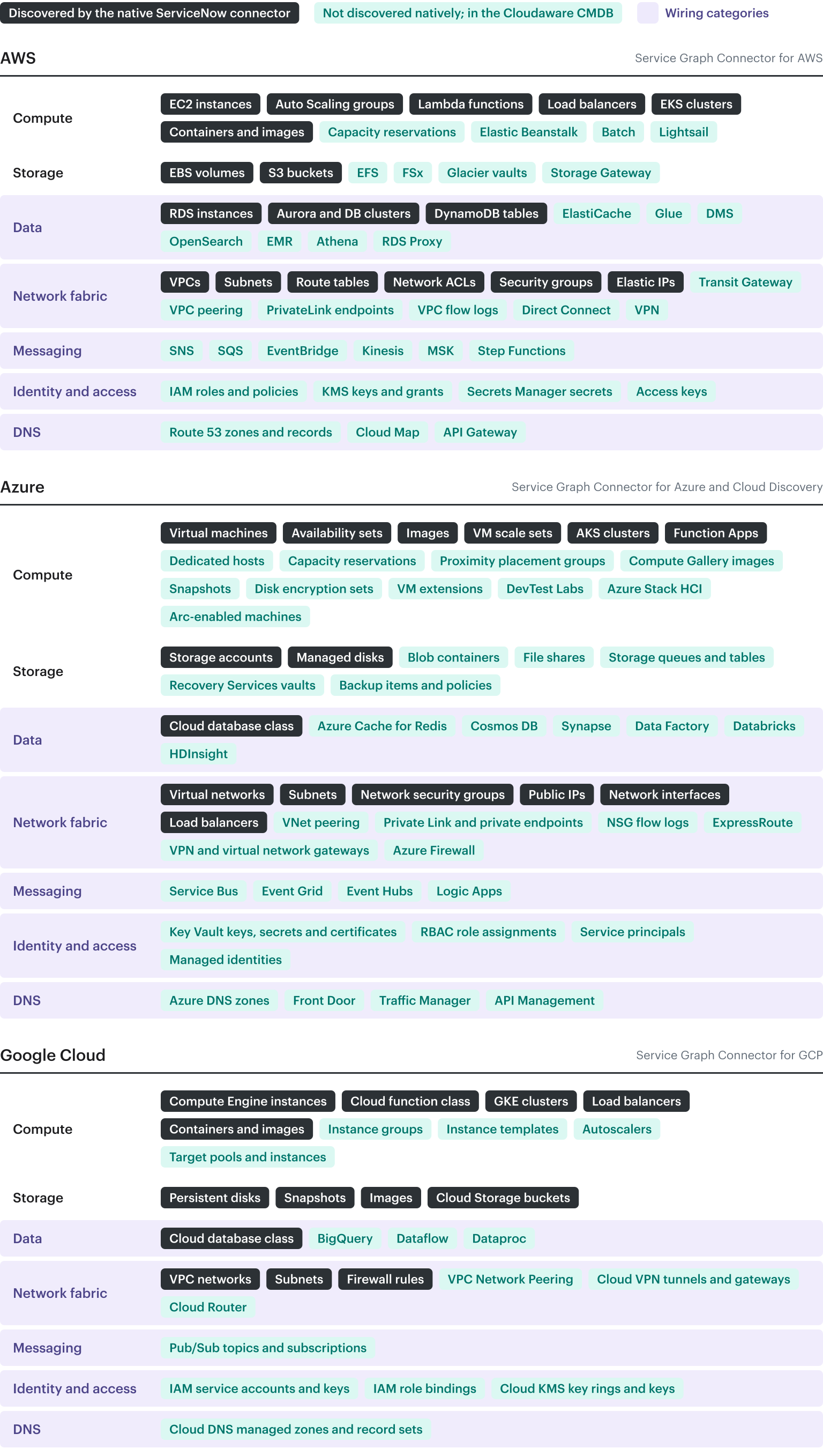
Diagram of cloud resource types on AWS, Azure and Google Cloud by group: the types the native ServiceNow connector discovers, and the types it does not discover that the Cloudaware CMDB holds; the five wiring categories are shaded.
What a wiring gap breaks
The CMDB is not a list kept for its own sake. Incident, vulnerability and recovery processes resolve through it: each one receives a resource identifier and looks up the owner, the application, the criticality and the blast radius. When the resource belongs to a type the CMDB does not model, all four lookups return nothing, and each process ends at the same place. The three walk-throughs below are written to the people who own them.
Incident: the alert names a resource with no CI
An alert on an undiscovered resource type arrives without an application, an owner or a blast radius, so the responder works from the AWS console rather than from the CMDB. The mechanism is ordinary. Incident assignment and escalation in ServiceNow key off the incident's Configuration Item, and the CI carries the relationships to the application service, the support group and the CIs around it.
Take a CloudWatch alarm on the age of the oldest message in an SQS queue (illustrative). The alert carries the queue's ARN. In an instance with no queue class, the Configuration Item field on the incident stays empty: there is no support group to assign from, no application service to escalate to, and no related CIs to check for a recent change. The responder opens the AWS console, reads the queue's tags, guesses at the consumer and pages a team from memory. The same alarm on an EC2 instance resolves through the CMDB, because the instance class exists and the CI carries the application relationship.
On Azure and Google Cloud the same alert, a Service Bus queue's dead-letter count or a Pub/Sub subscription's oldest unacknowledged message, lands the same way, because neither queue type is in ServiceNow's class lists for those providers.
Check this in your own tickets: open the last thirty incidents raised from cloud alarms, count the ones with an empty Configuration Item field, and group those by the resource type named in the alert. The types at the top of that list are the discovery gap for your instance.
Vulnerability: the scanner flags a Kinesis stream
A finding on a resource type the CMDB does not model arrives without an owner, an application, a criticality or an SLA, because in ServiceNow Vulnerability Response all four follow from the CI the vulnerable item is matched to. Follow one finding through.
A cloud scanner (Wiz, in this walk-through) reports a Kinesis stream with server-side encryption disabled and sends the finding to Vulnerability Response. Vulnerability Response matches imported findings to CIs through CI lookup rules; for cloud resources it matches on the scanner-supplied resource ID, and when no CI matches it creates one in the Generic Cloud Resources table (cmdb_ci_cmp_resource), as ServiceNow's product management describes. That record exists to hold the finding. It has no stream attributes, no relationship to an application and no owner, because nothing ever discovered the stream.
Whatever a given scanner integration does with an unmatched item, nothing downstream can act on it: there is no support group to assign to, no application to prioritize by, and no business criticality to set the remediation target from. The finding remains actionable only inside the scanner. An Event Hubs namespace on Azure or a Pub/Sub topic on Google Cloud with the same finding takes the same path; neither has a class in the Azure or GCP connector.
The reporting side is worse than the routing side. A CMDB coverage or compliance view shows zero non-compliant Kinesis streams, because there is no Kinesis class to be non-compliant. The view shows no non-compliant streams because it has no stream records to evaluate, not because the streams are encrypted.
The escalation is that the finding categories that matter most in the cloud point at exactly the types the connector does not model. An IAM policy with a wildcard action, a KMS key without rotation, a secret whose version has not changed in two years: each lands in the same generic table, or stays in the scanner, with no owner attached.
Check this in your own instance: list the vulnerable items whose CI class is Generic Cloud Resource or whose CI is empty, and group them by the scanner's resource type. That list is the set of classes your CMDB needs before a remediation SLA means anything for cloud findings.
Recovery: the runbook that looks complete
The measured example is an AWS application; the Azure and Google Cloud equivalents of its missing rows are named after the tables. For one production application at a Fortune 100 insurer, Cloudaware attributed 158 configuration items to the application and ServiceNow attributed 77. Every one of the 83 objects that ServiceNow held none of was a role, a policy, a key, a secret, a topic or a firewall rule.
The method behind the numbers: The comparison ran read-only in July 2026 on production resources only. On the Cloudaware side, the count was resources carrying the application's ID tag and the production environment tag; on the ServiceNow side, infrastructure CIs related to the application's production service through cmdb_rel_ci, cross-checked against the application-ID attribute on the CI. Both ServiceNow paths agree. The two systems' environment taxonomies are not one-to-one, and 128 objects that carried the application tag without an environment tag (log groups and database snapshots) were excluded, so the Cloudaware lead is understated rather than inflated.
Where both systems model a type, they agree resource for resource:
| Resource type | Cloudaware | ServiceNow |
|---|---|---|
| SQS queues | 38 | 38 |
| Lambda functions | 24 | 24 |
| S3 buckets | 7 | 7 |
| Security groups | 5 | 5 |
| EC2 instances | 1 | 1 |
The agreement rows matter because they rule out the obvious objection. Cloudaware is not over-counting; on the types both systems hold, the counts are identical. (SQS matches because that instance populates a custom queue table; the stock connector does not model SQS.) The difference is entirely in the types ServiceNow does not hold:
| Resource type | Cloudaware | ServiceNow |
|---|---|---|
| IAM policies | 42 | 0 |
| IAM roles | 33 | 0 |
| Security-group rules | 3 | 0 |
| KMS keys | 2 | 0 |
| Secrets Manager secrets | 2 | 0 |
| SNS topics | 1 | 0 |
| Total | 83 | 0 |
ServiceNow holds two records with no Cloudaware analogue, a database listener endpoint and an untyped relationship, which is why the net difference is 81 and the gross gap is 83.
For the recovery team, the difference is the runbook. A runbook built from the 77 lists the functions, the buckets, the queues, the security groups and the instance. It does not list the 33 roles the workloads run under, the 42 policies that grant those roles access, the 2 keys the data is encrypted with, or the 2 secrets that hold the connection credentials. Follow it in a real recovery and the compute comes up, cannot assume its roles, cannot decrypt its data and cannot reach its database. A runbook built from those 77 records omits every credential, key and role the application needs to start, and a recovery run from it stops at the first one.
The same rows exist under other names on the other two providers. On Azure the runbook would be missing the Key Vault keys, secrets and certificates and the RBAC role assignments the workload runs under; on Google Cloud, the IAM service accounts and role bindings and the Cloud KMS keys. None of those types is in the Azure or GCP connector class lists.
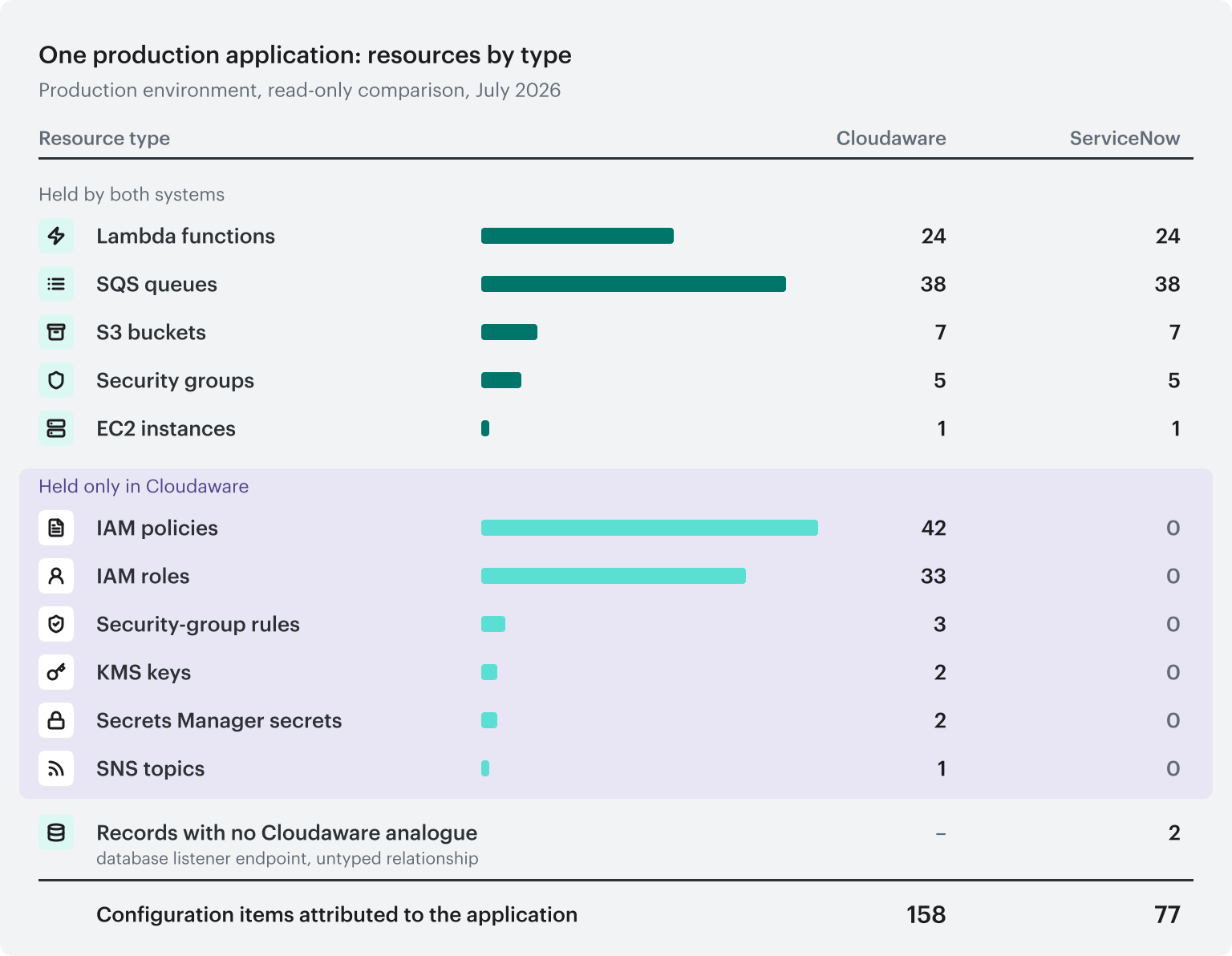
Diagram of one production application's resources by type, July 2026: 158 configuration items in Cloudaware and 77 in ServiceNow; the five types both systems hold match resource for resource, and the 83 held only in Cloudaware are IAM policies, IAM roles, security-group rules, KMS keys, Secrets Manager secrets and SNS topics.
The compounding fourth: dependencies
Application-to-application dependencies in the cloud are discoverable from the layer that carries them: the queue one application writes and another reads, the topic and its subscriptions, the event-bus rule and its target, the PrivateLink endpoint, the transit gateway attachment. Those are the messaging and network-fabric categories from the first section, and none of them is in the CMDB. A dependency map built from ServiceNow data cannot contain edges for which it holds no nodes. The usual fallback, typing relationships in by hand, is closed for exactly these objects: nobody hand-enters an EventBridge rule, and nobody keeps it current. The method for building the map from discovered data is covered in application dependency mapping and service mapping; the point here is only that the input is missing.
The gap has an ordinary cause and a large effect: it breaks the three processes the CMDB exists to serve.
Upgrade the ServiceNow CMDB with Cloudaware
ServiceNow does two things for an enterprise. It runs the IT process: tickets, changes, approvals, ownership. Everyone is trained on it and every workflow lives in it. It also holds the inventory that process refers to, and for the cloud that inventory is what the previous sections measured. The second can be fixed without touching the first.
The connector's coverage is ServiceNow's to change, and replacing ServiceNow to get a better inventory is not a realistic option for a process everyone is trained on. The remaining option is to feed it: bring the cloud inventory into ServiceNow from something that discovers the cloud. The goal is to extend and enrich the ServiceNow CMDB, not to replace it. Think of it as upgrading the lens. The CMDB stays the system of record for IT services and gets a wider and deeper view into the cloud.
Two ways to feed it
There are two ways to get the missing classes into ServiceNow, and they differ in who maintains the schema.
| Build the classes yourself | Cloudaware CMDB Application for ServiceNow | |
|---|---|---|
| Class definition | One class per missing resource type, designed and versioned by your team | Created by the application as tables extending cmdb_ci, one per Cloudaware object type you choose to import |
| Keeping up with the providers | Your backlog, every time AWS, Azure or Google Cloud adds or changes a service | Cloudaware's discovery model, maintained as the providers change |
| Population | Scripts you write and run, per class, per account | Scheduled import from Cloudaware discovery; daily is the documented recommendation |
| Duplicates with native discovery | Identification rules you write so the Identification and Reconciliation Engine does not create a second EC2 record | Supplement only: the app fills classes native discovery does not, and does not re-import what it does |
| Retirement | Your cleanup job | Disappearance time and outdated flags carried on every imported record |
| Azure and GCP | Repeat the exercise per provider | Same application, same object model |
| Prerequisites | Discovery expertise, scripting, ongoing ownership | IntegrationHub Enterprise Pack, Workflow Studio, admin rights, Cloudaware-issued credentials; no MID Server |
Teams do build the first column. Custom tables for SQS and CloudFront exist at the insurer in the recovery example, populated by a bespoke pipeline. That is real engineering and it works for the classes it covers; it is also why the SQS row in the recovery tables matched. The rows that did not match are the ones nobody built. The first column is a standing engineering commitment; the question it leaves is whether maintaining a cloud schema is your team's job.
Why you can't just dump CIs into ServiceNow
Loading raw cloud records into ServiceNow without a service association creates orphaned CIs: records disconnected from the service catalog, invisible to the workflows that key off a service, and impossible to report on by application. The failure mode of a do-it-yourself feed is the orphan rate on the ServiceNow side more often than the effort of writing the feed.
The Cloudaware application avoids the orphan problem by matching before it uploads. Every discovered object is mapped to an application in Cloudaware's service catalog first, by tag, account, network placement and naming rules, so untagged and mis-tagged resources still resolve. Each ServiceNow application record's sys_id is read from ServiceNow and written onto the objects that belong to it. The CIs arrive in ServiceNow already associated with the right application, through ServiceNow's own identifiers, and take part in incident, change and reporting workflows as if ServiceNow had discovered them natively.
How the integration flow works
Three steps, in order:
- Retrieve the service catalog. The integration reads the applications and business services from ServiceNow, with their sys_ids.
- Match CIs to services. This is the step that makes the rest work. Cloudaware's discovery holds the full object model for each AWS account, Azure subscription and GCP project; its service catalog rules attribute every object to an application; the ServiceNow sys_id for that application is attached to each object.
- Upload contextualized CIs. The Cloudaware CMDB Application writes the objects into their CI classes in ServiceNow, pre-associated with the application through native sys_ids, on the import schedule. Policy violations can be pushed as Incidents and detected changes as Change Requests through the same integration.
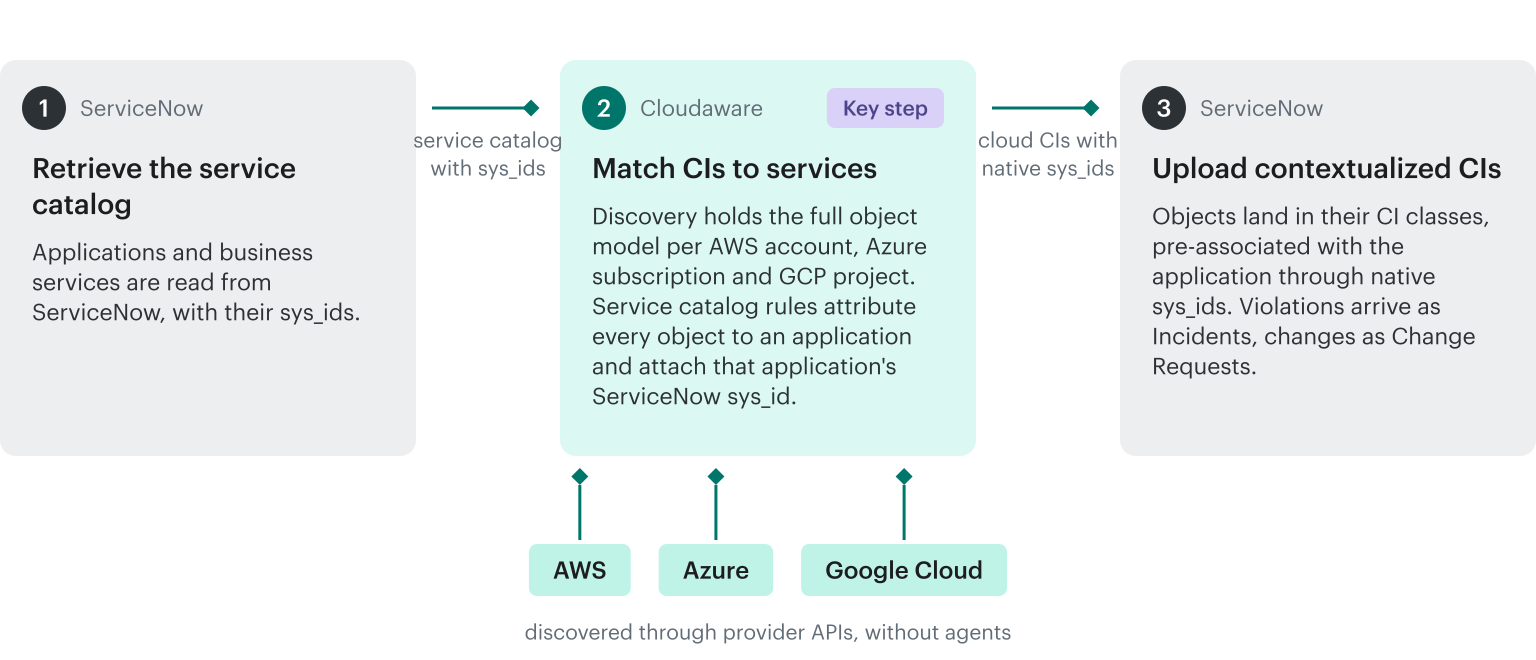
The three steps of the Cloudaware to ServiceNow integration: the service catalog is read from ServiceNow with its application identifiers, discovered objects are matched to applications in Cloudaware, and the CIs are uploaded to ServiceNow attached to those identifiers; AWS, Azure and Google Cloud feed the matching step.
Two properties of the feed decide whether a CMDB owner can accept it. First, it supplements rather than overlaps: the application fills the classes ServiceNow does not discover and does not re-import what native discovery already brings in, so an EC2 instance is not written twice and the identification engine has nothing to reconcile. Second, every backfilled object arrives attached to its application. The Kinesis stream from the vulnerability walk-through lands in ServiceNow with an application, an owner and a criticality on arrival, and the next finding on it has somewhere to go.
What stays in Cloudaware by design
Application-to-application dependencies are not written to ServiceNow. The upgrade gives ServiceNow the complete inventory with every object attached to its application; the dependency map, built from the messaging and network-fabric objects that make it possible, lives in Cloudaware's own interface, where the graph is queried, traversed and drawn. That is a product decision rather than a limit: the graph is the top tier of what the discovery data supports, and Cloudaware is where it is used. For how the graph is built and what it answers, see CMDB application mapping.
Three counts that show whether your instance has the gap
Three counts, run against your own instance, settle the question.
- Count the cloud CI classes with records, per provider. Aggregate cmdb_ci by sys_class_name and keep the cloud classes. Expect 30 to 40 for AWS, 15 to 20 for Azure and 10 to 20 for Google Cloud on a native-connector instance; add the custom tables you built, and note that they are yours to maintain.
- Count application-to-application relationships that a human did not type. Filter cmdb_rel_ci to relationships between application services and check where each came from. Expect near zero.
- Pick one production application and list its credentials, keys and roles in the CMDB. On AWS that is IAM roles, KMS keys and Secrets Manager secrets; on Azure, Key Vault keys and secrets and RBAC role assignments; on Google Cloud, IAM service accounts and Cloud KMS keys. If the list is empty, a runbook generated from the CMDB cannot restore the application's access.
Those counts are the numbers to bring to the discussion of what the CMDB is expected to hold.
Extend the ServiceNow CMDB into the cloud with Cloudaware
The ServiceNow CMDB stays the system of record for incidents, changes and ownership. Cloudaware supplies the cloud inventory the native connector does not discover, attached to the applications ServiceNow already knows, and holds the dependency graph that inventory makes possible. Cloudaware builds that graph from the cloud provider APIs and from live network traffic, and generates disaster-recovery runbooks and resiliency and cybersecurity assessments from it.
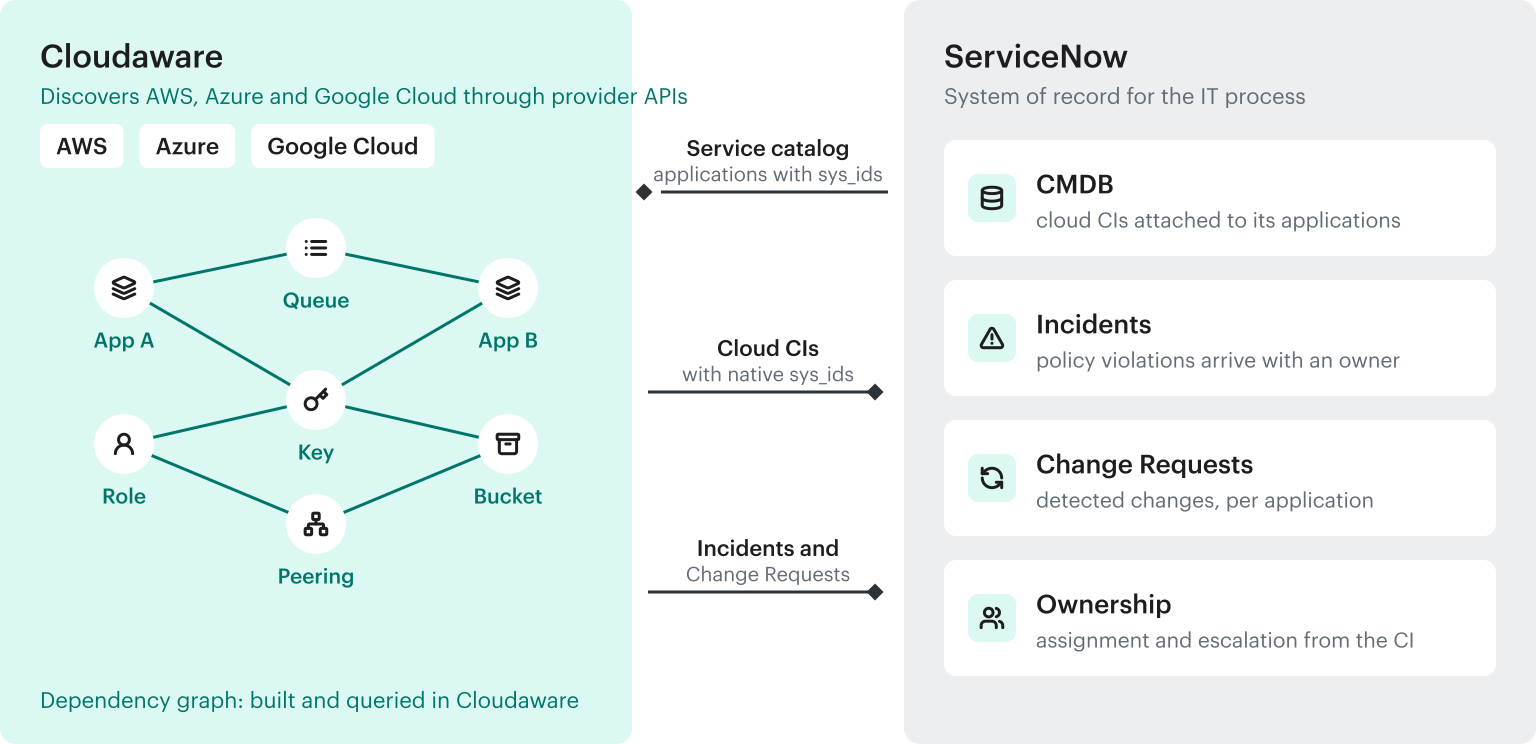
Cloudaware and ServiceNow after the integration: the service catalog is read from ServiceNow; cloud CIs with native identifiers, Incidents and Change Requests are written to ServiceNow; the dependency graph is held in Cloudaware.
Core capabilities:
- Discover the wiring, not only the compute: IAM roles and policies, KMS keys, Secrets Manager secrets, SNS, SQS, EventBridge, Kinesis, Transit Gateway, PrivateLink, VPC flow logs and Route 53 on AWS; Key Vault, RBAC role assignments, Service Bus, Event Grid, Event Hubs, Private Link and ExpressRoute on Azure; IAM service accounts and role bindings, Cloud KMS, Pub/Sub, VPC Network Peering and Cloud DNS on Google Cloud, in the Cloudaware CMDB, discovered through provider APIs without agents
- Attach every object to its application: service catalog rules resolve the owning application from tags, account, network placement and naming, so a stream, a key or a role is never anonymous
- Feed ServiceNow without duplicating it: the Cloudaware CMDB Application for ServiceNow creates the missing CI classes and fills them with objects carrying native sys_ids; violations arrive as Incidents and changes as Change Requests (extend ServiceNow CMDB)
- Evaluate the objects the native connector does not model: compliance policies run against the same records the CMDB holds, IAM roles and policies, KMS keys and secrets included, so a violation on any of them carries an owner before it becomes a ticket (Cloudaware CSPM)
Cloudaware does not change what the Service Graph Connector discovers, and it does not replace ServiceNow as the system of record for incidents, changes and ownership. Which classes to import, which applications count as Tier-1, and who owns each remain your decisions.
Appendix A: AWS resources ServiceNow does not discover natively
Source: the Cloudaware-ServiceNow gap analysis for AWS, re-measured in July 2026 against ServiceNow's published class lists for the Service Graph Connector for AWS. "Not discovered natively" means the stock connector has no class for it, per ServiceNow's documentation. ServiceNow's Zurich class reference includes target classes for some of these (storage volume snapshot, Redshift, cloud gateway); the July 2026 measurement did not observe them discovered. Some instances add a few of these through custom u_ tables (SQS and CloudFront are the common ones); that is a bespoke pipeline rather than connector capability, and it is yours to maintain. Appendices B and C cover Azure and Google Cloud.
| Group | Not discovered by the native connector | Why it matters for a recovery or a finding |
|---|---|---|
| Compute | Capacity reservations; Elastic Beanstalk; Batch; Lightsail | Environments and reservations the compute depends on at restore time |
| Storage | EBS snapshots; EFS; FSx; Glacier vaults; Storage Gateway | File systems the instances mount; archives a recovery restores from |
| Databases and data | Redshift; RDS Proxy; DAX; ElastiCache; OpenSearch; Glue (catalog, jobs, crawlers); Athena; EMR; MSK; Kinesis (streams, Firehose, analytics); DMS; DataSync | Caches, pipelines and streams the application state moves through |
| Networking | Internet and NAT gateways; Transit Gateway and its route tables; VPC endpoints (PrivateLink); VPC flow logs; VPC peering; VPN (connections, gateways, tunnels); Direct Connect and its gateway; managed prefix lists; Global Accelerator; Cloud WAN; Network Firewall; DHCP option sets | The paths between VPCs, to on-premises and to the database; the traffic record a dependency map is built from |
| DNS, CDN and edge | Route 53 hosted zones, domains, health checks and policies; CloudFront distributions; API Gateway (REST and HTTP) | The names and endpoints clients resolve; the front door a failover must repoint |
| Security, identity and compliance | IAM users, groups, roles and policies; access keys; KMS keys, aliases and grants; Secrets Manager; ACM certificates; CloudHSM; GuardDuty; WAF; Shield; Directory Service | Who may call what; the keys and credentials without which restored compute cannot read its data |
| Messaging and integration | SNS topics and subscriptions; SQS queues; MQ brokers; EventBridge (buses, rules, targets); Step Functions | The application-to-application edges: publisher, consumer, trigger |
| Observability | CloudWatch alarms; CloudWatch Logs (groups, streams, filters); CloudTrail (trails, events); X-Ray | The alarms that page, and the audit trail an investigation reads |
| Developer and CI/CD | CodeBuild, CodeCommit, CodeDeploy, CodePipeline, CodeStar; CloudFormation stacks | The stacks a rebuild is run from |
| Management and governance | Cost Explorer and cost allocation; Service Catalog; RAM; License Manager | Shared resources and the cost of each service |
| AI, ML and analytics | SageMaker (domains, models, endpoints, jobs); Bedrock (agents, models, guardrails, flows); Comprehend, Rekognition, Textract, Polly, Transcribe, Kendra, Lex; QuickSight | The model endpoints and pipelines newer applications are built on |
| Other services | App Mesh and Cloud Map; AppStream and WorkSpaces; IoT; media services; Backup, Snowball, MWAA, OpsWorks, SWF, SES | Service discovery, end-user compute and backup plans |
Partial or indirect in the native connector: AMIs (mapped to the generic OS template class); launch configurations and templates; ECS clusters, services and tasks; ECR repositories and images; network interfaces (ENIs); AWS Organizations, OUs and accounts; AWS Config and Systems Manager (used as data sources, not modeled as CIs).
Covered natively, for credit: EC2 instances; EBS volumes; Auto Scaling groups; Lambda functions; load balancers; EKS clusters with pods, deployments, DaemonSets, ReplicaSets, namespaces, nodes, services and volumes; Docker containers and images; S3 buckets; RDS instances; Aurora and DB clusters; DynamoDB tables; VPCs; subnets; route tables; network ACLs; security groups (the group, not its individual rules); Elastic IPs; accounts, regions and availability zones.
Appendix B: Azure resources ServiceNow does not discover natively
Cloudaware side: the Cloudaware-ServiceNow gap analysis for Azure, 366 Azure object types as of July 2026. ServiceNow side: the Service Graph Connector for Azure class reference and Cloud Discovery for Azure, both Zurich. "Not discovered natively" means neither path has a class for it. ServiceNow's class reference includes a generic cloud web server class; the measurement did not observe App Service discovered into it. The custom-table caveat from Appendix A applies: a u_ table for Key Vault or Service Bus in your instance is your pipeline, not the connector's.
| Group | Not discovered by the native connector | Why it matters for a recovery or a finding |
|---|---|---|
| Compute | Dedicated hosts and host groups; capacity reservations; proximity placement groups; Compute Gallery images; snapshots; disk encryption sets; VM extensions; DevTest Labs; Azure Stack HCI; Arc-enabled machines | The reservations, galleries and encryption sets a rebuild depends on |
| Containers and apps | Container Apps; Container Instances; Container Registry (registries, repositories, images); App Service plans, deployments and certificates; Service Fabric clusters; the namespaces, pods, deployments and secrets inside an AKS cluster | The application layer above the VM, and the registry a redeploy pulls from |
| Storage and backup | Blob containers, file shares, queues and tables inside a storage account; Recovery Services vaults, backup items and backup policies | The containers a recovery restores, and the vault it restores from |
| Databases and data | Cosmos DB; SQL Managed Instance and elastic pools; Synapse workspaces and pools; Data Factory pipelines and linked services; Databricks workspaces; HDInsight clusters; Azure Cache for Redis; Analysis Services | The state and the pipelines the application depends on |
| Networking | VNet peering; virtual network gateways and connections; local network gateways; ExpressRoute circuits and peerings; Azure Firewall and firewall policies; NAT Gateway; route tables and routes; private endpoints and Private Link; Bastion; DDoS protection plans; Network Watcher flow logs; NSG rules; application security groups | The paths between VNets, to on-premises and to the database; the traffic record a dependency map is built from |
| DNS, CDN and edge | Azure DNS zones and record sets; Private DNS zones; Front Door; Traffic Manager; Application Gateway and WAF policies; API Management | The names and endpoints clients resolve; the front door a failover must repoint |
| Security, identity and compliance | Key Vault keys, secrets and certificates; Entra ID users, groups, applications, service principals and roles; RBAC role definitions and assignments; Policy definitions, assignments and exemptions; Defender plans and security alerts; regulatory compliance assessments; management locks; SSH public keys | Who may call what; the keys and secrets without which restored compute cannot read its data |
| Messaging and integration | Service Bus namespaces, queues, topics and subscriptions; Event Grid topics, domains and subscriptions; Event Hubs namespaces, hubs and consumer groups; Notification Hubs; IoT Hub; Logic Apps workflows | The application-to-application edges: publisher, consumer, trigger |
| Observability | Log Analytics workspaces and tables; Application Insights; Monitor alert rules, scheduled query rules, action groups and activity log alerts; diagnostic settings; Automation accounts and runbooks; Advisor recommendations | The alarms that page, and the audit trail an investigation reads |
| Management and cost | Management groups; billing accounts and profiles; reservations and savings plans; subscription quotas | Shared commitments and the cost of each service |
| AI | Azure AI accounts and deployments; AI Search | The model endpoints newer applications are built on |
Partial or connector-only: VM scale sets, AKS clusters, Function Apps and the cloud database class are target classes of the Service Graph Connector for Azure and are absent from pattern-based Cloud Discovery's list; the Kubernetes objects inside an AKS cluster are not target classes on Azure the way they are on AWS and GCP. The community thread cited earlier confirms managed identities, Log Analytics workspaces, metric and scheduled-query alert rules, VM extensions and snapshots as outside the default supported set.
Covered natively, for credit: subscriptions and regions; resource groups; availability sets; virtual machines; managed disks; images; virtual networks and subnets; network security groups (the group, not its rules); public IPs; network interfaces; load balancers and their IPs; storage accounts; and, through the Service Graph Connector, VM scale sets, AKS clusters, Function Apps and the cloud database class.
Appendix C: Google Cloud resources ServiceNow does not discover natively
Cloudaware side: the Cloudaware-ServiceNow gap analysis for Google Cloud, 129 object types listed; the page carries no update date and its ServiceNow column predates the GCP connector, so it is used here only for the Cloudaware column. ServiceNow side: the Service Graph Connector for GCP class reference (Zurich) and the connector's community overview (October 2025). The custom-table caveat applies.
| Group | Not discovered by the native connector | Why it matters for a recovery or a finding |
|---|---|---|
| Compute scaling | Managed and unmanaged instance groups; instance templates; autoscalers; target pools and target instances | The scaling layer a rebuild recreates the fleet from |
| Networking | VPC Network Peering; Cloud VPN tunnels and gateways; Cloud Router and BGP peers; routes; static external IP addresses; URL maps, target proxies and backend services behind a load balancer | The paths between VPCs and to on-premises; the routing a failover changes |
| DNS | Cloud DNS managed zones and resource record sets | The names clients resolve to reach the application |
| Identity and security | IAM roles, policy bindings and audit configs; service accounts and service account keys; Cloud KMS key rings and crypto keys | Who may call what; the keys and credentials restored compute needs |
| Data and analytics | BigQuery datasets and tables (the Terraform connector maps tables to the generic database class from Terraform state; the GCP connector does not); Dataflow jobs; Dataproc clusters and jobs; AI Platform (ML Engine) models, versions and jobs | The state and the pipelines the application depends on |
| Messaging | Pub/Sub topics and subscriptions | The application-to-application edges: publisher, consumer |
| Observability | Cloud Logging sinks and log-based metrics; Cloud Monitoring alert policies and conditions | The alarms that page, and the audit trail an investigation reads |
| Containers | Container Registry repositories and images; the config maps, ingresses, autoscalers, secrets, service accounts and stateful sets inside a GKE cluster | The registry a redeploy pulls from; the cluster objects beyond the connector's ten Kubernetes classes |
| Management and cost | Billing accounts | The cost of each service |
Partial or connector-only: the connector's own overview lists thirteen CI classes centered on Compute Engine instances, disks, network interfaces, IP addresses, projects and storage buckets, while its Zurich class reference lists 48 target classes, so check which of the 48 your instance populates before crediting a class. Static external IPs land in the generic IP address class. Load balancers are covered with pools, members and health checks, but the URL maps and backend services above them are not.
Covered natively, for credit: organizations, folders and projects; regions and zones; Compute Engine instances, persistent disks, snapshots and images; VPC networks, subnets and firewall rules; load balancers with pools, members and health checks; Cloud Storage buckets; the cloud database and cloud function classes; GKE clusters with nodes, node pools, pods, deployments, ReplicaSets, services, namespaces, volumes, cluster roles and role bindings; Docker containers and images.