


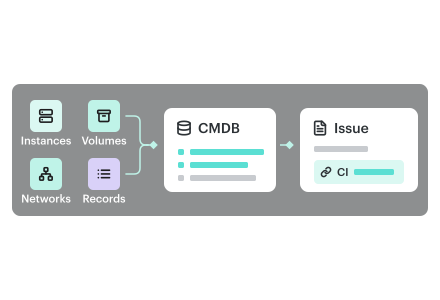
Jira asset management works for a curated set of CIs. It doesn't scale to a modern enterprise cloud. The limits are technical and economic, and Atlassian publishes every one of them.
Assets, formerly Jira Insight, ships with Jira Service Management. Most teams start their CMDB there because it sits next to the issues. Then they try to load the cloud into it. We hear the result from Jira Service Management teams: a CMDB filled in by hand, and always behind.
This article lists the limits with Atlassian's own numbers and links. Then it shows how teams get past them without leaving Jira.
TL;DR
- Capacity runs out. A site holds 3 million objects by default and 10 million on request. Each object type holds 2 million. Each type allows 120 attributes.
- Loading is slow. The Assets API creates one object per call, at 1,000 calls a minute. Three million objects take about 50 hours to load once.
- Assets doesn't discover the cloud. Atlassian says Data Manager "is not a discovery tool." Its adapter list has no AWS or Google Cloud adapter.
- The cost grows with the cloud. Objects above your allowance cost $0.02 each per month at list price. There is no archiving. Three million objects cost $59,000 a month on Premium.
- There is a way past it. Keep the full inventory in a CMDB that discovers it, and put the CI on the Jira issue. Cloudaware does this for $0.008 per CI per month at list price.
What Jira asset management does well
Assets stores objects in schemas. Each schema has object types, and each type has attributes. References connect objects, so a business service can point at the application behind it. An Assets field links the affected object to an incident or a change request. Jira Automation can act on that link.
This works for CIs that a person decides should exist and that change rarely:
- Business services and applications from your service catalog.
- Cloud accounts and subscriptions, such as AWS accounts and Azure subscriptions.
- Long-lived servers and databases that someone built on purpose.
- Network devices and hardware that change through a change request.
Atlassian's own advice on how to avoid CMDB failure agrees. It says to "choose what you include very carefully."
Why an enterprise cloud breaks the model
An enterprise cloud is a different kind of inventory. AWS alone has about a thousand object types, counting child and link objects. Instances in an EC2 Auto Scaling group start and stop with load. Configuration changes land on security group rules, keys and DNS records all day.
A copy of that in Assets is out of date as soon as the import finishes. Keeping it current means syncing every change. Keeping it small means deciding, for every resource type, whether anyone will ever need it. Neither job ends.
| Curated CI set | Enterprise cloud inventory | |
|---|---|---|
| Who creates the record | A person or a change request | The provider API, when the resource starts |
| How often it changes | Rarely | All day |
| How many records | What the team chooses to keep | Every resource in every account |
| What keeps it accurate | Change discipline | Discovery |
The technical limits of Jira asset management
Capacity: 3 million objects per site
Jira Assets Cloud holds 3 million objects per site by default. Atlassian states this on its page about Assets usage and limits. You can request up to 10 million, a change Atlassian announced in October 2025. Atlassian tests your site first, and you pay for the larger tier.
Atlassian's table of Assets data limits caps each object type at 2 million objects. It also caps each type at 120 attributes. Every cloud tag you want to search on needs its own attribute. The site limit counts every object, including the CIs you already keep.
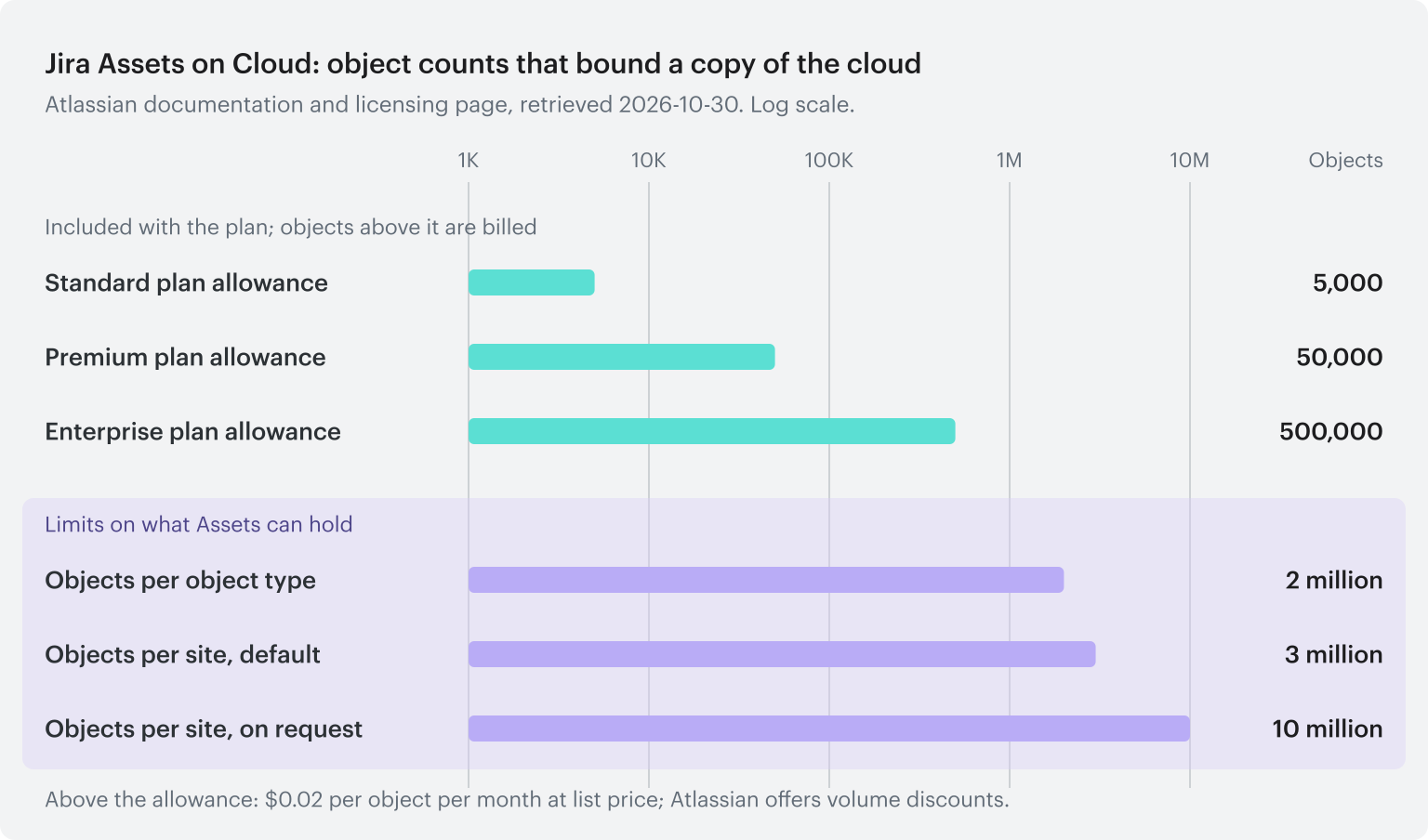
Diagram: the Jira Assets object counts that limit a cloud copy, as published by Atlassian (retrieved 2026-10-30).
Loading: about 50 hours for 3 million objects
The Assets REST API creates one object per call. Atlassian limits most endpoints to 1,000 requests a minute. Three million objects take 3,000 minutes to load, about 50 hours.
That covers the first load only. Every started instance and deleted volume needs another call against the same limit. Atlassian keeps a support article on rate-limit errors during Assets imports. The Imports REST API changes how you load data. It doesn't change the object count or how current the copy is.
Discovery: Assets doesn't find cloud resources
Assets stores what you give it. Atlassian's Assets Data Manager combines data from other tools. Atlassian says it "is not a discovery tool." Its adapter list includes Azure virtual machines, Intune and SCCM. As of October 2026 it has no AWS or Google Cloud adapter. Atlassian has validated Data Manager up to 2 million records.
Assets Discovery is a network scanner you run on your own machines. It finds servers and devices on networks it can reach. It doesn't read cloud provider APIs.
Search: built for small result sets
An Assets field on an issue holds at most 200 objects. An AQL search reports a total of at most 1,000 objects. Jira issue search has a 7-second timeout on Assets data, so complex queries can return empty Assets columns. These are sensible limits for a curated set. They show Assets wasn't built to search millions of cloud resources.
Data Center: guardrails and an end date
On Data Center, Atlassian's guardrails suggest about 2 million objects per instance when objects carry many references, and 5 million when they don't. Each schema should stay under 500,000 objects. Atlassian Data Center products reach end of life on March 28, 2029.
The economics of Jira asset management
Each Jira Service Management plan includes some Assets objects. The Assets licensing page lists them:
| Plan | Objects included |
|---|---|
| Standard | 5,000 |
| Premium | 50,000 |
| Enterprise | 500,000 |
Objects above the allowance cost $0.02 each per month at list price. Atlassian offers volume discounts. The monthly cost is (objects minus the allowance) × $0.02.
| Objects in Assets | Premium | Enterprise |
|---|---|---|
| 3 million | $59,000 a month | $50,000 a month |
| 10 million | $199,000 a month | $190,000 a month |
These are list prices before volume discounts. They leave out agent licenses, which you pay either way.
Three more details matter. Usage is measured by object count, and Assets Cloud has no archiving. A terminated instance keeps counting until someone deletes its object. If you turn extra usage off, object creation, imports and syncs pause at the limit. Then the copy stops updating at all. And someone has to keep curating the schema as the cloud changes.
Five checks before you load cloud resources into Assets
Each check uses data your cloud team already has.
- Count resources by type. Compare the total with your plan allowance and the 3 million limit. Compare your largest type with the 2 million cap.
- Price the copy. Multiply the objects above your allowance by $0.02. Repeat with next year's expected growth.
- Time the load and the daily sync. Divide the total by 1,000 to get minutes per pass. Count daily create, change and delete events in AWS CloudTrail or the Azure activity log.
- List the CI types your issues reference. Pull last quarter's incidents and changes. The ten most referenced types are your curated set.
- Name an owner for each attribute. Write down who keeps application, environment and owner current. An attribute with no owner goes stale first.
If the referenced types fit inside your allowance and change rarely, keep them in Assets. If they don't, you've reached the limits of Jira asset management. The ServiceNow version of this question has the same answer.
How to get past the limits of Jira asset management
You don't need to leave Jira. You need a different place for the inventory. The working alternative has three parts:
- Keep a small curated set in Assets, such as business services and long-lived servers.
- Keep the full inventory in a CMDB that discovers it and keeps it current.
- Put the right CI on each Jira issue from that CMDB, with its application, environment and owner.
Cloudaware does the second and third parts. Your team keeps working in Jira. The page on Cloudaware for Jira Service Management shows how it works.
What Cloudaware discovers
Cloudaware CMDB connects to your systems through their APIs. Nobody types in a CI. Every record stays current as things change.
- Cloud: every resource type in AWS, Azure, Google Cloud, Oracle Cloud, Alibaba Cloud and Kubernetes. The docs list every supported object type.
- Data center: virtual machines, hosts and datastores in VMware vCenter and Nutanix, plus bare-metal servers.
- Network: switches and routers, found through SNMP or IP discovery, or read from SolarWinds.
- End-user devices: laptops, phones and tablets from Microsoft Entra ID, Jamf and SCCM, matched to their users. Purchase records add warranty and end of life.
- Software: installed software and versions on every server and laptop. Software that isn't on your approved list is flagged.
- Security and monitoring coverage: data from tools such as CrowdStrike, Qualys, Tenable, Datadog and New Relic is matched to each CI. You see which machines nobody scans or monitors.
Cloudaware checks each source against the others. A host your security tool sees but your inventory doesn't is flagged. So is a device with no purchase record. Cloudaware also keeps every change, including resources that no longer exist. You can see what a CI looked like last week.
Service catalog rules assign each resource to its application, environment and owner. That's the context an engineer needs on a Jira issue.
Put the right CI on the Jira issue
The Cloudaware integration for Jira works in both directions. The CI reaches the issue, and the issue shows up on the CI.
Pick the CI in Jira
The Cloudaware app for Jira Cloud adds a Cloudaware CI field to the issue screen. Type a name, ID or IP address. The field searches the Cloudaware CMDB, and you pick the match. The issue links to that CI in Cloudaware. Nothing is copied into Jira Assets, so no Assets objects are used.
Let the linker link issues from alerts and email
Many issues arrive with an identifier already in them. A monitoring alert names an instance ID. A user's email quotes an IP address. The Cloudaware linker reads each new or updated issue. It links every CI it finds and adds the application, environment and owner. Its comments come from the Cloudaware CMDB app, not from a person's account.
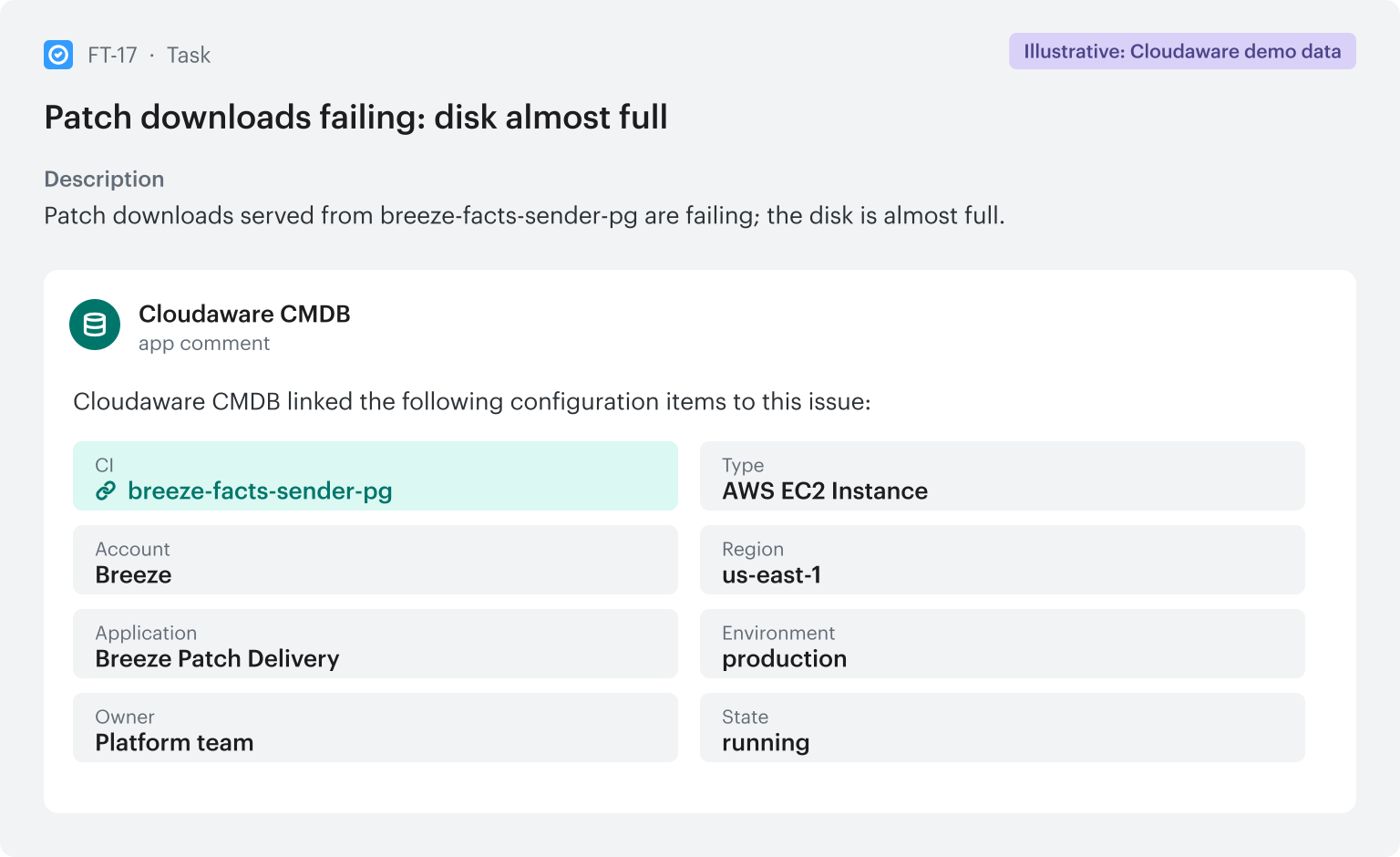
Illustrative example from Cloudaware's demo data: the linker resolves the host named in the issue and posts the CI with its application, environment and owner.
See issues on the CI, and open issues from Cloudaware
Cloudaware connects to Jira Cloud or Jira Server with an API token. It imports issues and matches each one to its CIs. In CMDB Navigator, a CI shows its issues next to its change history and dependencies.
Cloudaware Workflows open issues too, through Jira Actions. Set a condition, such as a certificate about to expire or a policy finding. When a CI meets it, Cloudaware opens an issue in your project. When the CI is fixed, Cloudaware comments on the issue. Jira Automation can then close it.
Compare the cost at list price
Cloudaware's list price is $0.008 per CI per month. Here is the same inventory in both systems, per month, before volume discounts:
| Inventory | Jira Assets Premium | Jira Assets Enterprise | Cloudaware CMDB |
|---|---|---|---|
| 3 million CIs | $59,000 | $50,000 | $24,000 |
| 10 million CIs | $199,000 | $190,000 | $80,000 |
Jira Assets: objects above the allowance × $0.02, without agent licenses. Cloudaware: CIs × $0.008.
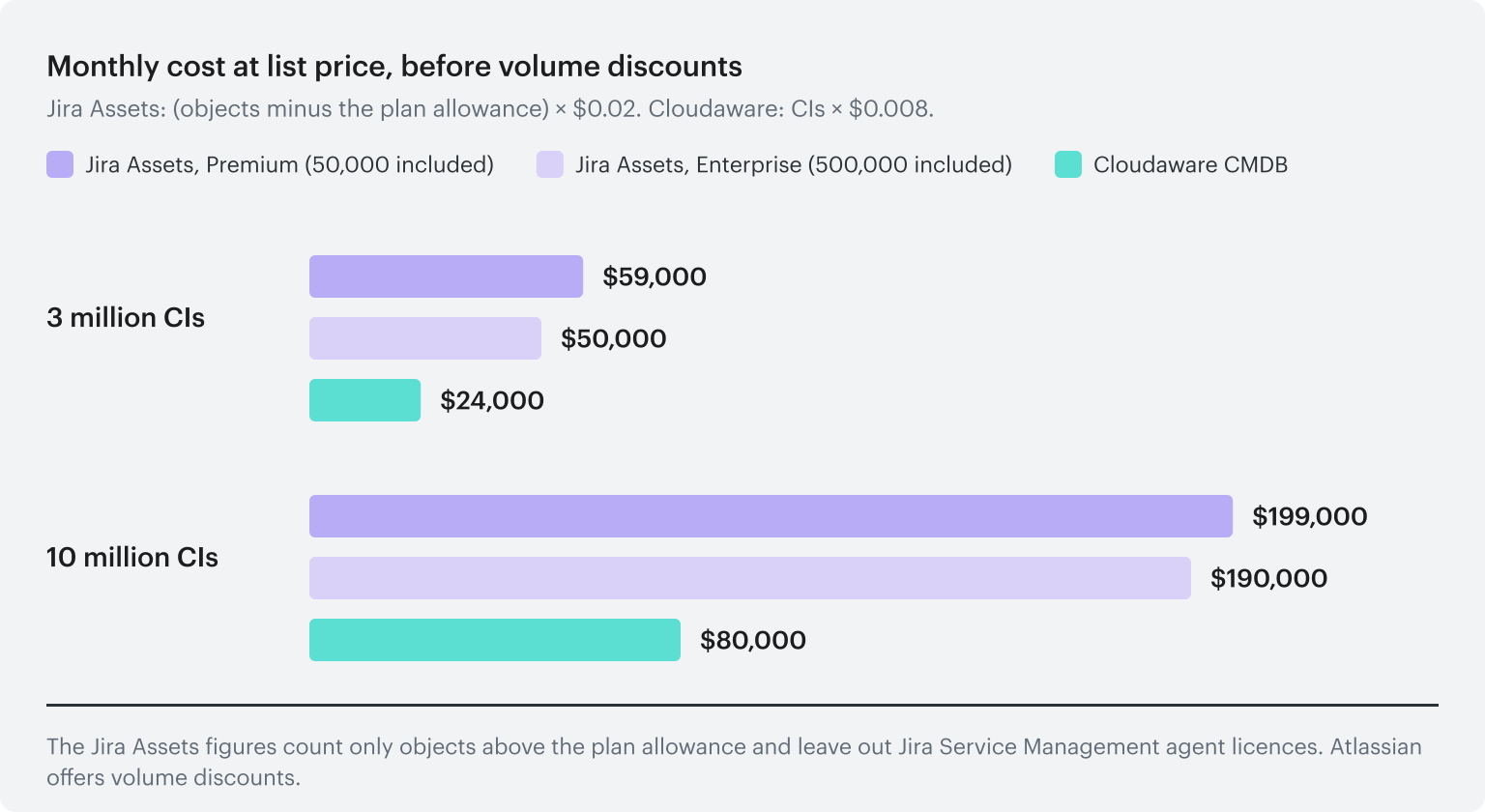
Diagram: monthly cost at list price for the same inventory in Jira Assets above the allowance or in Cloudaware CMDB.
Your agent licenses and workflows stay the same either way. The Cloudaware for Jira Service Management page shows the prices side by side. On request, Cloudaware can also load a filtered set into Assets, such as the production servers your change process references.
AI agents that work in Jira and Confluence
Cloudaware's AI-based products read the CMDB and the service graph through Cloudaware's hosted MCP. They know each CI's application, owner and dependencies. They post their work in Jira and Confluence, where your teams already look.
SRE Assist investigates linked incidents
When an incident is linked to its CI, SRE Assist investigates. It checks recent changes, the request path and the CI's dependencies. It posts what it found and the next step on the issue. It changes nothing.
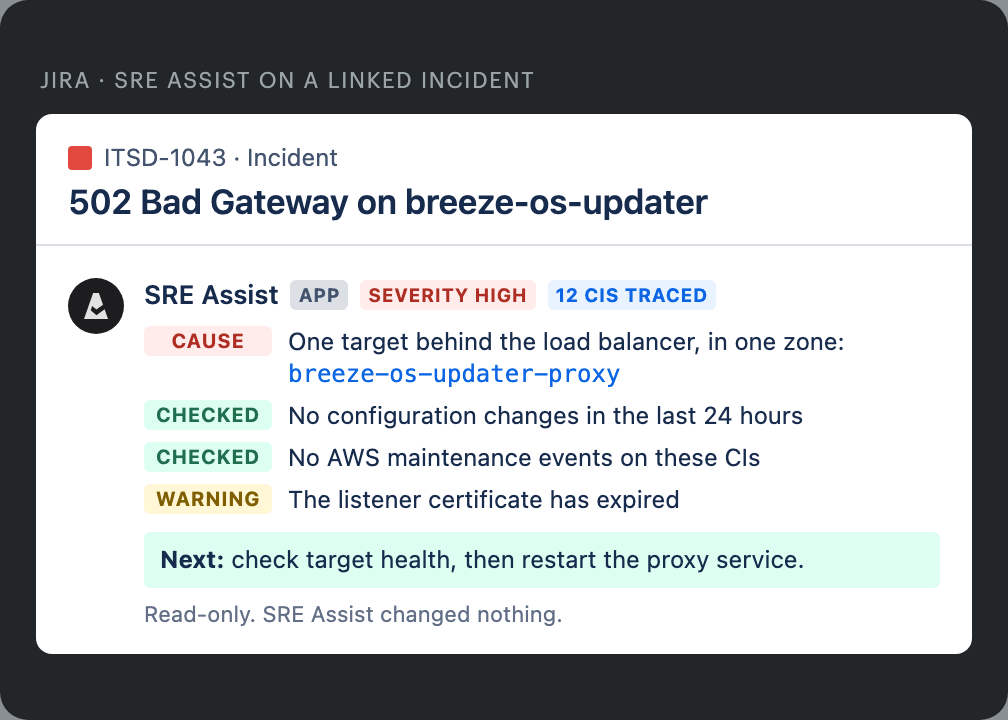
Illustrative example from Cloudaware's demo data: SRE Assist posts its investigation on the incident. It is read-only.
DR runbooks stay current in Confluence
An agent writes each application's DR runbook into Confluence from the CMDB. The runbook lists the resources, the order to restore them and what blocks recovery. The agent rewrites the page on your schedule, such as every morning. Each run is a new page version, so the history is there. The same agent can write architecture pages with diagrams.
Each application owner gets one page
Owners get requests from the cost, security, compliance and audit teams. Each team sends its own list. Cloudaware puts the assessments for each application on one Confluence page: resiliency, cybersecurity, compliance, cost and modernization. The owner works from one ranked list. Findings from your other assessment tools can go on the same page.
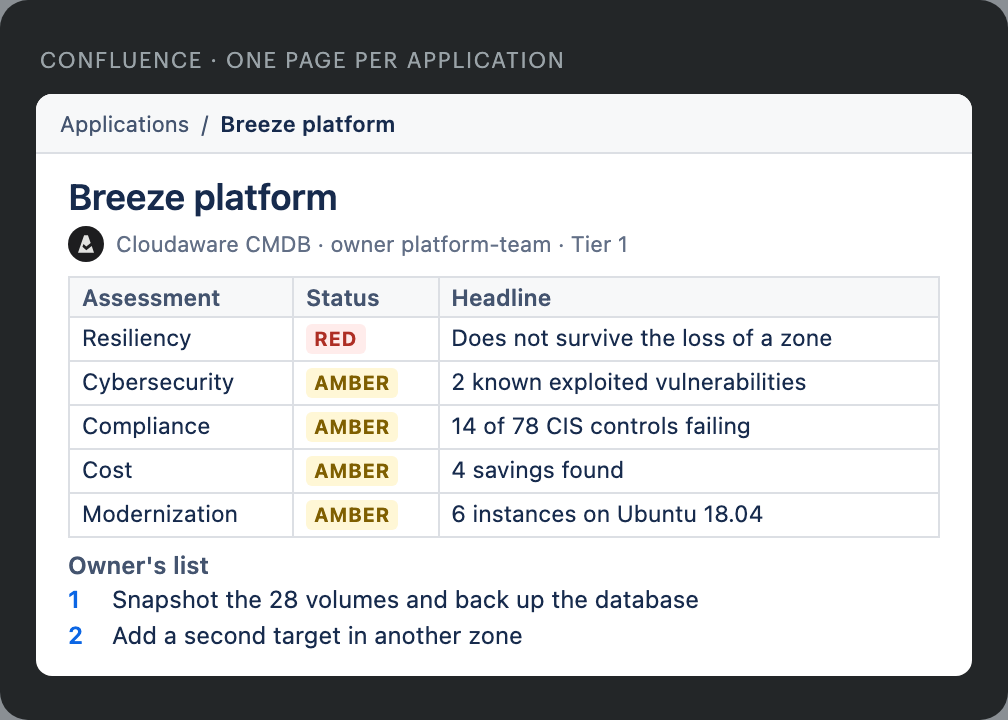
Illustrative example from Cloudaware's demo data: one Confluence page per application, with the owner's ranked list.
You can also point your own AI assistant, such as Claude or ChatGPT, at Cloudaware's hosted MCP. Ask about your CIs in plain English. There is nothing to install.
Scale past Jira asset management with Cloudaware
Jira stays where the work happens. Cloudaware keeps the inventory current at any size. Each incident and change carries the right CI, and each CI shows its issues.
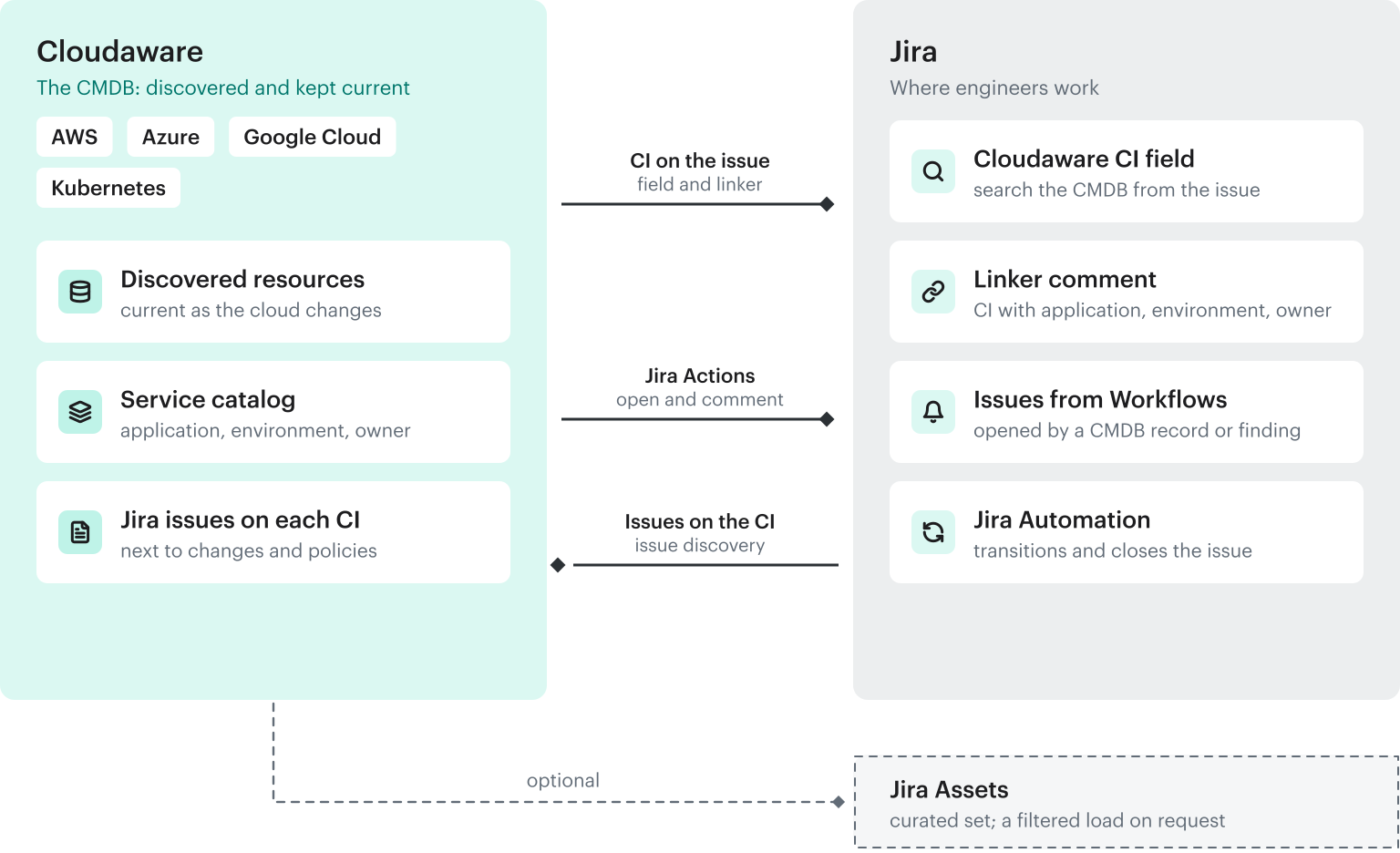
Diagram: the CMDB stays in Cloudaware and the work stays in Jira.
Core capabilities:
- Discover everything without manual entry: the Cloudaware CMDB covers cloud, data center, network and end-user devices, with 100+ integrations
- Attach every CI to its application, environment and owner: service catalog rules and service mapping
- Put the CI on the Jira issue: the Cloudaware CI field and the linker (Cloudaware for Jira Service Management)
- Open and update Jira issues: Workflows with Jira Actions
- Work with AI agents in Jira and Confluence: SRE Assist investigations, live DR runbooks and one page per application owner
Most teams reach a production-ready setup in 30 to 45 days. Cloud and SaaS sources connect with an API key. Data center discovery runs from one virtual appliance on your network.