


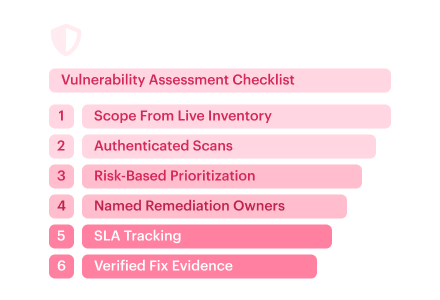
The scan says Completed. A vulnerability assessment checklist should tell you which machines that status actually covers. During scale-out, an auto-scaling group can launch EC2 instances after the scan targets are set. With a fixed target list, those machines miss the run. Of the 120 VMs in the inventory, only 103 have a fresh, successful package scan on record. Seventeen lack current evidence.
A finding that makes it into the report can sit untouched until the next scan flags it again. All it takes is a missing owner or remediation SLA.
Cloudaware practitioners Igor Kachurin and Valentin Kel share the field practices behind this security vulnerability assessment checklist. Download the free PDF and editable template with Owner and Evidence columns. The guide shows how those records support PCI DSS and ISO/IEC 27001 reviews, with NIST SP 800-115 as a testing reference.
Download the free PDF of the vulnerability assessment checklist
Get my pdf
Key insights
An auditor points to a production VM on your list. “Show me the scan for this one.” A vulnerability assessment checklist earns its keep when you can pull up that record on the spot.
- All the accounts showed up as covered. Open the settings for one of them, and there it is: Lambda code scanning is off. AWS re:Inforce 2025 demo.
- A clean network scan can miss a vulnerable library. An authenticated scan can read the installed version straight from the host’s package list.
- What’s exposed can change what gets patched first. A flaw attackers already exploit on a public payments service can outrank a higher-scoring issue on an isolated test box.
- The team that can ship the fix should own the ticket and its SLA deadline. Security might spot the vulnerable package first, while the database team controls the patch window.
- In production, the fix has to reach every affected workload. One of seven ECS tasks in that AWS demo still ran the old image partway through the update.
- An audit-ready check has to be repeatable. A second engineer working from the same scope and evidence should reach the same conclusion.
What a vulnerability assessment checklist is (and what it isn’t)
A vulnerability assessment checklist is an ordered set of checks and evidence requirements for a complete, repeatable, and auditable assessment across the full agreed scope.
What’s included in a vulnerability assessment?
| Stage | What you should be able to show |
|---|---|
| Scope | A dated list of in-scope assets and who approved any exclusions. |
| Discovery | An asset inventory snapshot with resource IDs and any newly found assets flagged for a scope decision. |
| Scanning | A timestamped result for each required check on each asset, or a recorded reason it’s missing. |
| Prioritization | Why each finding got its priority, with the CVE ID and CVSS score where available. |
| Remediation | A ticket with an owner and due date, linked to the change record or approved exception. |
| Verification | A dated retest result linked to the change it verifies. |
| Reporting | A sign-off record showing what’s still open and which exceptions were approved. |
If all you kept was a link to the live inventory, a terminated VM can disappear from view. A dated snapshot lets the next engineer tell whether it was in scope that day.
“If we switch scanners halfway through a quarter, I still want the same rule for what counts as a pass. Put that rule in the checklist and the next engineer can make the same call from a different report.”


Where the checklist fits
- Process. The assessment process is the work itself. Engineers run checks and investigate what comes back, starting with the right vulnerability assessment tools for the assets in scope. The checklist tells the team when it can call the run complete.
- Lifecycle. A signed assessment captures what the team knew on a given date. Its open findings feed the backlog that carries forward through the vulnerability management lifecycle.
- Pen test. An exposed admin endpoint can be a finding in an assessment. In a penetration test, the tester might try to use that endpoint to reach a protected system within the agreed rules of engagement. NIST SP 800-115, section 5.2.
At a quarterly review, a cloud security lead can use a security vulnerability assessment checklist to decide which checks need another run. Before an audit, it doubles as an index to the evidence. When a new cloud account or environment goes live, platform teams revisit the scope. After a significant change, they start with the checks that change affects.
The vulnerability assessment checklist: best practices for every stage
Each item starts with a best practice, shows how it plays out in the cloud, and names the failure it helps prevent. The seven stages fit into five blocks with about five checks apiece. We pair scope with discovery because a new VM can change what needs checking, and verification with reporting because a retest can change what you sign off on.
The vulnerability assessment checklist PDF has all the checks in one printable copy for review. All formats are free and ungated. For each assessment, start with a fresh copy of the editable vulnerability assessment template in Google Sheets or XLSX.
Scope the assessment and prove full asset coverage
Set scope while there’s still time to assign an owner or get the scanner access. At sign-off, that record is how you tell a missed check from an approved exclusion.
- Put an owner next to every account in scope. An AWS production account and a sandbox can sit under the same team and still need different checks. Give each boundary its own row using the AWS account ID, Azure subscription ID, or Google Cloud project ID. Record the environment and Regions in scope. If the owner is unclear, keep the row visible and name someone to resolve it.
Failure it prevents: An entire account drops out of the assessment because nobody claimed it. - Build scope from current inventory. Pull a fresh asset list from AWS Config for recorded accounts and Regions, Azure Resource Graph for your subscriptions, and Cloud Asset Inventory for Google Cloud. If asset discovery comes back empty for a subscription, check read permissions before treating it as empty. At sign-off, save a dated snapshot of the inventory and scope you actually reconciled.
Failure it prevents: Last month’s export becomes this month’s scope, with every new resource missing from the start. - Match scanner records to the full asset list. Here’s the trap. If you start with the scanner’s target list, any asset it never picked up is already out of your coverage count.
Join scan records to the inventory by provider resource ID, keeping assets with no match. For the Lambda gap in the AWS demo, run this from the delegated Inspector administrator account for each account and Region in scope.
Read resourceState.lambda.status and resourceState.lambdaCode.status separately. If code scanning is required, its status gets its own coverage check. Then use Inspector’s ListCoverage to inspect the resource’s scanStatus and lastScannedAt. Flag missing or stale results on the asset row.
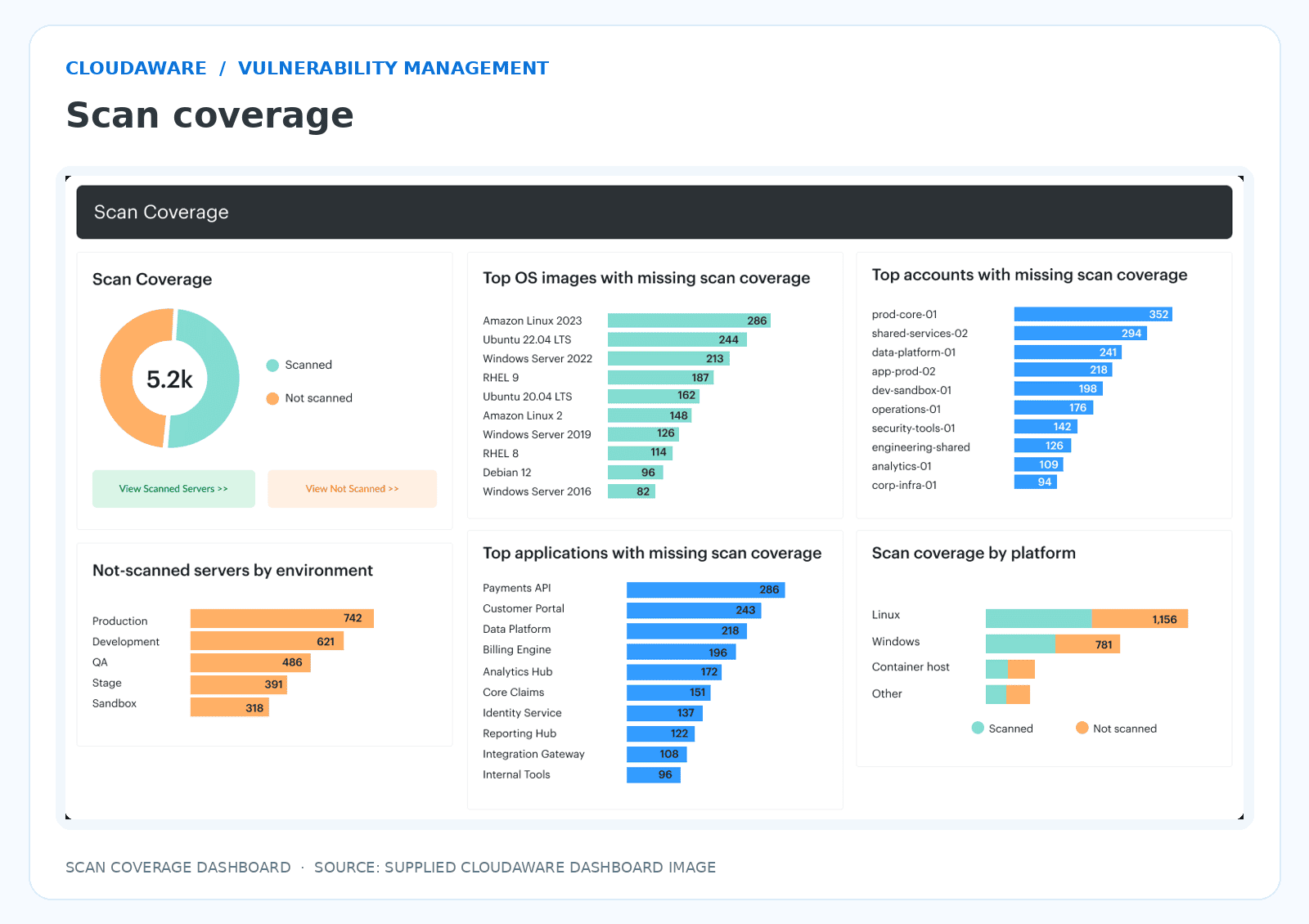
The dashboard summarizes scanned and unscanned resources and shows where coverage is missing by environment, application, account, and platform. - Capture workloads that come and go. A Spot instance can launch and disappear between inventory pulls. Use the Auto Scaling group’s activity history to recover its instance ID and launch time. For short-lived containers, keep the image digest the workload actually ran. For serverless, record the deployed function version and the check that covered it. Inspector’s Lambda eligibility applies to $LATEST, so a published version serving traffic needs its own evidence.
Failure it prevents: Short-lived workloads vanish from the assessment even though they were part of the attack surface during the review window. - Tag the business context before triage. Carry environment and owner tags or labels into the CMDB. Add data sensitivity from the service owner and verify internet exposure against the network path. An EC2 instance with a private IP can still receive traffic through a public load balancer. When the next finding lands, those fields help you decide how urgent it is and who can act. Keep them on the asset record for ongoing cloud vulnerability management.
Failure it prevents: A production service gets treated like a test box because both assets look the same in the scanner.
“You can’t assess what you can’t see. When a CVE looks like a scanner miss, I’d start with the asset ID and find out when it entered the scanner’s scope. If it arrived after the run, that’s a timing gap to fix before you tune a plugin.”

Configure authenticated scans across the whole estate
Before the first run, decide what a successful check should leave behind for each asset type, whether that’s a package inventory from a host or a configuration record from a cloud API.
Record what each host actually got. Take two passes against the same RHEL EC2 instance. The unauthenticated run may show port 22 and an SSH banner. With SSH credentials and enough access to read the package database, the credentialed scan can report the installed openssh-server RPM release. Record the method and outcome per host. A planned unauthenticated check gets its own status. If login succeeds but the required local checks fail, mark the result partial.
Match the scanner to the asset. A login to the VM gets you local package data. Testing a protected route on the app calls for a session in the app itself.
| Asset type | How the scanner gets access | What to record |
|---|---|---|
| Host or agent | SSH or Windows credentials for remote checks, or an enrolled agent | Host ID and the local checks that ran |
| Network | A probe from the relevant network segment, with device credentials for supported checks | Where the probe ran and which ports it could reach |
| Web or API (DAST) | A test account or API token with the intended role | The role and a protected route the scanner reached while authenticated |
| Container image | Access to the registry or an image supplied by CI | Image digest and scan result ID |
| Cloud configuration | A scoped identity with read access to the provider APIs | The scope queried and any denied reads |
- Go past the VM list. On RDS, pull the engine version and public-access setting from the service API. For S3, check Block Public Access at the bucket and account levels. Lambda dependencies need a package check on the function bundle. Keep the IaC scan result with the commit, then read back the deployed settings after release. A console edit can change what’s live while the template stays exactly as it was.
- Give deploys their own trigger. Keep continuous scanning where the platform supports it and a scheduled cadence as a backstop. When a deployment changes an artifact or configuration, trigger the check that covers the change. For example, ECR continuous scanning checks a new image on push. If the release reuses an existing image, check the age of the result for that digest and trigger a rescan if it’s stale.
- Check the job and the host. Confirm the run finished and account for targets that failed or were skipped. For Nessus, look for Credentialed checks: yes in plugin 19506 on each host requiring local checks. Qualys separates insufficient privileges from successful authenticated checks; Inspector Unmanaged EC2 instance or No inventory points to SSM. For suspected false positives, compare the full installed RPM release with the vendor advisory; Red Hat may backport fixes while retaining an older upstream version.
“A drop in findings right after a credential rotation would make me check the authentication pass rate. A scanner that lost access can give you a better-looking chart with less of the estate actually checked.”
Prioritize findings with exposure and business context
Fix the partner webhook tester first. A partner login can reach its vulnerable URL fetcher, which can read an internal diagnostics response containing a production deploy token. The private docs worker has the higher CVSS score. It can wait.
Illustrative triage example
| Finding A · Partner webhook tester | Finding B · Private docs worker | |
|---|---|---|
| CVSS Base | 6.5 · Medium | 8.8 · High |
| EPSS v5 | 8% | 34% |
| CISA KEV | Unlisted | Unlisted |
| Exposure | A partner can reach the affected feature over public HTTPS | Only the CI service identity can submit jobs to the private queue |
| Asset criticality | Support utility with a path to a production deploy credential | Builds internal documentation previews |
| Verdict | Fix first. The token can authorize production releases. | Fix next under the current access controls. |
B’s higher EPSS carries less weight here because only the CI service identity can reach the vulnerable feature.
- Who can reach the vulnerable feature? With ingress-nginx CVE-2025-1974, check the controller version and whether its validating admission webhook is enabled. Then test whether a pod with the network access an attacker could get can connect to that webhook. Keep the source and destination with the finding when you analyze each vulnerability.
- What does the threat evidence tell you? CVSS Base answers the question “*How severe is the flaw on its own?” To answer “How likely is exploitation in the wild over the next 30 days?*”, record the score and date from FIRST’s EPSS v5 data. Has it already been exploited? A listing in CISA’s KEV catalog means CISA has evidence of exploitation in the wild. Give that evidence more weight than a low EPSS score when the flaw applies to your asset.
- What could an exploit touch next? Go back to the CMDB context you captured in Scope. The tester is a low-tier support tool. Its path to a deploy token extends the blast radius to production releases. That dependency is what moves the finding up in risk-based prioritization.
When Inspector, Tenable, and Wiz flag the same CVE on the same asset, group them into one triage record keyed by canonical asset ID + CVE. Keep each scanner’s evidence and the affected packages or components attached. Two vulnerable packages can share a CVE and still need separate fixes.
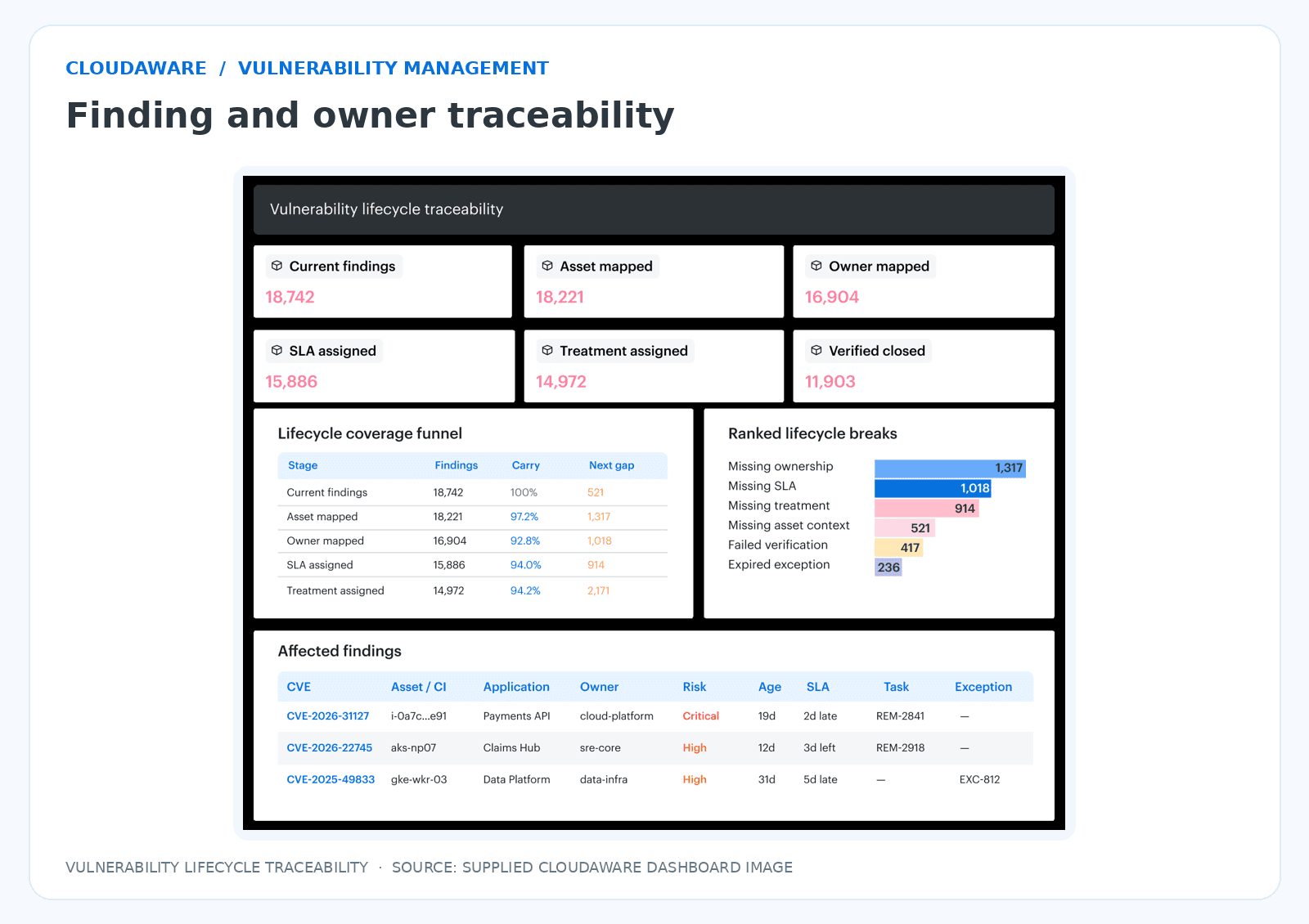
The dashboard connects findings to assets, owners, SLAs and remediation tasks; the supplied capture does not establish a cross-scanner priority order.
Agree on the severity-to-SLA mapping with service owners before triage. Set the time allowed for each priority band and agree what evidence can move a finding into a faster one, such as a verified path to a production secret.
[quote igrikus]
“When we move a finding up the queue, I want the ticket to say what would move it back down. Six weeks later, another engineer should be able to check the exact permission we based that call on.”
Remediate, assign an owner, and track to an SLA
A patched AMI can be ready by lunchtime while every production worker still runs the old image. Give the remediation ticket to the platform engineer who can ship the new image and get it onto the fleet. Every affected finding needs a named owner and a due date, even when one rollout covers them all.
Anatomy of a remediation ticket · illustrative
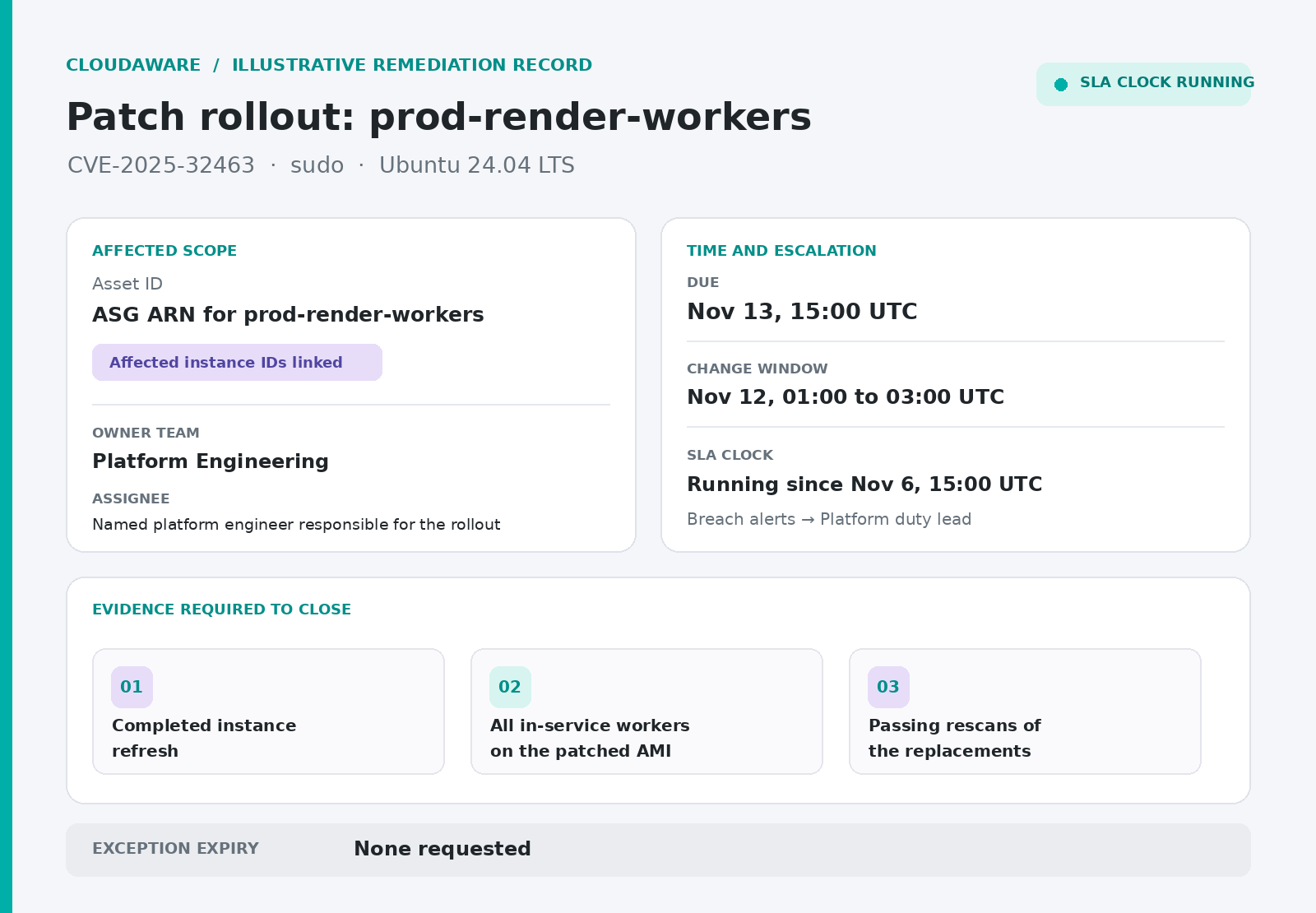
Illustrative Cloudaware remediation ticket for CVE-2025-32463 in sudo on Ubuntu 24.04 LTS. The prod-render-workers group has affected instances linked, Platform Engineering owns the rollout, and the card shows the Nov 13 due date, running SLA, Nov 12 change window, three required verification steps, and no requested exception.
- Open the task where Platform already works, in its Jira project or ServiceNow queue, and link the individual findings. The assessment sheet can point to that ticket. When the assignee changes, the original SLA clock keeps running.
- Use the deadline agreed in Prioritize to drive the escalation. Show how long each finding has been open alongside its due date. If the deadline passes with the finding still open, automatically notify the duty lead with the ticket and how long it’s overdue. PagerDuty can deliver that alert if it’s where the team handles escalations.
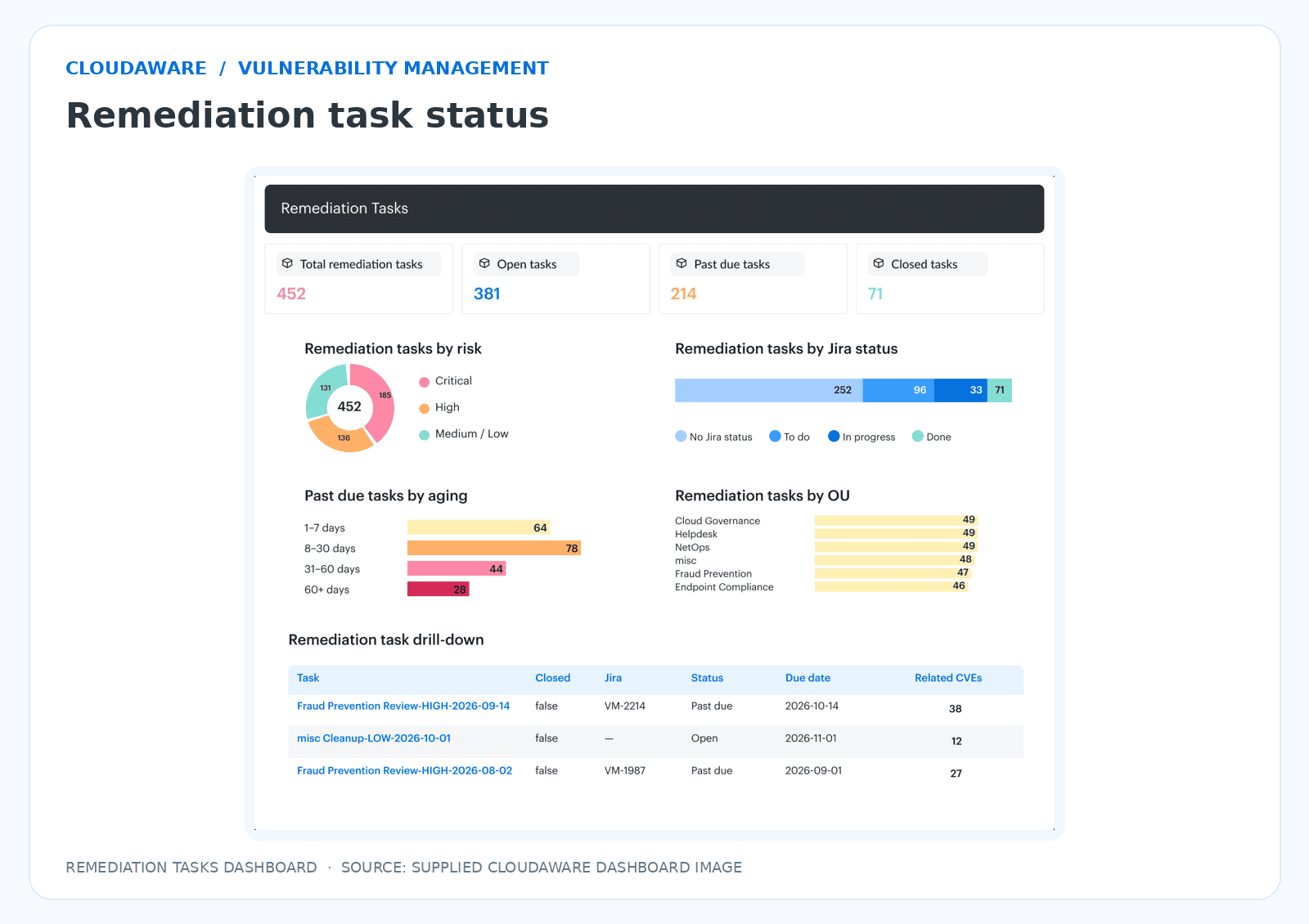
Cloudaware Remediation Tasks dashboard showing open and past-due task counts, aging, and a task drill-down. Supplied reference capture. The dashboard shows open and overdue remediation tasks, their aging and a task drill-down.
For the AMI rollout, put the patched image in a new launch template version and deploy it through EC2 Auto Scaling Instance Refresh. Book a window with room for the new workers to pass health checks and for a rollback if they fail. Link the change record to the finding so the rollout stays visible in patch management.
If the earliest viable window falls after the deadline, raise the exception before the SLA expires. Keep the approved risk acceptance linked to the ticket and record:
- The exact assets and CVE covered.
- Why the fix has to wait and which temporary control reduces exposure.
- The person authorized to accept the risk and the owner responsible for the fix.
- The expiry date and who reviews any findings that are still open then.
“I look for the person who can make a call when a rollout slips. The engineer covering Friday night should be able to open the ticket and see who can approve a new window before the deadline.”
Verify fixes and produce audit-ready reports
Mark a finding fixed once a successful re-scan confirms that the original vulnerability is gone from the asset or image now in service. For a container rollout, that means checking what every replica actually pulled.
ECS verification timeline
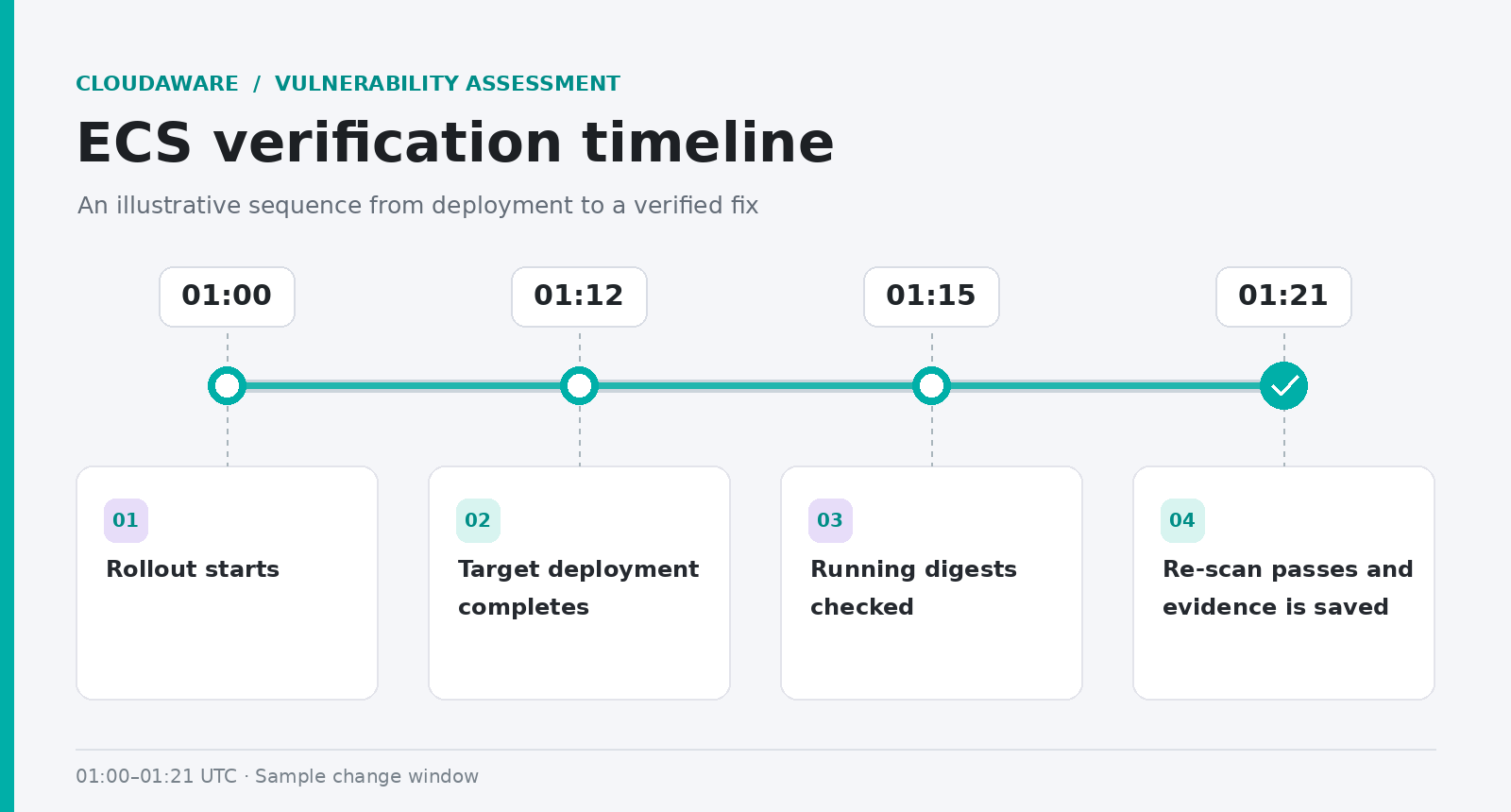
Four-step ECS verification timeline: 01:00 rollout starts; 01:12 target deployment completes; 01:15 running digests checked; 01:21 re-scan passes and evidence is saved.
Once the deployment completes, use DescribeTasks to read containers. imageDigest for the affected container in every running service task. Match each digest to the one that passed the re-scan.
One task still on the old image? The finding stays open. In Kubernetes, that comparison starts with the affected container’s imageID in each running pod.
A fix can quietly come undone on the next redeploy or rollback. That’s when the digest check is worth running again. If the old image returns, reopen the original ticket. Link any finding under a new task ID back to it so the regression shows up in your trend.
Amazon Inspector automatically closes findings when a resource is deleted, terminated, or loses scan eligibility. It deletes those records after three days, so capture the closure reason while you can still reconcile it with inventory and scan coverage.
| Closure reason | What it means | What the report should say |
|---|---|---|
| Fixed | A successful re-scan cleared the original finding | Verified fix, with scan ID and date |
| Resource gone | Inventory confirms the affected resource was retired | Retired, with the retirement date |
| Out of scope | An approved change removed the resource from assessment scope | Scope exclusion, with the decision and date |
| Coverage lost | The resource is still in scope, but scanning stopped | Coverage gap. Verification remains open. |
Link the dated before-and-after results, scan IDs, and task-to-digest snapshot under Evidence to close in the remediation ticket. That gives an auditor a path from the original finding to the verification result when sampling ISO 27001 vulnerability management evidence.
What goes in the report
Compare coverage with the previous assessment using the same freshness rules. Show the percentage of in-scope assets with current, successful checks. If findings and coverage both dropped, check which assets fell out of scanning before calling it progress.
Of the findings due for remediation this period, how many had a verified fix by their deadline? That share is your SLA attainment rate. Overdue findings that are still open count in the total due. Approved exceptions get their own line with expiry dates. For mean time to remediate (MTTR), the clock runs from detection to verified fix. Break out that average by priority.
Book the next assessment before sending the report. Carry coverage gaps and workloads that reverted into Scope so the next inventory reconciliation starts with what this one missed.
Map the checklist to compliance frameworks
When an assessor asks for PCI DSS 11.3.1.2 evidence, pull up the dated internal scan report and show whether authentication succeeded on the sampled host. The Evidence column in your cyber security vulnerability assessment checklist should take them from the control number to the exact record, using the same asset ID they see in the inventory.
Vulnerability assessment evidence by stage and framework
| Checklist stage | Evidence to link | PCI DSS v4.0.1 | ISO/IEC 27001:2022 Annex A | NIST SP 800-115 guidance |
|---|---|---|---|---|
| Scope and discover | Dated inventory with component functions and owners | 12.5.1 · In-scope system component inventory | A.5.9 · Asset inventory with owners | §6.5 · Assessment Plan Development §4.1 · Network Discovery |
| Scan internally | Dated reports, authentication results, and records of systems that cannot accept scan credentials | 11.3.1 · At least once every three months 11.3.1.2 · Authenticated internal scanning | A.8.8 · Identification of technical vulnerabilities | §4.3 · Vulnerability Scanning |
| Scan after a significant change | Change record linked to the internal scan and any required rescans | 11.3.1.3 · Internal scan after the change, with rescans as needed | A.8.8 · Evidence of exposure evaluation | §4.3 · Vulnerability Scanning |
| Scan externally via an ASV | Dated passing report from the Approved Scanning Vendor, with scan scope | 11.3.2 · Passing external ASV scan at least once every three months | A.8.8 · External scan evidence | §4.3 · Vulnerability Scanning |
| Prioritize findings | Assigned risk rank and rationale for the impact on the organization | 6.3.1 · Vulnerability identification and risk ranking | A.8.8 · Exposure evaluation | §7.3 · Analysis |
| Remediate | Remediation ticket and treatment decision | 11.3.1 · Resolve high-risk and critical findings 11.3.1.1 · Address other applicable internal findings based on targeted risk analysis | A.8.8 · Action on technical vulnerabilities | §8.1 · Mitigation Recommendations §8.3 · Remediation/Mitigation |
| Verify and report | Before-and-after scan results, closure reasons, and review records where applicable | 11.3.1 · Rescans confirm resolution of high-risk and critical findings | A.8.8 · Treatment evidence A.5.36 · When used in a policy compliance review A.5.35 · When used as evidence in an independent security review | §8.2 · Reporting §8.3 · Remediation/Mitigation (verification through retesting) |
Keep the scan records separate. The passing ASV report goes with the external scan for that period. The internal scan needs its own authentication evidence, and the post-change scan needs a link to the change that triggered it. Use the PCI scope validated by your Qualified Security Assessor (QSA) and check Annex A applicability against your Statement of Applicability. For an example of how to assemble the records so an auditor can trace one finding from discovery through verified closure, see ISO 27001 vulnerability management.
6 mistakes that make a vulnerability assessment fail
Open the last assessment your team marked complete. Pick a symptom below and spend a minute checking it against the report, scan history, or ticket.
A production account has no row in the coverage report
Search the export for the last production account you onboarded. If it’s also missing from the inventory used for the assessment, you’ve found a blind spot the coverage dashboard can’t flag. Rebuild scope from live inventory.
The same banner-based alert keeps getting dismissed
Look at the scan history for a host that supports credentialed checks. If every run was unauthenticated, the decision to call the alert a false positive may still rest on the banner alone. Settle the disputed finding with authenticated scan evidence.
The priority rationale is just CVSS 8.8
Try a finding on a service whose access rules recently changed. Can you tell from the ticket whether anyone checked if the vulnerable feature became reachable? Revisit the finding using exposure and business context.
Every old ticket is assigned to Security
Open one for a service another team deploys. Look for the person who can ship the fix and the date they’re working toward. If all you find is the team that received the alert, route the ticket to a named remediation owner with a due date.
The green scan predates the deployment
Compare the last successful scan with a deploy that changed a package or image. If the scan came first, that green badge still describes the previous build. Add a scan trigger for material changes.
The handoff contains a scan export and that’s it
Follow one high-risk finding to its treatment decision. If the trail ends at the CVE row, the assessment stopped at detection. Add verification and reporting to the sign-off criteria.
When the same symptom shows up across teams, look at the shared workflow and where it’s breaking down. Start with these program-level best practices.
Run a complete vulnerability assessment with Cloudaware
Matching scanner exports to live inventory gets old fast when you’re doing it one resource ID at a time. Cloudaware Vulnerability Management keeps scan records linked to assets in the multi-cloud CMDB as data comes in. Start your vulnerability assessment checklist there and you can see which assets still need a check.
Go back to the scale-out example. Look up the new EC2 instance IDs and check Scan Status and Last Scan Date. A blank date gives you an instance to investigate even when the scan job says Completed. If the instance is missing from the scanner’s targets, route a ticket to the owner listed in the CMDB.
What this looks like in practice
- For Lambda, start with the CMDB account list and check in Inspector where code scanning is enabled.
- Once you’ve ranked a finding using its asset context, you can follow its SLA clock on the remediation task.
- After an ECS rollout, link the digest comparison from ECS to the task so the next reviewer can see which image you verified.
- If Inspector closes a finding because the instance was deleted, record that reason on the task. That’s how the person writing the report knows to count a retirement.
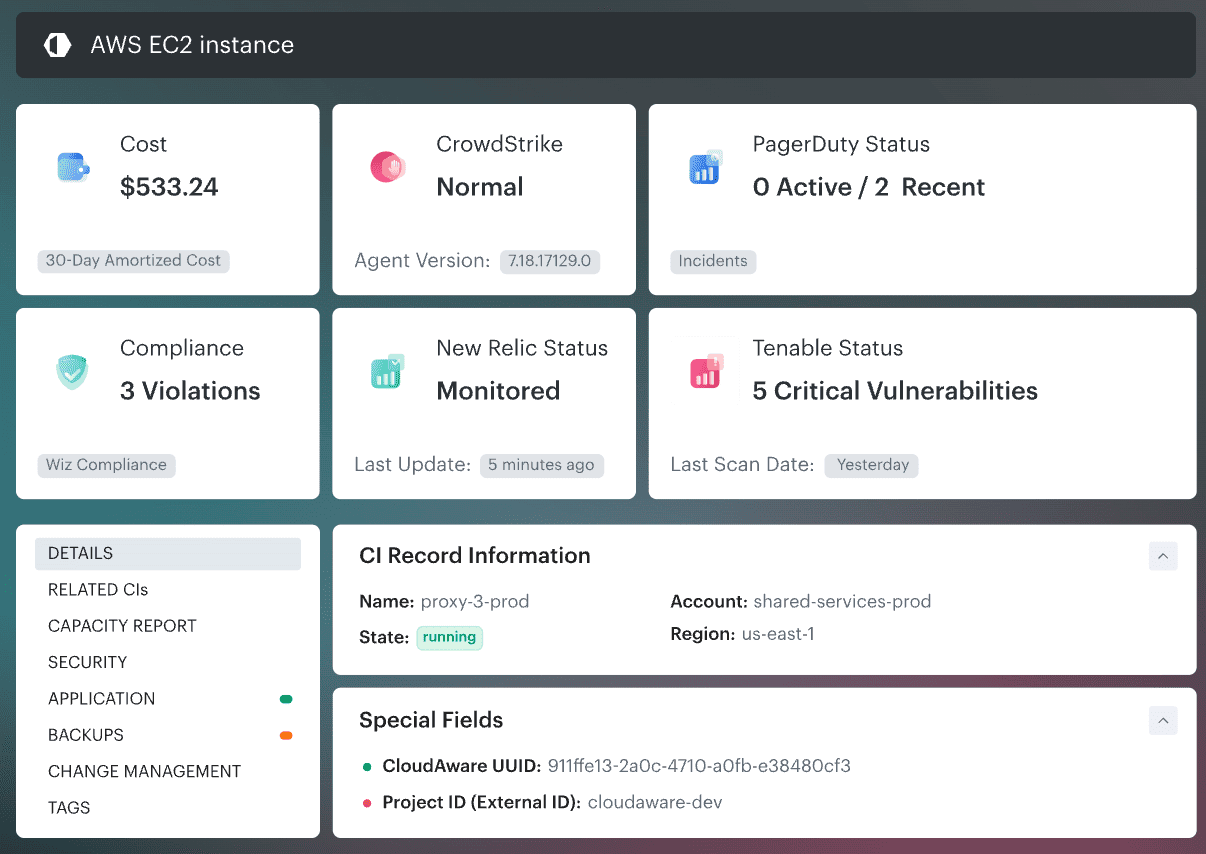
The EC2 CI and scan coverage captures illustrate two separate views; they do not identify a particular EC2 instance with a blank scan date.
Features behind the workflow
- Multi-cloud CMDB and scan coverage reporting. Compare in-scope assets with Scan Status and Last Scan Date to find unscanned or stale resources by service type.
- Scanner integrations for Tenable (including Nessus), Qualys, and CrowdStrike. Link findings and scanner identifiers to affected CMDB assets while preserving the source of each record.
- Asset context for triage. Relate findings to applications, environments, owners, and business criticality; rank work using severity, exploitability, vulnerability age, and asset context.
- Remediation Tasks with Jira and ServiceNow routing. Carry affected assets, risk, owner, and due date into the team’s ticket queue with links back to the CMDB.
- SLA tracking and exception governance. Monitor due dates, overdue work, escalation reports, and exception expiry by owner or application.
- Verification and audit evidence. Confirm fixes with rescans, retain links to patch or change records, and report remediation status and time to remediate.
Cloudaware Vulnerability Management sits above the scanner engine. The engine runs the checks. Cloudaware brings scanner results together, checks coverage against the CMDB, adds asset context, and tracks remediation. Teams can use their connected scanners or Cloudaware’s optional managed scanning service, VSaaS.